vizcb-codeblock-visualizer
Run the following command in DeepSeek Harness:
dsh plugin install Reseezhang/vizcb-codeblock-visualizer
Paste the following prompt into your AI chat to install this plugin:
Run dsh plugin install Reseezhang/vizcb-codeblock-visualizer in your terminal to install the visualizer plugin from https://github.com/Reseezhang/vizcb-codeblock-visualizer, then restart DeepSeek Harness to activate it.
About this plugin
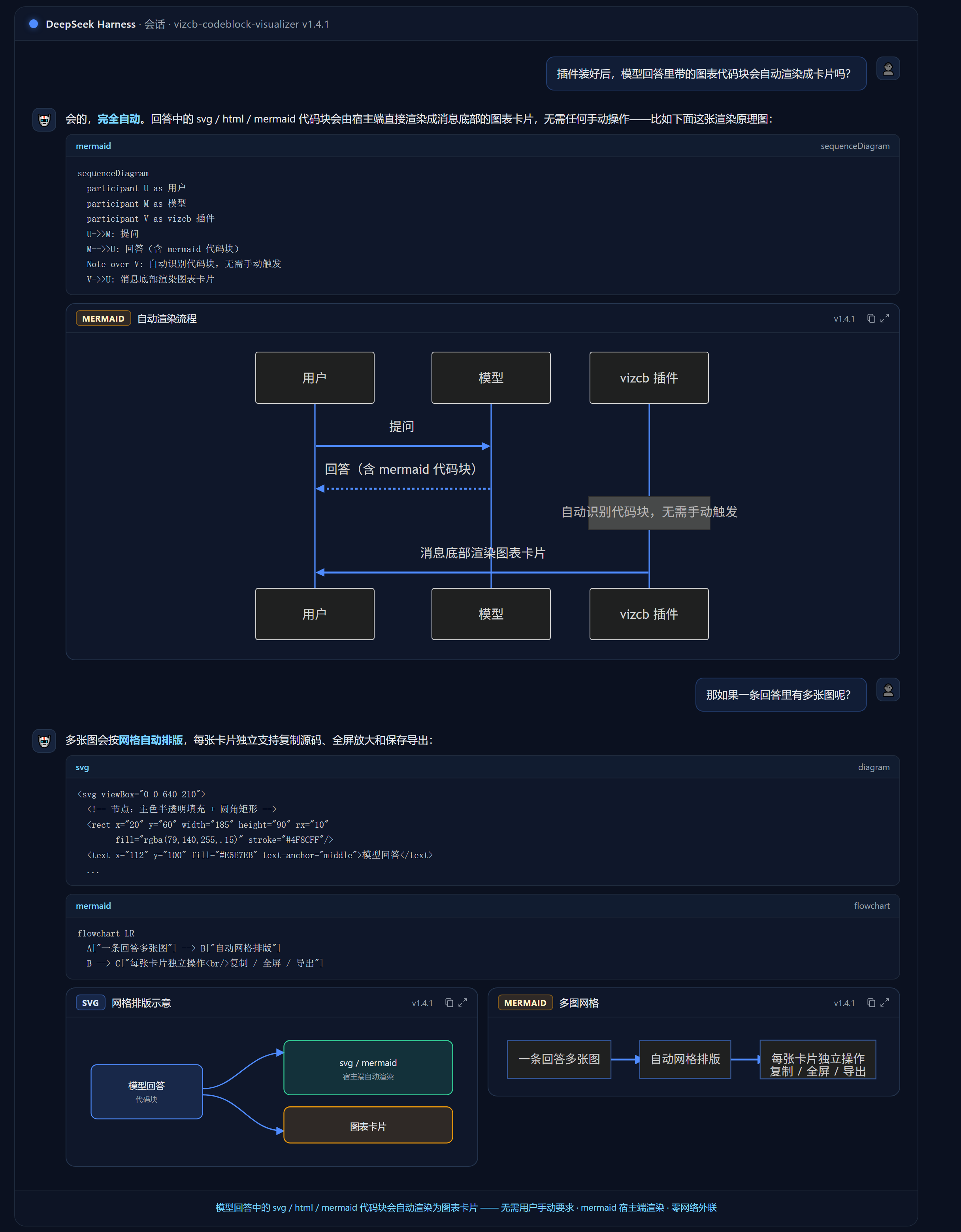
Model responses in DeepSeek frequently contain SVG, HTML, or Mermaid code blocks that are hard to read as raw text. vizcb-codeblock-visualizer renders those fenced blocks in-place into visual preview cards in your workspace: SVG is sanitized with DOMPurify before display, HTML runs inside a sandboxed iframe, and Mermaid renders in isolated worker_threads with support for 24 dialect aliases (flowchart, sequenceDiagram, etc.). In dark themes, text and connectors automatically align to the host palette, node rectangles expand to fit overflow with auto-adaptive viewBox, and concurrent requests for the same diagram are deduplicated and cached. The entire rendering pipeline makes zero network requests, relying on no CDN or external scripts.
Beyond static diagrams, the plugin provides a present-files preview panel so that workspace files (HTML, images, plain text) referenced at the end of a response appear as clickable cards with mtime-based auto-refresh, path copy, and folder reveal. Every card includes a full-screen lightbox, one-click source-code copy, and export to PNG, SVG, or HTML via the native save dialog. When rendering fails, a notification bar at the top of the card explains the exact cause instead of silently hiding the content; once rendering succeeds, the source fence can be auto-hidden to keep the page clean. All rendering logic runs on the host side without polluting the global scope.
This plugin is ideal for developers and technical writers who regularly generate flowcharts, sequence diagrams, interactive HTML pages, or need to review large volumes of diagram output from DeepSeek. It mounts as a bundle and offers fine-grained configuration for rate limiting, theme switching, canvas background, and iframe script control. Released under the MIT license with no additional server-side dependencies.
Screenshots
Use Cases
- Render Mermaid flowcharts and sequence diagrams from model output into interactive preview cards
- Instantly review HTML pages or workspace files referenced in model responses
- Export rendered diagrams to PNG or SVG for documentation and presentations with one click
Best For
- Developers who frequently generate flowcharts or sequence diagrams
- Technical writers reviewing visual artifacts in conversational output
- DeepSeek power users who prioritize rendering security and zero network egress
Related Plugins
A service-oriented sidebar framework for DSH, offering a full workbench with file explorer, embedded browser, real terminal, Git panel, and extensible plugin services.

A beautiful, practical Claude Code-style TUI plugin with pixel whale top bar, flowing glow title, real-time status line, streaming thought expansion, time rewind, context progress bar and TPS gauge — zero core changes.

The plugin market for DeepSeek Harness: browse/search/one-click install community plugins and themes, with updates, backup/restore, hot disable, diagnostics, and AI fix.

A persistent whale widget on the DSH web UI that shows DeepSeek balance, today's usage, and per-turn cost, with drag-and-snap and sound effects.