dsh-plugin-question-index
Run the following command in DeepSeek Harness:
dsh plugin install antlordGit/dsh-plugin-question-index
Paste the following prompt into your AI chat to install this plugin:
Run dsh plugin install antlordGit/dsh-plugin-question-index inside DeepSeek Harness to add this plugin; the source is available at https://github.com/antlordGit/dsh-plugin-question-index
About this plugin
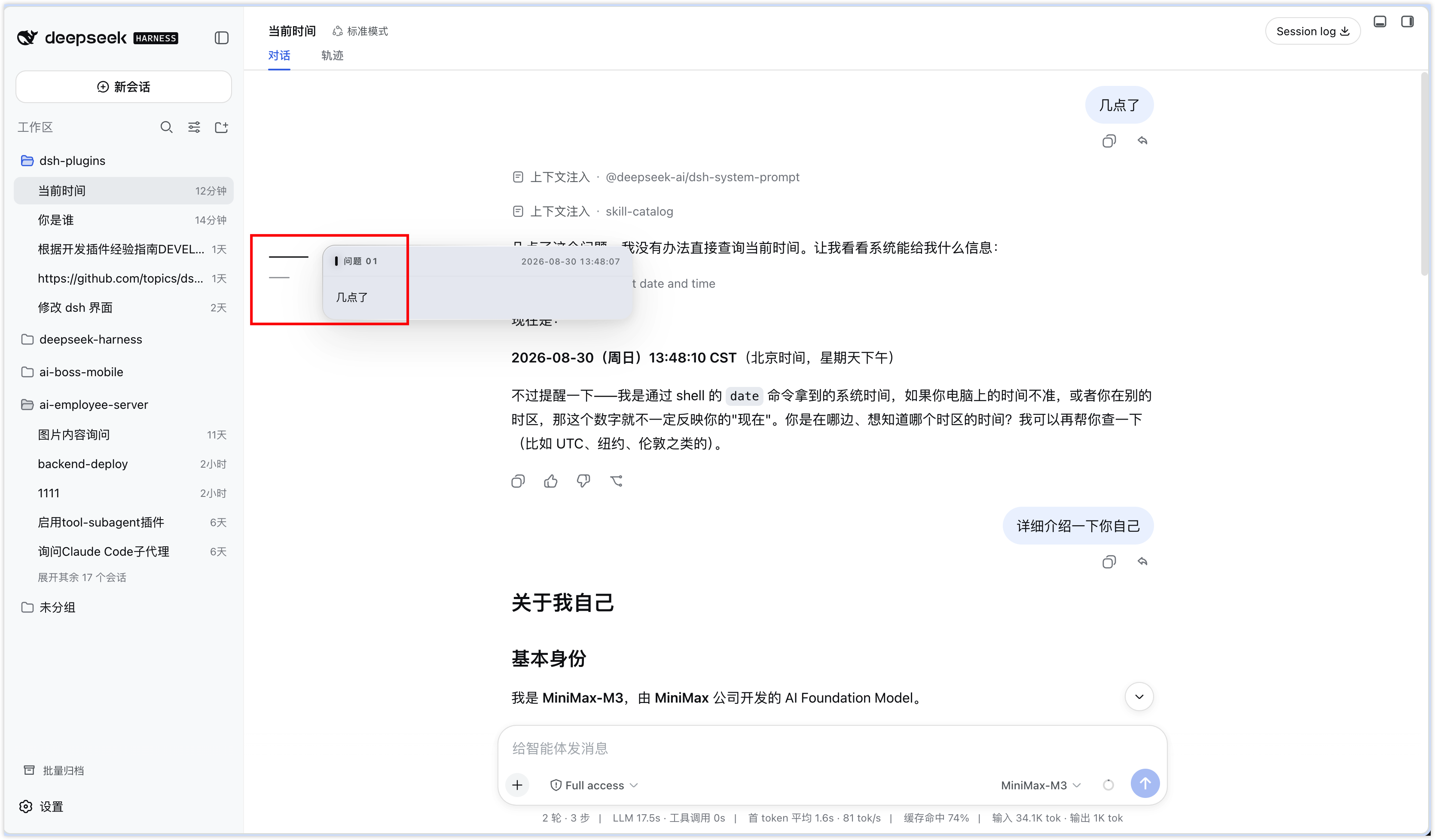
Once a conversation runs past twenty or thirty messages, a deceptively simple question—what did I actually write in my third prompt?—starts eating real time and mental bandwidth. You scroll, squint, search, and repeat. dsh-plugin-question-index quietly adds a slim tick-mark rail along the left edge of the DSH chat pane: one short line per user question, ordered by turn, with a small badge on any mid-run interjection.
Hover a tick and it extends smoothly, revealing the full prompt in an overlay to the right; long prompts scroll independently within that overlay. Click and the chat content smooth-scrolls to the matching message. If you are on the trajectory tab or any other view, the plugin first switches back to the chat tab, then scrolls—no buttons, no modals, just a quiet line doing the work.
The plugin is strictly additive. It registers a single entry in the shell.overlay layer, replaces no existing UI, and inherits DSH theme tokens so both light and dark modes work out of the box. It is built for anyone who runs long, iterative technical sessions—code archaeology, multi-pass writing, architecture debates—and wants a glanceable, keyboard-accessible index of their own prompts without opening another panel or leaving the window.
Screenshots
Use Cases
- Jump back to a specific prompt after dozens of turns in a long conversation
- Review historical prompt content during multi-pass code or writing sessions
- Navigate to a particular message in a large session using keyboard only
Best For
- DSH developers who run deep, multi-turn technical conversations every day
- Heavy AI users who repeatedly revisit their own prompt history
- Tool-oriented users who prefer lightweight, non-invasive UI enhancements
Related Plugins
A service-oriented sidebar framework for DSH, offering a full workbench with file explorer, embedded browser, real terminal, Git panel, and extensible plugin services.

A beautiful, practical Claude Code-style TUI plugin with pixel whale top bar, flowing glow title, real-time status line, streaming thought expansion, time rewind, context progress bar and TPS gauge — zero core changes.

The plugin market for DeepSeek Harness: browse/search/one-click install community plugins and themes, with updates, backup/restore, hot disable, diagnostics, and AI fix.

A persistent whale widget on the DSH web UI that shows DeepSeek balance, today's usage, and per-turn cost, with drag-and-snap and sound effects.