dsh-skill-editor
Run the following command in DeepSeek Harness:
dsh plugin install bosinHU/dsh-skill-editor
Paste the following prompt into your AI chat to install this plugin:
To install this plugin in DeepSeek Harness, run dsh plugin install bosinHU/dsh-skill-editor. Full source: https://github.com/bosinHU/dsh-skill-editor .
About this plugin
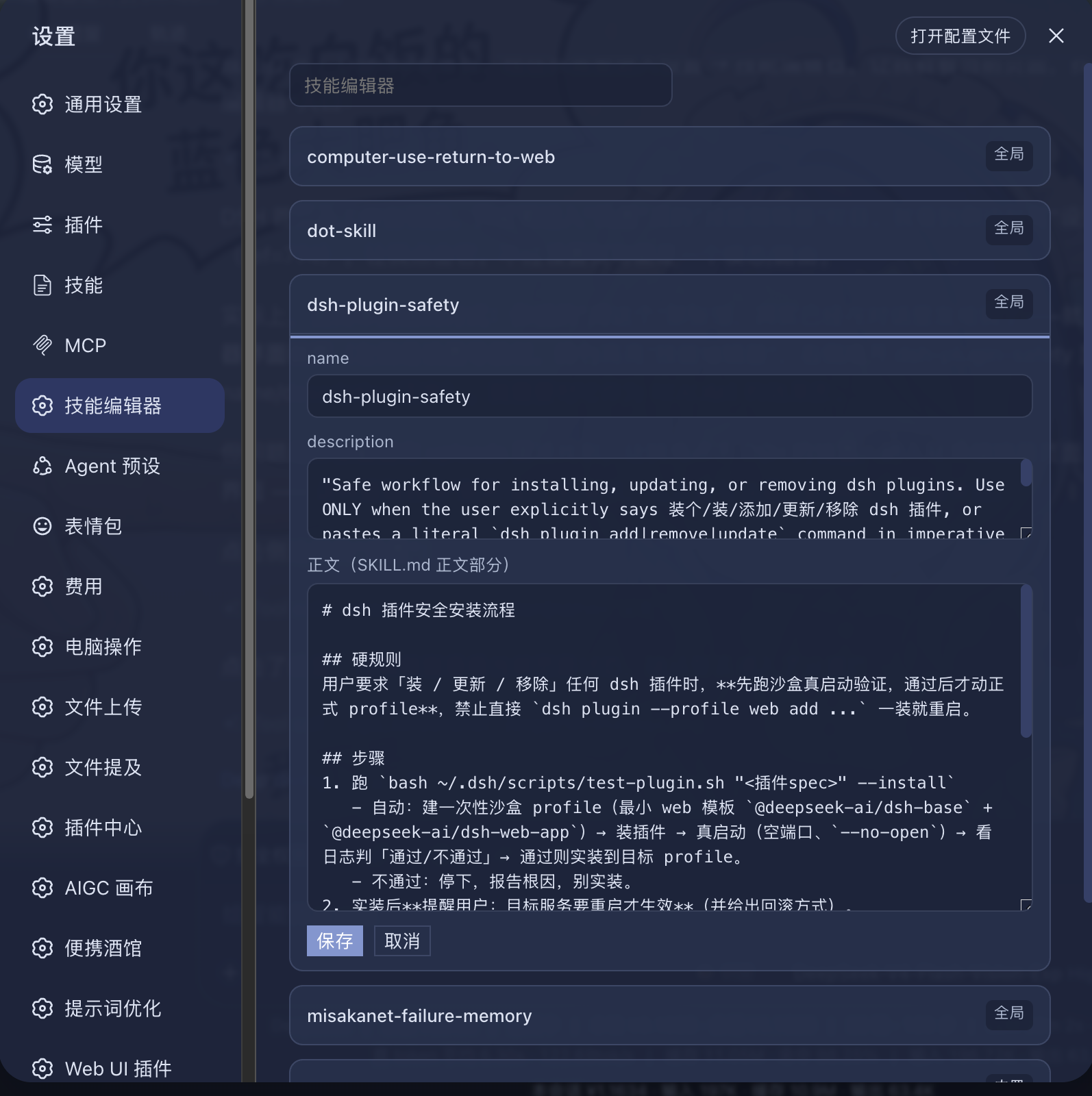
Adjusting a skill description or rewriting its body used to mean opening a terminal, hunting through ~/.dsh/skills or your workspace for the right SKILL.md, carefully avoiding every other frontmatter field, and hoping you actually saved. dsh-skill-editor collapses that into three steps: open Web Settings, click the Skill Editor tab, expand a skill, edit, and hit Save. The change is written to disk immediately; refresh the page and it is live with no restart required.
Built-in safety tiers keep accidents out of the picture: local skills (~/.dsh/skills, ~/.agents/skills, workspace .dsh/skills) are fully editable and savable, while bundled and plugin-embedded skills are locked to read-only with a visible warning so a stray edit cannot break dsh. The editor touches only name, description, and the body (content after the --- divider); every other frontmatter field is preserved untouched. All file reads and writes go through node:fs on plain-text files with zero third-party dependencies, so future dsh upgrades will not invalidate the plugin. Need it gone? Uninstall it and everything is clean with no side effects.
Who it is for: anyone who works in the dsh Web interface and needs to fine-tune skill descriptions or bodies on a regular basis—adding a sentence, tweaking an example, or rewriting an instruction entirely. No file-system spelunking, no programming background required.
Screenshots
Use Cases
- Edit a skill description or body and see the change take effect after a page refresh, no terminal needed
- Distinguish read-write permissions between local and built-in skills to prevent accidental breakage of dsh
- Review and tweak name, description, and body across all skills without touching other frontmatter fields
Best For
- dsh Web users who frequently adjust skill descriptions or instructions
- Non-programmers who prefer editing skill content in the browser instead of the file system
- Teams or individuals managing multiple local skills who need quick batch edits
Related Plugins
A service-oriented sidebar framework for DSH, offering a full workbench with file explorer, embedded browser, real terminal, Git panel, and extensible plugin services.

A beautiful, practical Claude Code-style TUI plugin with pixel whale top bar, flowing glow title, real-time status line, streaming thought expansion, time rewind, context progress bar and TPS gauge — zero core changes.

The plugin market for DeepSeek Harness: browse/search/one-click install community plugins and themes, with updates, backup/restore, hot disable, diagnostics, and AI fix.

A persistent whale widget on the DSH web UI that shows DeepSeek balance, today's usage, and per-turn cost, with drag-and-snap and sound effects.