
dsh-files-native
Run the following command in DeepSeek Harness:
dsh plugin install meyaomiao/dsh-files-native
Paste the following prompt into your AI chat to install this plugin:
Run dsh plugin install meyaomiao/dsh-files-native in DeepSeek Harness (source: https://github.com/meyaomiao/dsh-files-native), then fully restart dsh web and hard-refresh the browser to activate the plugin.
About this plugin
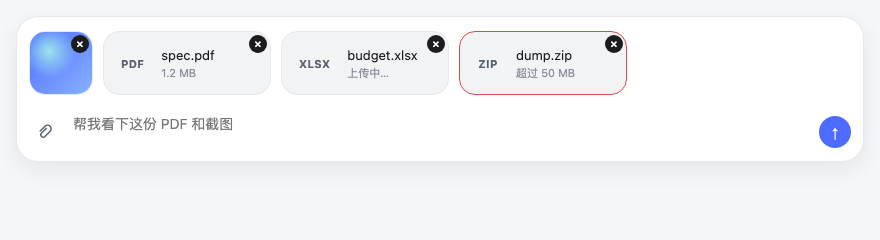
Attaching files in DeepSeek Harness has always felt like fighting the interface: hunting for an upload button, guessing the format, staring at a progress bar. dsh-files-native pulls attachment upload back onto the same track as the official composer. Drag a file anywhere into the window, press Ctrl+V, or click the paperclip, and images plus file cards appear in the input immediately, with no need to aim at a specific target.
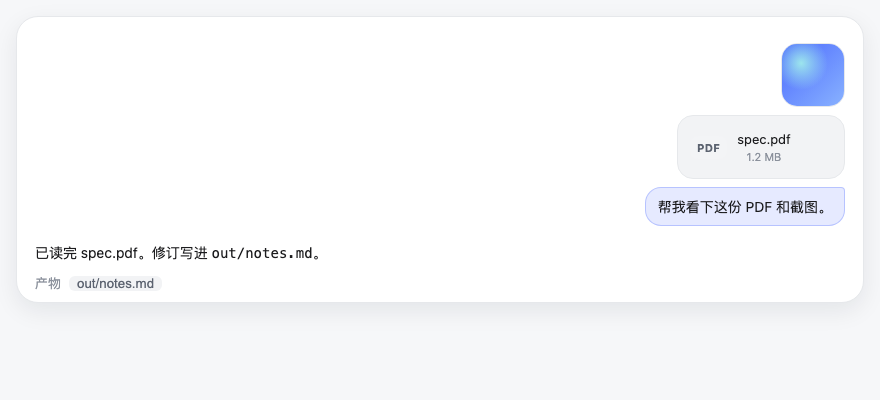
Images (PNG, JPEG, WebP, GIF) join the official draft strip as 64 px thumbnails with a lightbox on click, feeding the model visual context on send. Everything else lands in the session workspace under .dsh-uploads/ and renders as a 64 px-tall horizontal card showing an extension badge, file name, and size. After sending, file cards dock alongside the user bubble column so the assistant reply never wedges itself between your question and the attachment. The whole flow feels as seamless as a native desktop app.
Built for users who regularly swap images, code snippets, or logs with the model inside Harness. Per-file cap is 50 MB, per-batch cap 20 files, and the upload route is loopback-only. Do not stack with dsh-file-fix, dsh-file-upload, or dsh-paste-to-path, as their entries will conflict.
Screenshots

Use Cases
- Drag an image into the window and see the thumbnail in the composer instantly
- Paste a PDF or code file with Ctrl+V and the card appears on the same track
- File cards follow the user bubble after send, keeping replies out of the way
Best For
- Developers who frequently swap screenshots and logs with the model
- Harness users who want an attachment experience close to a native client
- Anyone who prefers one clean upload track over stacking multiple plugins
Related Plugins
A service-oriented sidebar framework for DSH, offering a full workbench with file explorer, embedded browser, real terminal, Git panel, and extensible plugin services.

A beautiful, practical Claude Code-style TUI plugin with pixel whale top bar, flowing glow title, real-time status line, streaming thought expansion, time rewind, context progress bar and TPS gauge — zero core changes.

The plugin market for DeepSeek Harness: browse/search/one-click install community plugins and themes, with updates, backup/restore, hot disable, diagnostics, and AI fix.

A persistent whale widget on the DSH web UI that shows DeepSeek balance, today's usage, and per-turn cost, with drag-and-snap and sound effects.