dsh-gpu-pulse
Run the following command in DeepSeek Harness:
dsh plugin install zhubaohi/dsh-gpu-pulse
Paste the following prompt into your AI chat to install this plugin:
Run dsh plugin install zhubaohi/dsh-gpu-pulse in your terminal to install the plugin (source: https://github.com/zhubaohi/dsh-gpu-pulse), then restart dsh web to see the GPU monitor strip at the bottom-right of the page.
About this plugin
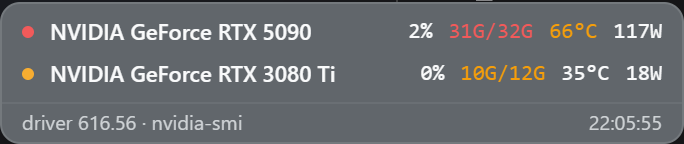
When you run long jobs inside the DSH Web UI, GPU utilization, VRAM pressure, and temperature are the first things you want to glance at without leaving the page. dsh-gpu-pulse mounts a compact, floating monitor strip directly onto the DSH page, pulling data from nvidia-smi on the DSH host via a lightweight poll-and-cache route—no extra daemon, no agent calls, no build step.
One row per GPU lays out utilization, used/total VRAM, temperature, power draw, and the top VRAM-consuming processes when the driver reports them, each colour-coded green, amber, or red against sensible thresholds. The whole strip is press-and-drag anywhere on the page; the position is persisted per browser profile and a double-click snaps it back to the default corner. It always renders above side panels and drawers, so it never gets buried.
This is built for anyone running NVIDIA discrete GPUs on Windows or Linux who works with DSH daily—especially multi-GPU inference or training setups where you want all cards visible at a glance. On machines without an NVIDIA driver it degrades to a small n/a pill and quietly re-probes every five minutes, lighting up on its own the moment a driver appears, with zero manual follow-up.
Screenshots
Use Cases
- Keep an eye on utilization, VRAM, and temperature during long inference or training runs without leaving the browser
- Glance at every GPU at a time on multi-GPU rigs, one compact row per card
- Spot which card and which process is eating VRAM the moment a metric crosses an amber or red threshold
Best For
- DSH power users on any machine with an NVIDIA discrete GPU
- Inference or training workloads that need all GPUs visible at once
- Developers who want zero-config, zero-daemon monitoring with no extra services to babysit
Related Plugins
A service-oriented sidebar framework for DSH, offering a full workbench with file explorer, embedded browser, real terminal, Git panel, and extensible plugin services.

A beautiful, practical Claude Code-style TUI plugin with pixel whale top bar, flowing glow title, real-time status line, streaming thought expansion, time rewind, context progress bar and TPS gauge — zero core changes.

The plugin market for DeepSeek Harness: browse/search/one-click install community plugins and themes, with updates, backup/restore, hot disable, diagnostics, and AI fix.

A persistent whale widget on the DSH web UI that shows DeepSeek balance, today's usage, and per-turn cost, with drag-and-snap and sound effects.