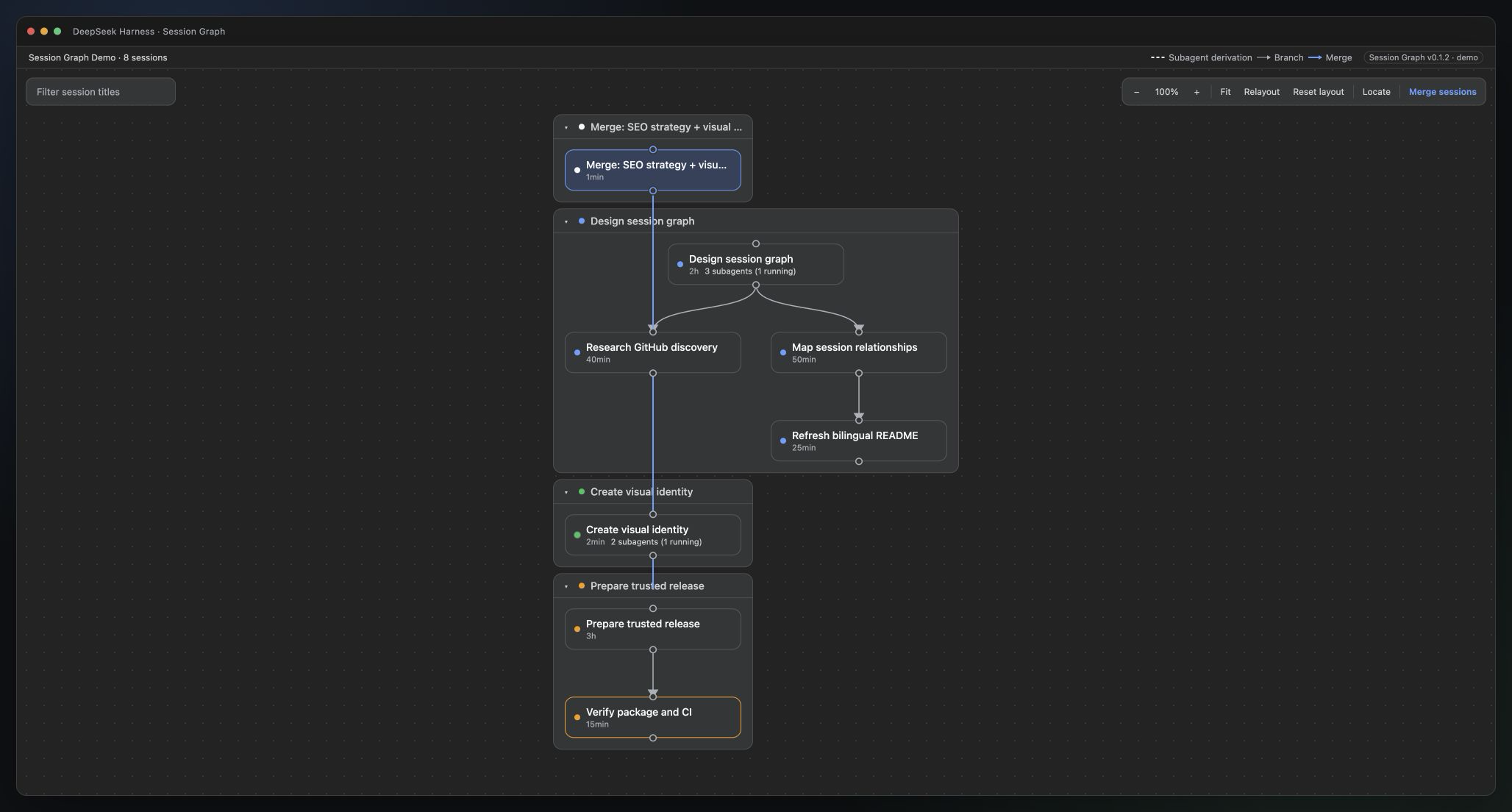
dsh-session-graph
Run the following command in DeepSeek Harness:
dsh plugin install benz-ai-x/dsh-session-graph
Paste the following prompt into your AI chat to install this plugin:
Run dsh plugin install benz-ai-x/dsh-session-graph in a DeepSeek Harness terminal, pulling from https://github.com/benz-ai-x/dsh-session-graph, then restart dsh web to activate the Graph tab.
About this plugin
Juggling multiple parallel AI agent sessions inside DeepSeek Harness quickly turns branching history, merge provenance, and sub-agent ownership into an invisible tangle buried in linear text logs. dsh-session-graph turns that hidden structure into a draggable, zoomable, filterable canvas so you can read spatial relationships instead of scrolling through timestamps, all without leaving the conversation view.
Four capabilities do the heavy lifting. Branch lineages, merge provenance edges, and folded sub-agent derivations each render in a distinct visual style, making backbone and sideline obvious at a glance. The canvas itself supports drag, snap alignment, collapse, zoom, pan, minimap, and auto-relayout, and every arrangement you make stays in browser storage without touching a single session log. Picking two or three sessions lets you create a merge target whose sources are captured at immutable event boundaries, leaving the original sessions and their existing lineages completely intact. On-demand session digests retain only user instructions and final assistant text, make one auxiliary model call for a concise overview with key outcomes and open items, and cache the result in host memory as a read-only projection that never enters the session log or alters lineage.
This plugin is aimed at developers and teams who run three or more parallel agent branches, need to merge deliverables on a schedule, or want to recap a long session without re-reading every turn. It plugs in as a pure browser-side extension, adds no extra runtime dependencies, and leaves Harness model routing, persistence, and the agent sandbox untouched. Install it and a Graph tab appears beside the standard conversation tabs, ready to use on any non-blank session.
Screenshots
Use Cases
- Tracking multiple parallel agent branches and instantly seeing which session forked from which and where sub-agents derive from
- Merging two or three sessions into a new target while preserving immutable snapshot provenance from each source
- Quickly reviewing key outcomes and open items from a long session without scrolling through every turn
Best For
- Developers or research teams juggling three or more parallel agent sessions at a time
- Engineers who regularly merge multi-session outputs and need full provenance records
- Users who want to manage session lifecycles visually and cut down manual log-reading
Related Plugins
A service-oriented sidebar framework for DSH, offering a full workbench with file explorer, embedded browser, real terminal, Git panel, and extensible plugin services.

A beautiful, practical Claude Code-style TUI plugin with pixel whale top bar, flowing glow title, real-time status line, streaming thought expansion, time rewind, context progress bar and TPS gauge — zero core changes.

The plugin market for DeepSeek Harness: browse/search/one-click install community plugins and themes, with updates, backup/restore, hot disable, diagnostics, and AI fix.

A persistent whale widget on the DSH web UI that shows DeepSeek balance, today's usage, and per-turn cost, with drag-and-snap and sound effects.