dsh-workbench
Run the following command in DeepSeek Harness:
dsh plugin install lee259/dsh-workbench
Paste the following prompt into your AI chat to install this plugin:
To install this plugin in DeepSeek Harness, use the command dsh plugin install lee259/dsh-workbench, with the full source code available at https://github.com/lee259/dsh-workbench.
About this plugin
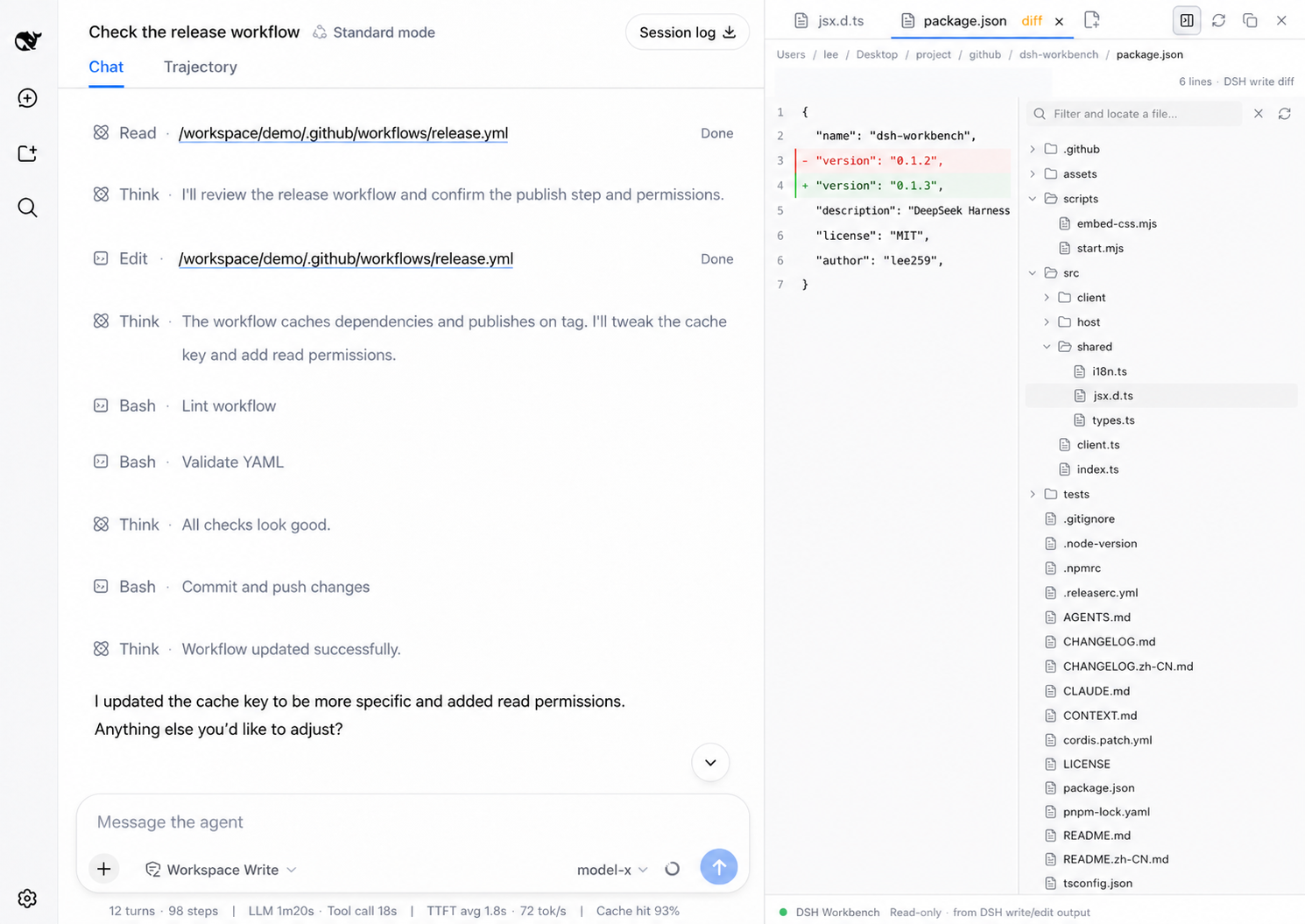
DSH Workbench is a right-side file workspace plugin designed for DeepSeek Harness. During AI-assisted coding, developers often need to switch frequently between chat windows and code files, which can disrupt their workflow and reduce efficiency. DSH Workbench addresses this issue by integrating a file viewer directly into the DeepSeek Harness chat interface. It allows users to read file contents or view real-time diffs alongside the conversation, maintaining context continuity and enabling developers to monitor and review code changes without leaving the chat.
In terms of core capabilities, DSH Workbench supports multi-file tab management, enabling users to open, switch, and pin multiple files for easy comparison and reference. It captures write operations from DeepSeek Harness, presenting code changes as diffs to show before-and-after content, along with syntax highlighting, folding, search, and quick navigation features to enhance the file browsing experience. The plugin also integrates session review, keyboard shortcuts, and path insertion tools to further optimize workflow.
It is ideal for programmers using DeepSeek Harness for development, especially those who frequently need to inspect code changes, perform code reviews, or collaborate with AI on refactoring tasks. Whether for daily coding, debugging, or learning, DSH Workbench helps maintain a smooth workflow, allowing developers to focus more on the task at hand and boost productivity.
Screenshots
Use Cases
- View and edit files directly within AI conversations
- Capture and review code change diffs in real-time
- Manage multiple tabs for complex project navigation
Best For
- Programmers using DeepSeek Harness for daily development
- Development teams needing collaborative code review
- Technical professionals relying on AI tools to boost efficiency
Related Plugins
A service-oriented sidebar framework for DSH, offering a full workbench with file explorer, embedded browser, real terminal, Git panel, and extensible plugin services.

A beautiful, practical Claude Code-style TUI plugin with pixel whale top bar, flowing glow title, real-time status line, streaming thought expansion, time rewind, context progress bar and TPS gauge — zero core changes.

The plugin market for DeepSeek Harness: browse/search/one-click install community plugins and themes, with updates, backup/restore, hot disable, diagnostics, and AI fix.

A persistent whale widget on the DSH web UI that shows DeepSeek balance, today's usage, and per-turn cost, with drag-and-snap and sound effects.