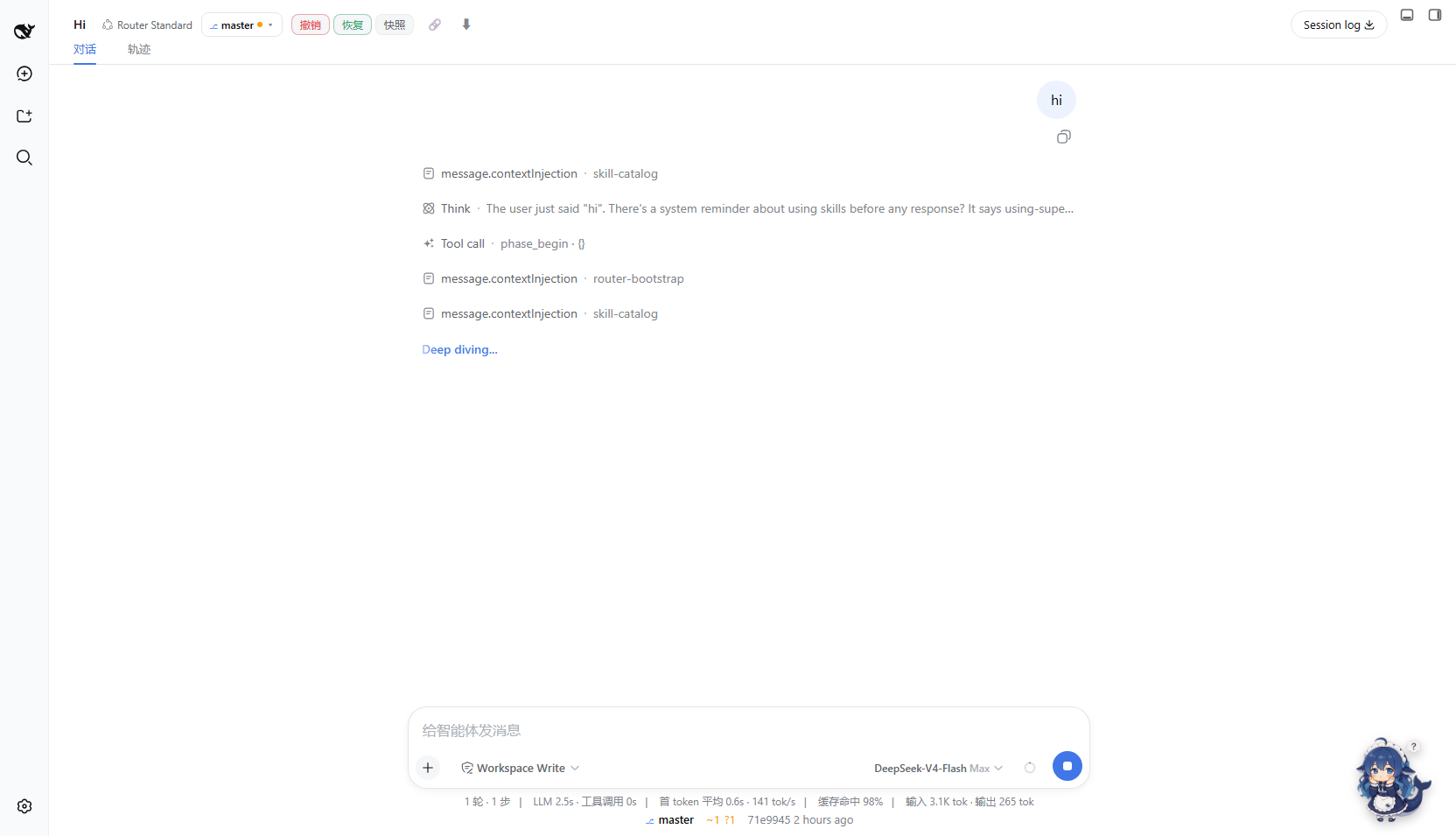
dsh-git-status
Run the following command in DeepSeek Harness:
dsh plugin install shenhuanageshei/dsh-git-status
Paste the following prompt into your AI chat to install this plugin:
Run dsh plugin install shenhuanageshei/dsh-git-status in DeepSeek Harness to install; source: https://github.com/shenhuanageshei/dsh-git-status
About this plugin
Glancing at git status during an AI-assisted coding session used to mean alt-tabbing to a terminal or installing a separate extension, breaking focus and losing session context. dsh-git-status embeds a live git snapshot directly into the conversation view: an interactive badge in the session header and an ambient status line above the composer, so branch, ahead/behind counts, dirty-file stats, worktree, and HEAD are all visible at a glance.
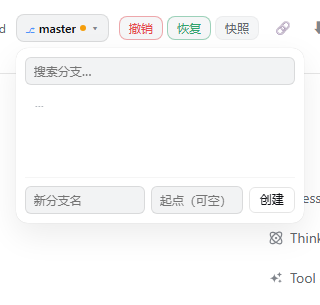
Clicking the badge opens a branch menu with search, switch (remote branches get DWIM tracking), and create. Every write operation follows a strict safety model: only git switch is used (never --force), a ref whitelist plus argument-array spawning eliminates shell injection, a per-cwd mutex serialises concurrent switches, and a confirmation prompt fires while an agent run is in progress. Non-git directories hide both surfaces automatically, detached HEAD shows a short sha, and linked worktrees carry a dedicated marker.
Built for engineers who drive DSH for AI-assisted development and need to glance at branch state or dirty counts without leaving the chat. Zero build step, official slot mounting, no host code changes-install and it works.
Screenshots
Use Cases
- Glance at branch and dirty state mid-conversation without alt-tabbing
- Switch or create a branch from the session header badge with DWIM tracking
- Watch ahead/behind and worktree updates in the ambient line while an agent runs git commands
Best For
- Engineers using DSH for AI-assisted coding
- Developers who need in-session git awareness without leaving the chat
- Teams working with multiple worktrees and parallel branches
Related Plugins
A service-oriented sidebar framework for DSH, offering a full workbench with file explorer, embedded browser, real terminal, Git panel, and extensible plugin services.

A beautiful, practical Claude Code-style TUI plugin with pixel whale top bar, flowing glow title, real-time status line, streaming thought expansion, time rewind, context progress bar and TPS gauge — zero core changes.

The plugin market for DeepSeek Harness: browse/search/one-click install community plugins and themes, with updates, backup/restore, hot disable, diagnostics, and AI fix.

A persistent whale widget on the DSH web UI that shows DeepSeek balance, today's usage, and per-turn cost, with drag-and-snap and sound effects.