dsh-theme-manager
Run the following command in DeepSeek Harness:
dsh plugin install runcat-tommy/dsh-theme-manager
Paste the following prompt into your AI chat to install this plugin:
Install the dsh-theme-manager plugin in DeepSeek Harness by running dsh plugin install runcat-tommy/dsh-theme-manager. Source: https://github.com/runcat-tommy/dsh-theme-manager
About this plugin
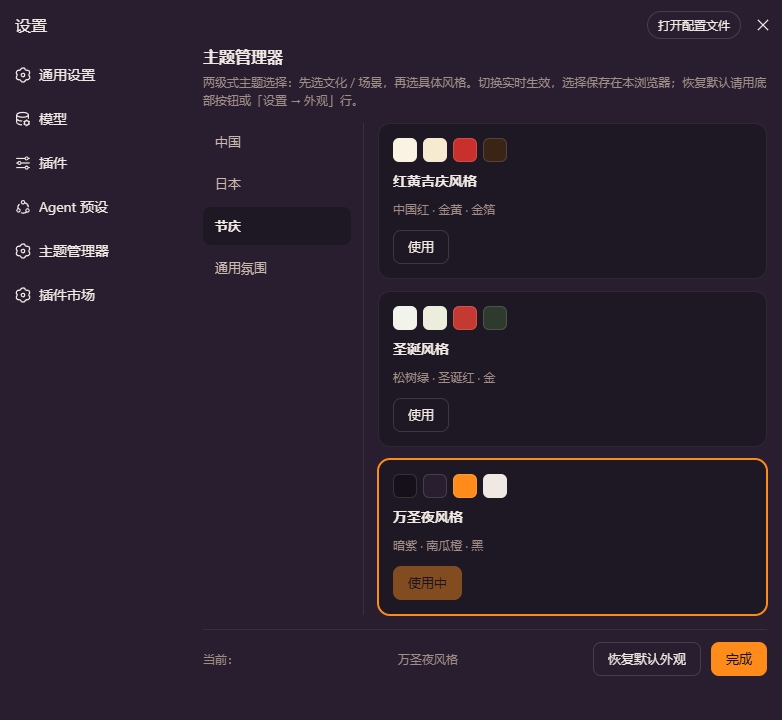
DeepSeek Harness ships with only three built-in appearance modes-light, dark, and system-following-leaving little room for personal touch or cultural flair. dsh-theme-manager adds a two-level picker: browse by culture or scene (Chinese, Japanese, seasonal, general, developer, high-contrast, national flag), then pick a specific style card and apply it instantly. No page reload is needed, and your choice persists across sessions through browser storage.
The plugin ships 58 ready-made styles, spanning ink-wash painting, ukiyo-e, blue-and-white porcelain, Dunhuang murals, cyberpunk, Mondrian, and familiar developer palettes such as Catppuccin Mocha, Dracula, and Tokyo Night. Each theme is applied via --dsw-alias-* design tokens, so nothing is hard-coded into the source. Copy follows the interface locale (Chinese / English), and a background updater checks npm every six hours, offering one-click update, dismiss, or rollback right inside the settings page.
Whether you prefer a xuan-paper-white-and-sumi-ink Chinese look in the morning, switch to an Nord glacier-blue palette for late-night coding, or dare to try black-and-gold or acid-green high-contrast themes, every option is one click away-without leaving the settings tab.
Screenshots
Use Cases
- Give your DeepSeek UI a cultural look—ink wash, ukiyo-e, or porcelain blue
- Switch to Catppuccin, Nord, or Tokyo Night for late-night coding sessions
- Experiment with bold high-contrast palettes like black-and-gold or Mondrian for inspiration
Best For
- DeepSeek users who want more than three default appearance modes
- Developers who code in DeepSeek for hours and need a comfortable dark palette
- Designers and product leads who want to preview how cultural palettes affect UI feel
Related Plugins

whale-girl is a desktop pet in the DSH Web GUI (bottom-right for instant companionship) — draggable, feedable, playable; completed tasks, sessions and companionship time accrue into seniority levels, titles, and memories.

Renders your local Wallpaper Engine wallpapers as the DSH web background, supporting video, web, and scene wallpapers with a liquid-glass effect and rich customization.

A WebGPU ocean skin for DeepSeek Harness with five-wave Gerstner waves, translucent theme, day/night cycle, and quick controls, installable as plugin or extension.

A Galgame-style conversation view and visual scene editor for DSH web sessions, with a real-time editing mode.