dsh-view-manager
Run the following command in DeepSeek Harness:
dsh plugin install runcat-tommy/dsh-view-manager
Paste the following prompt into your AI chat to install this plugin:
Run dsh plugin install runcat-tommy/dsh-view-manager to install from npm, or clone from https://github.com/runcat-tommy/dsh-view-manager for local development, then restart the Web UI to activate.
About this plugin
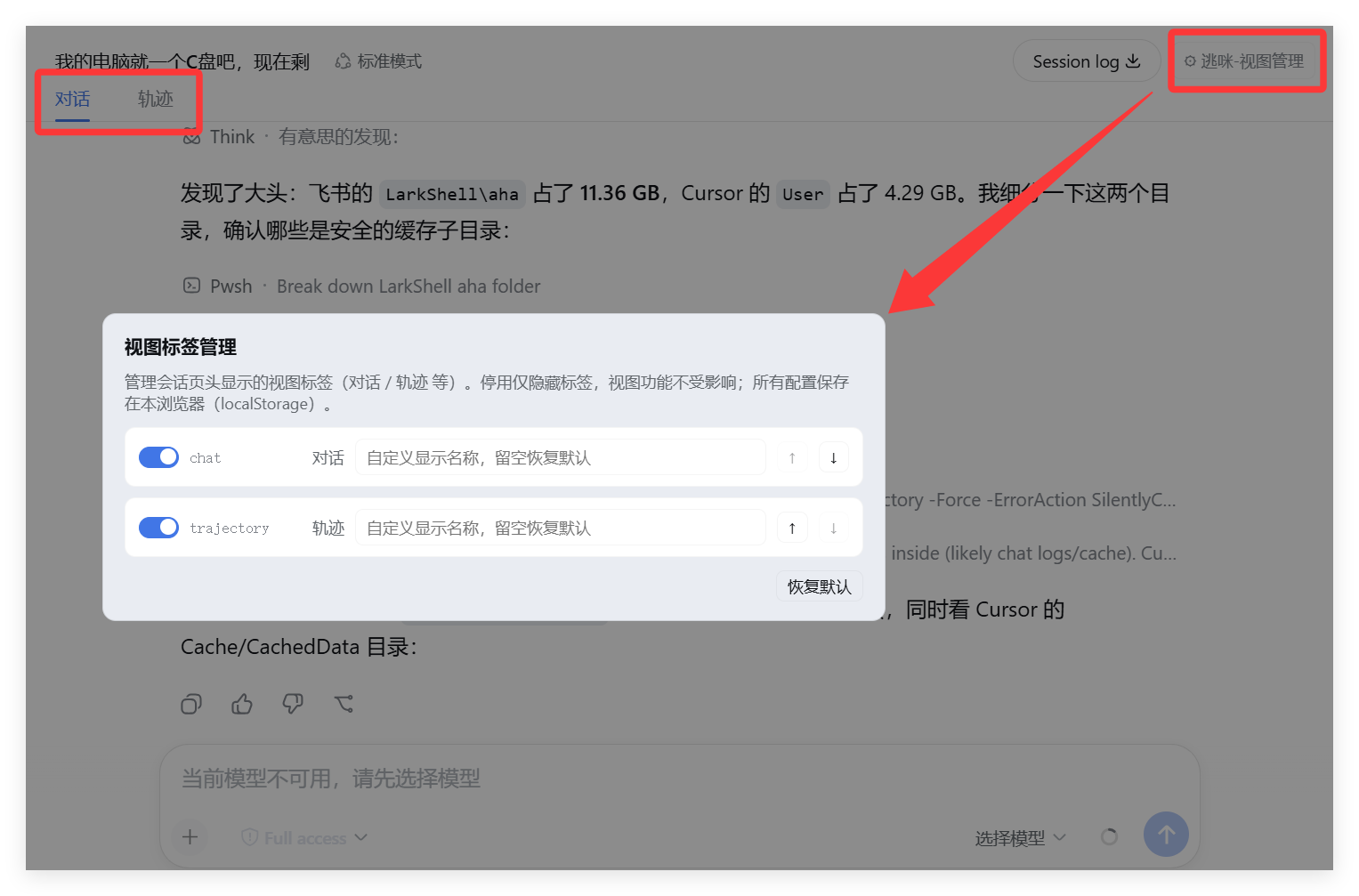
The DeepSeek Harness session header registers view tabs through the conversation.view slot—Chat, Trajectory, and whatever view plugins ship next. As tabs pile up, the header grows cluttered, yet the official host renderer exposes no extension point for hiding, reordering, or renaming them. dsh-view-manager is a lightweight, client-side plugin built to fill exactly that gap.\n\nOpen the management panel and each registered view gets one row: a toggle to show or hide the tab (disabling only hides it—the view itself keeps working), up and down arrows to reorder, and a text field to rename (leave it blank to restore the default; labels follow the DSH interface language automatically). Every setting is stored in browser localStorage and takes effect instantly, no Web UI restart required. The plugin also polls the npm registry for newer versions; when one is found, a red dot badge appears on the button and an update card slides into the top of the panel with three actions—update now, ignore this version, or remind me later—and it re-reads the local version number after updating rather than trusting the exit code blindly.\n\nIf you run multiple view tabs in DeepSeek Harness and find the default order or names unsatisfying, yet do not want to patch source code or write custom scripts, this is the quickest fix. It is a pure client plugin with zero server-side dependencies, MIT licensed: install it, restart the Web UI once, and the management entry will sit at the right edge of your session header.
Screenshots
Use Cases
- Hiding unused view tabs from a crowded session header
- Rearranging tab order to match personal workflow
- Renaming tabs to align with team terminology
Best For
- Developers who rely on multiple view tabs in DeepSeek Harness daily
- Users who want UI customization without forking source code
- DeepSeek users juggling several view plugins at once
Related Plugins
A service-oriented sidebar framework for DSH, offering a full workbench with file explorer, embedded browser, real terminal, Git panel, and extensible plugin services.

A beautiful, practical Claude Code-style TUI plugin with pixel whale top bar, flowing glow title, real-time status line, streaming thought expansion, time rewind, context progress bar and TPS gauge — zero core changes.

The plugin market for DeepSeek Harness: browse/search/one-click install community plugins and themes, with updates, backup/restore, hot disable, diagnostics, and AI fix.

A persistent whale widget on the DSH web UI that shows DeepSeek balance, today's usage, and per-turn cost, with drag-and-snap and sound effects.