dsh-token-stats
Run the following command in DeepSeek Harness:
dsh plugin install phungthien269/dsh-token-stats
Paste the following prompt into your AI chat to install this plugin:
Run dsh plugin install phungthien269/dsh-token-stats in DeepSeek Harness to install this plugin; source: https://github.com/phungthien269/dsh-token-stats
About this plugin
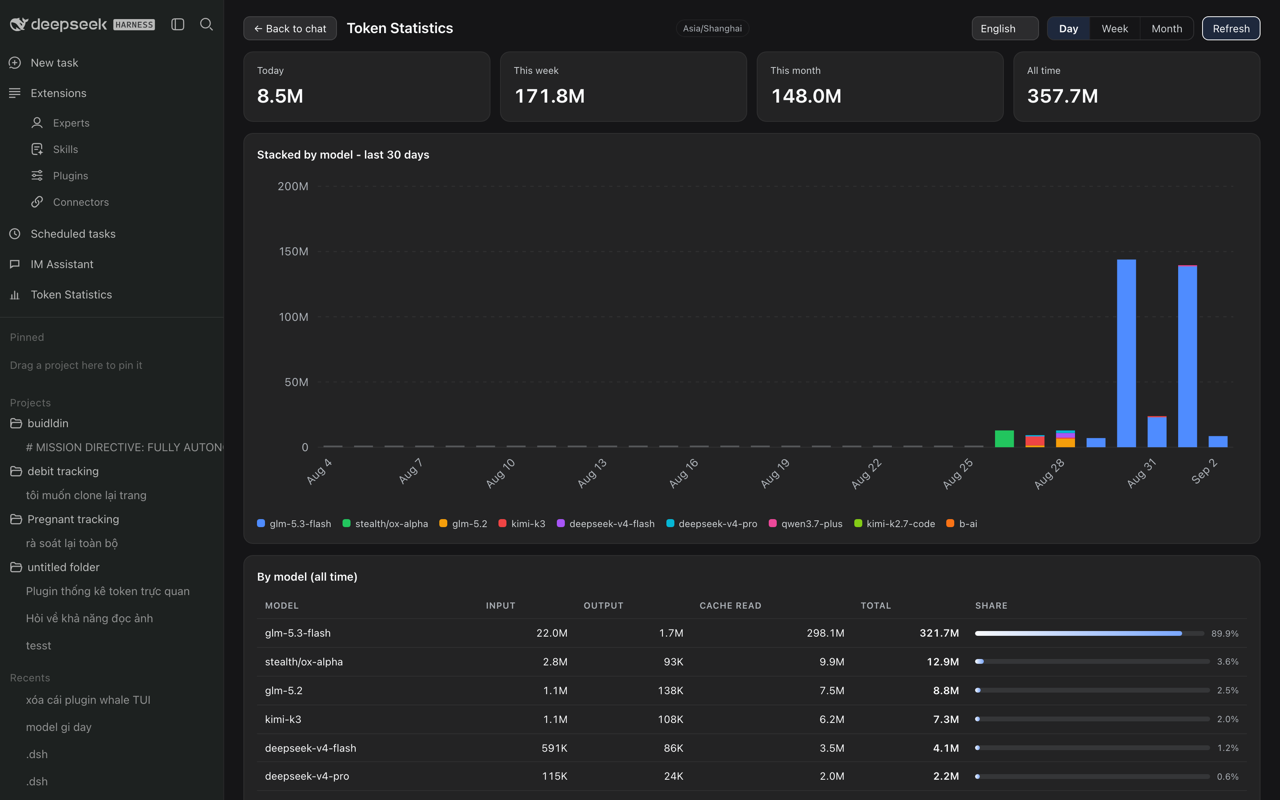
If you call the DeepSeek API through the Harness web GUI every day and end up manually tallying numbers from the Wallet ledger, dsh-token-stats removes that friction. It turns the 365-day local record that the built-in Wallet plugin already keeps into a live usage dashboard, right inside the app sidebar—no extra collection pipeline, no external service.
At the top you see four summary cards covering today, this week, this month, and all time, each showing total tokens and, when pricing data is available, the associated cost. Below them sits a hand-rolled SVG stacked bar chart in which every model gets its own color; you can switch between a 30-day, a 12-week (ISO), or a 12-month view, and hovering over a bar reveals per-model breakdowns. The final section is a table sorted by total tokens, listing input, output, cache-read tokens and a proportional share bar for each model, so the heaviest consumer is obvious at a glance. The interface ships in English, Vietnamese, Chinese, and Japanese, and remembers your choice; while the dashboard is open it auto-refreshes every 30 seconds, with a manual button as a fallback.
It is aimed at developers who make high-frequency DeepSeek calls and want to see exactly where tokens and cost go, and at team members who juggle several models and need a quick side-by-side comparison. The plugin is strictly read-only, has zero runtime dependencies, requires no build step, and never writes to the Wallet ledger.
Screenshots
Use Cases
- After a heavy day of DeepSeek API calls, check today token spend and cost at a glance
- When juggling multiple models, compare per-model token share and cost side by side
- Review weekly or monthly AI call trends to inform budgeting and model selection
Best For
- Solo developers who hit the DeepSeek API through the Harness GUI daily
- Engineering teams that track multi-model usage and API spend
- Platform engineers who care about per-model token breakdowns and pricing data
Related Plugins
A service-oriented sidebar framework for DSH, offering a full workbench with file explorer, embedded browser, real terminal, Git panel, and extensible plugin services.

A beautiful, practical Claude Code-style TUI plugin with pixel whale top bar, flowing glow title, real-time status line, streaming thought expansion, time rewind, context progress bar and TPS gauge — zero core changes.

The plugin market for DeepSeek Harness: browse/search/one-click install community plugins and themes, with updates, backup/restore, hot disable, diagnostics, and AI fix.

A persistent whale widget on the DSH web UI that shows DeepSeek balance, today's usage, and per-turn cost, with drag-and-snap and sound effects.