dsh-prompt-history-plugin
Run the following command in DeepSeek Harness:
dsh plugin install hotpot-labs/dsh-prompt-history-plugin
Paste the following prompt into your AI chat to install this plugin:
Run dsh plugin install hotpot-labs/dsh-prompt-history-plugin in your terminal to install; source code at https://github.com/hotpot-labs/dsh-prompt-history-plugin
About this plugin
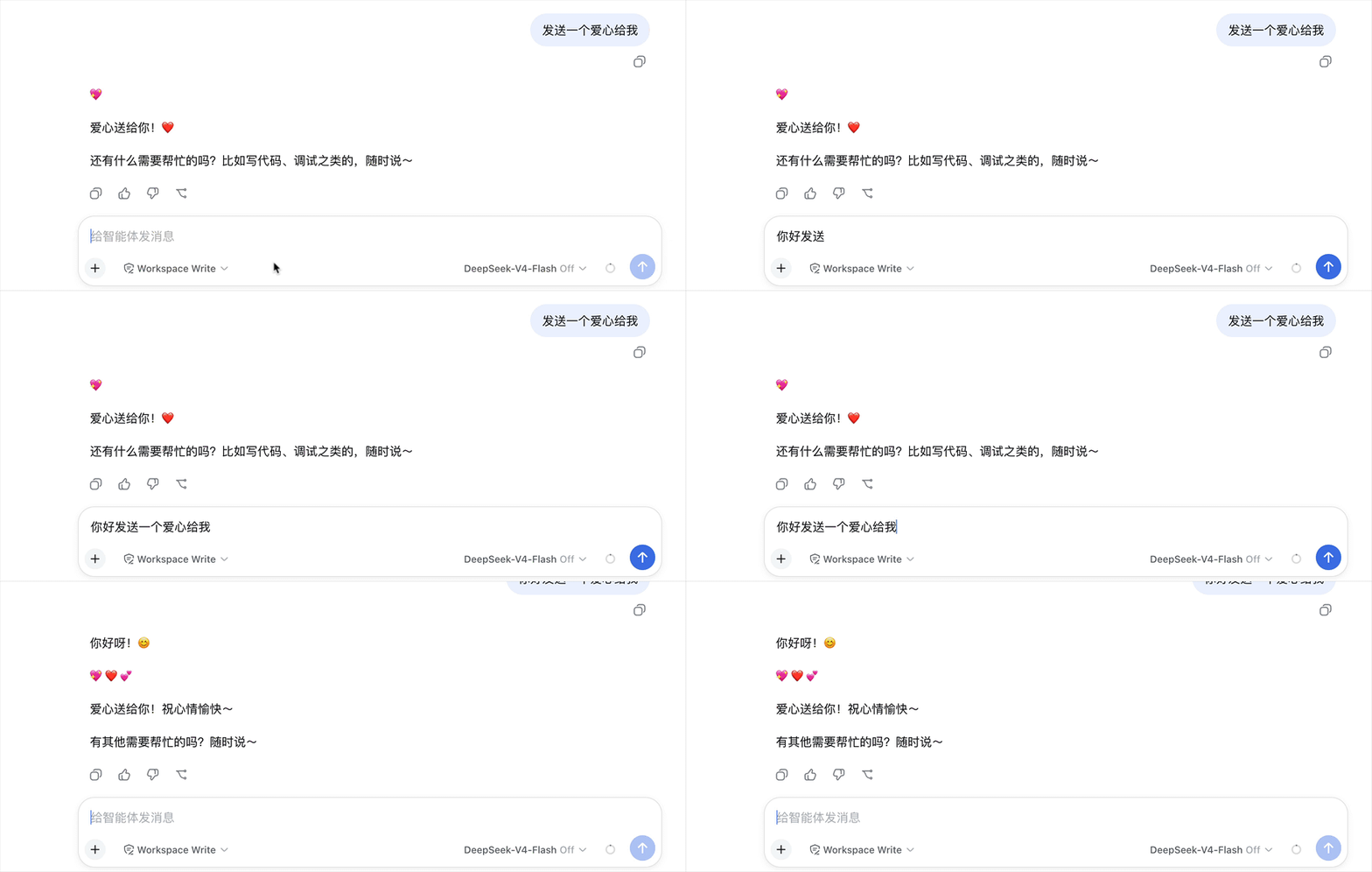
Tweaking prompts back and forth in the dsh Web composer usually means copy-pasting between messages repeatedly. dsh-prompt-history-plugin turns prompt history into up/down arrow muscle memory: with the caret at the very start of the input, press Up to step back through earlier prompts and Down to step forward, just like shell history in a terminal.
Every prompt accepted by the conversation is automatically saved to browser localStorage (capped at 100 entries, deduplicated, most-recent-use first) and shared across sessions and tabs. Navigation only activates when the composer is empty or the caret sits at position zero, so it never steals arrow keys from slash or at-sign trigger menus and never disrupts multi-line caret movement. Your in-progress draft is stashed on entry and restored when you exit navigation. The plugin renders zero visible UI; it simply attaches key behaviour to the existing composer.
If you switch between prompts rapidly in dsh Web, A/B test phrasings, or just want to skip the repeated copy-paste cycle, this plugin keeps your hands on the keyboard and turns two arrow keys into a full retrospective. It is a pure client-side bundle with local-only storage and no backend service required.
Screenshots
Use Cases
- Iteratively refine prompts in dsh Web by stepping through history with arrow keys
- A/B test different phrasings without copy-pasting between messages
- Share prompt history across tabs and sessions, pick up where you left off
Best For
- Developers who write and debug prompts frequently in dsh Web
- Prompt engineers who want to cut repetitive copy-paste and speed up iteration
- Web users who prefer local-only storage with zero backend dependencies
Related Plugins
A service-oriented sidebar framework for DSH, offering a full workbench with file explorer, embedded browser, real terminal, Git panel, and extensible plugin services.

A beautiful, practical Claude Code-style TUI plugin with pixel whale top bar, flowing glow title, real-time status line, streaming thought expansion, time rewind, context progress bar and TPS gauge — zero core changes.

The plugin market for DeepSeek Harness: browse/search/one-click install community plugins and themes, with updates, backup/restore, hot disable, diagnostics, and AI fix.

A persistent whale widget on the DSH web UI that shows DeepSeek balance, today's usage, and per-turn cost, with drag-and-snap and sound effects.