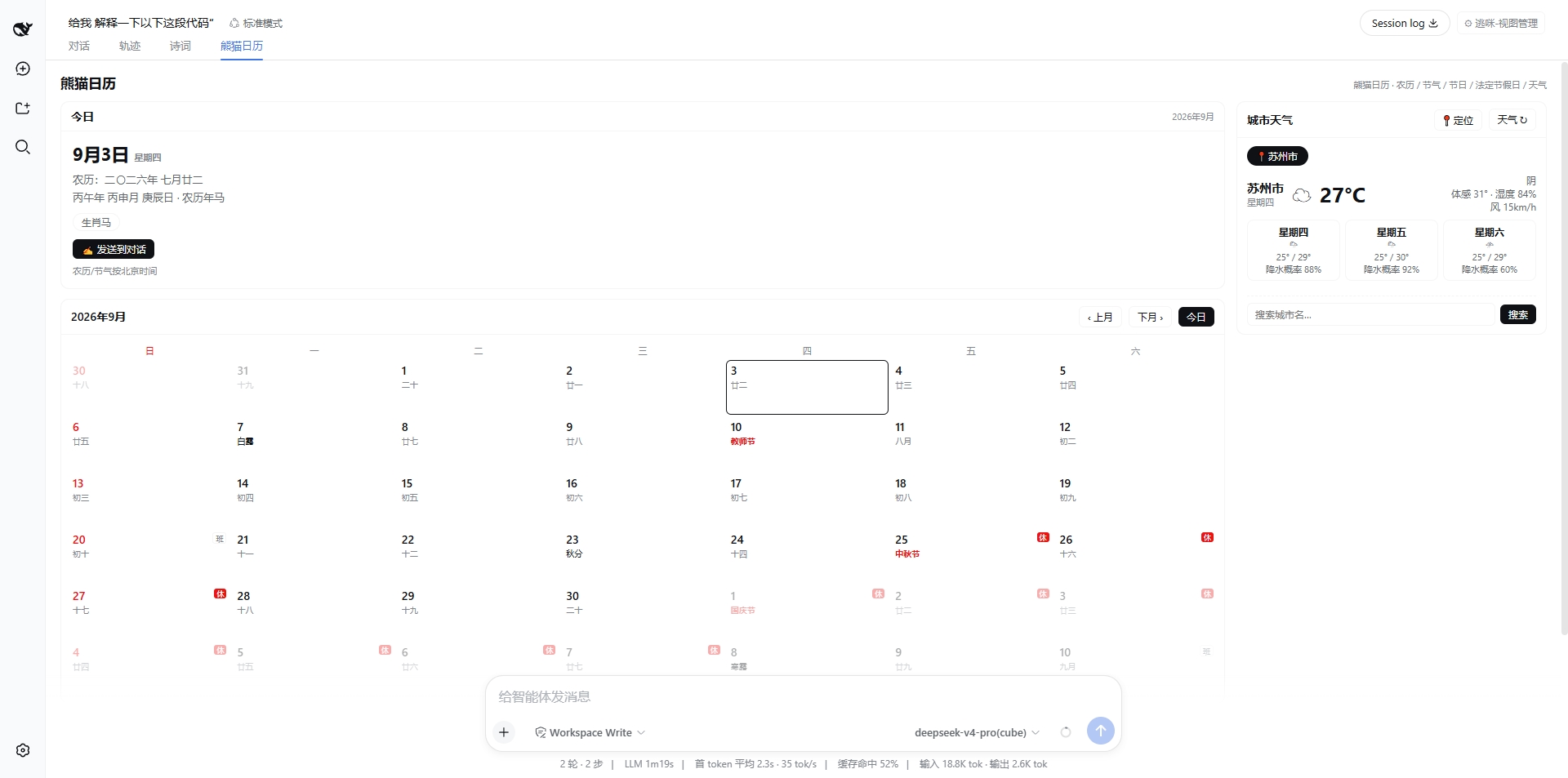
dsh-panda-calendar
Run the following command in DeepSeek Harness:
dsh plugin install runcat-tommy/dsh-panda-calendar
Paste the following prompt into your AI chat to install this plugin:
Run dsh plugin install runcat-tommy/dsh-panda-calendar in your terminal to install this plugin; the source repository is https://github.com/runcat-tommy/dsh-panda-calendar, then restart dsh web to see the tab in the session header.
About this plugin
In a DSH Web session, composing prompts or planning schedules often calls for a quick glance at the lunar date, solar terms, statutory holidays, or the weather in a particular city. Until now, those facts are scattered across phone apps, web searches, or weather APIs that demand a key.
dsh-panda-calendar folds all of that into a single tab in the session header. It ships with verified lunar, ganzhi, zodiac, and solar-term data tables covering 1900 to 2100, so the calendar works fully offline. Statutory holidays (including make-up workdays) are sourced from the State Council announcement data with built-in snapshot fallbacks. Weather comes from Open-Meteo, supports adding and swapping cities, and persists them in localStorage. None of it requires registration, an API key, or a backend. A one-click "send to chat" writes the summary of the day into the input box so the AI can pick up the conversation with full date context.
It is built for developers who use DSH in Chinese-language workflows, writers and planners who think in lunar seasons, and anyone who wants a single, zero-config panel for date, culture, leave, and weather without opening another tab.
Screenshots
Use Cases
- Checking today's solar term and lunar date before composing a Chinese prompt
- Planning a trip by viewing multi-city weather and makeup workdays in one panel
- One-click send of the day's summary into the chat as AI conversation context
Best For
- Developers who use DSH for Chinese-language writing and scheduling
- Users who plan their lives around lunar dates, solar terms, and zodiac signs
- Anyone who wants a single zero-config panel for date and weather instead of opening another tab
Related Plugins
A service-oriented sidebar framework for DSH, offering a full workbench with file explorer, embedded browser, real terminal, Git panel, and extensible plugin services.

A beautiful, practical Claude Code-style TUI plugin with pixel whale top bar, flowing glow title, real-time status line, streaming thought expansion, time rewind, context progress bar and TPS gauge — zero core changes.

The plugin market for DeepSeek Harness: browse/search/one-click install community plugins and themes, with updates, backup/restore, hot disable, diagnostics, and AI fix.

A persistent whale widget on the DSH web UI that shows DeepSeek balance, today's usage, and per-turn cost, with drag-and-snap and sound effects.