dsh-token-rush
Run the following command in DeepSeek Harness:
dsh plugin install mikijiyun/dsh-token-rush
Paste the following prompt into your AI chat to install this plugin:
Run dsh plugin install mikijiyun/dsh-token-rush inside DeepSeek Harness to install the plugin (source: https://github.com/mikijiyun/dsh-token-rush), then restart the dsh web process and the floating HUD will appear in the top-left corner of the session page.
About this plugin
You hand the model a long task, stay absorbed in the conversation, and only wince when the invoice appears and your balance has quietly shrunk. Worse, DeepSeek doubles its per-token rate during weekday peak windows (09:00-12:00 and 14:00-18:00 Beijing time), and most users have no idea they are being charged twice.
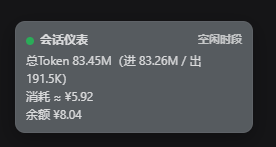
dsh-token-rush pins a compact ~216 px floating HUD to the top-left corner of the DeepSeek Harness session page so the answer is always in your peripheral vision. It shows the current session cumulative token usage (input, output, and cache buckets) in real time, estimates cost against the official per-model price sheet with automatic 2x peak markup (marked with an approximation sign), and proxies the account balance query on the host side with a 60-second cache so the API key never leaves the server. Before any message is sent the window is fully transparent and click-through; once a conversation starts it fades to semi-transparency over 0.8 s. Drag it anywhere you like-its position is remembered locally, and a double-click snaps it back to default. When a peak window is active the entire HUD shifts to a bold amber-red, a gentle nudge that says: double pricing is on, so take it easy.
It is built for developers and individual users who call the DeepSeek API through the DSH frontend on a pay-per-token plan and want glanceable cost awareness without hunting through billing dashboards. Pure hand-written JavaScript, zero build steps, zero extra dependencies, MIT licensed-install it and it just works.
Screenshots
Use Cases
- Automatically shifts to amber-red during peak hours (weekday 09:00-12:00, 14:00-18:00) to signal double-rate billing
- Glanceable top-left HUD showing cumulative tokens, estimated cost, and balance during long conversations-no need to switch to a billing dashboard
- Customize peak windows and timezone via environment variables to match your local work schedule
Best For
- Individual API developers on pay-per-token plans who want continuous cost awareness
- Users working with the DeepSeek API through the DSH frontend
- Small teams that need lightweight, in-page cost visibility without external monitoring tools
Related Plugins
A service-oriented sidebar framework for DSH, offering a full workbench with file explorer, embedded browser, real terminal, Git panel, and extensible plugin services.

A beautiful, practical Claude Code-style TUI plugin with pixel whale top bar, flowing glow title, real-time status line, streaming thought expansion, time rewind, context progress bar and TPS gauge — zero core changes.

The plugin market for DeepSeek Harness: browse/search/one-click install community plugins and themes, with updates, backup/restore, hot disable, diagnostics, and AI fix.

A persistent whale widget on the DSH web UI that shows DeepSeek balance, today's usage, and per-turn cost, with drag-and-snap and sound effects.