dsh-btw
Run the following command in DeepSeek Harness:
dsh plugin install WLV-ZEDD/dsh-btw
Paste the following prompt into your AI chat to install this plugin:
Run dsh plugin install WLV-ZEDD/dsh-btw to install the plugin into your DeepSeek Harness environment; the full source code is at https://github.com/WLV-ZEDD/dsh-btw
About this plugin
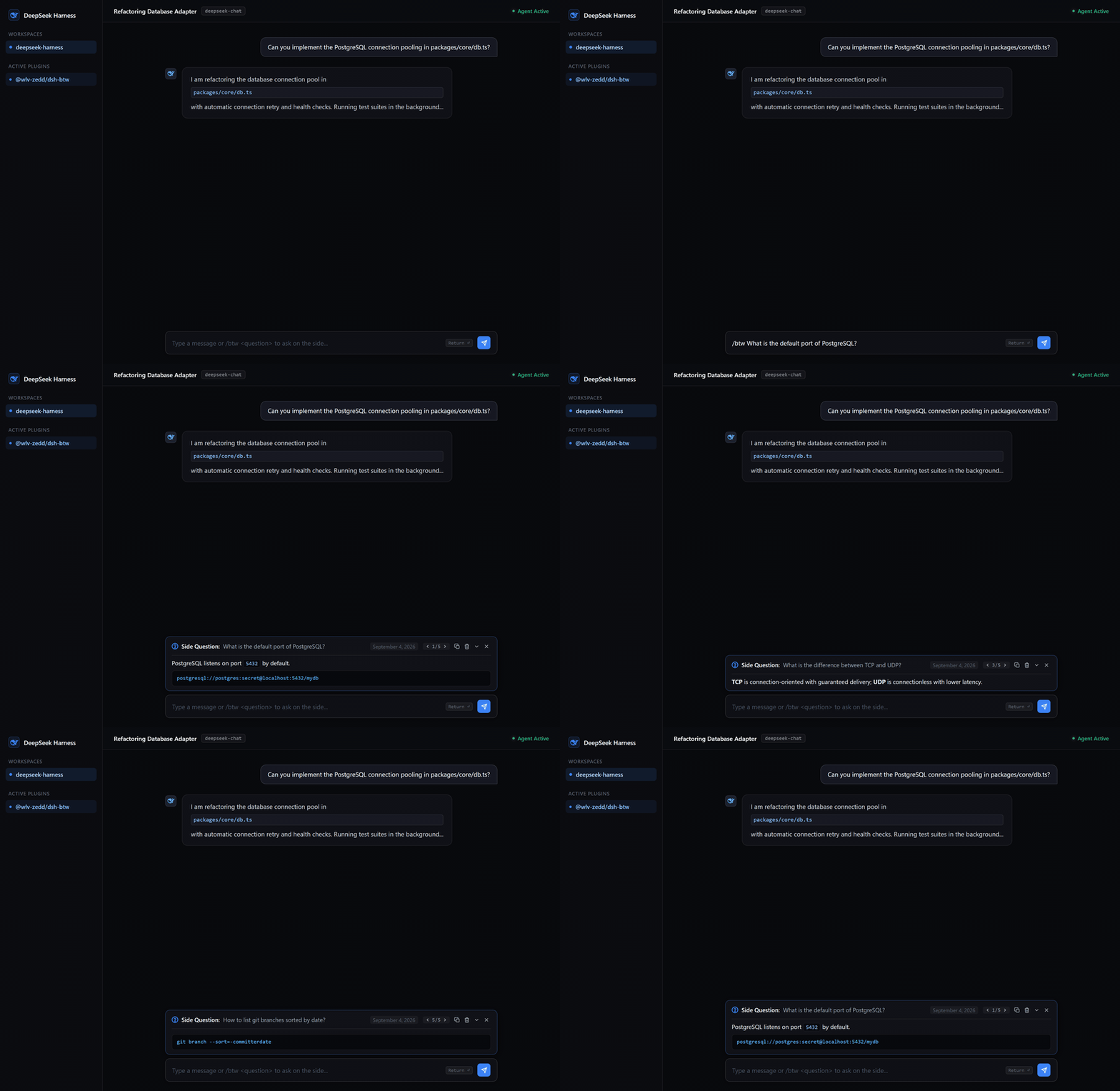
Mid-way through a multi-step agent run in DeepSeek Harness, you suddenly need to verify a variable name or tweak a prompt line. Interrupting the main conversation scatters context; staying silent just hurts. dsh-btw solves that awkward pause: type /btw followed by a quick question in the chat bar, the input clears instantly, and the request executes in the background with zero disturbance to the active agent loop.
The answer appears as a floating banner directly above the composer, complete with a real-time pulsating animation, full Markdown rendering, pagination between previous side questions, and a collapse toggle. Session Q&A history is persisted in a dedicated JSON file, keeping other plugin data clean. The model is auto-inherited from the active ctx.llm session config, with no extra setup required.
Built for DeepSeek Harness users who collaborate with agents frequently and need a lightweight, non-blocking side channel to ask quick questions without breaking the flow of the main task.
Screenshots
Use Cases
- Inserting a quick question while the agent is running a multi-step task without interrupting the main loop
- Quickly verifying a variable name, prompt wording, or config detail
- Instant lookups and history that keep the main conversation context clean
Best For
- Developers who frequently collaborate with DeepSeek Harness agents
- AI workflow users who need quick lookups without breaking the main task
- Prompt engineers who value context integrity and a smooth questioning rhythm
Related Plugins
A service-oriented sidebar framework for DSH, offering a full workbench with file explorer, embedded browser, real terminal, Git panel, and extensible plugin services.

A beautiful, practical Claude Code-style TUI plugin with pixel whale top bar, flowing glow title, real-time status line, streaming thought expansion, time rewind, context progress bar and TPS gauge — zero core changes.

The plugin market for DeepSeek Harness: browse/search/one-click install community plugins and themes, with updates, backup/restore, hot disable, diagnostics, and AI fix.

A persistent whale widget on the DSH web UI that shows DeepSeek balance, today's usage, and per-turn cost, with drag-and-snap and sound effects.