
dsh-dock
Run the following command in DeepSeek Harness:
dsh plugin install UnknowCao/dsh-dock
Paste the following prompt into your AI chat to install this plugin:
Run dsh plugin install UnknowCao/dsh-dock in your DeepSeek Harness terminal to install this plugin; the source repository is https://github.com/UnknowCao/dsh-dock .
About this plugin
Launching DSH web used to be a fixed ritual: open a terminal, run the command, copy the token, paste it into a browser, hit F11 manually. Restarting meant hunting through the process list for a PID and killing it cold. No single step is hard, but repeating them several times a day adds up.
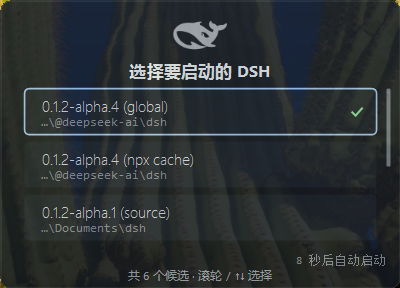
dsh-dock folds the whole flow into two entry points. A black-whale icon on the desktop: if the server is already running, a double-click opens a fullscreen window instantly; if not, a branded cold-start card appears, the server boots silently, and the window shows up the moment it is ready. A sidebar menu groups settings, a page reload that leaves the server untouched, and a graceful full shutdown that disposes the entire process tree, saves sessions in real time, so the next click picks up right where you left off. When multiple DSH installations coexist, a self-drawn scrollable candidate list inside the card lets you switch by version, type, and path at a glance.
Built for Windows users who treat DSH web as a daily workbench and start or stop the service often. A single native executable, no compilation step, zero runtime dependencies, no extra downloads or lifecycle scripts after installation.
Screenshots



Use Cases
- Opening and closing DSH web several times a day without touching a terminal at all
- Switching between multiple DSH installations quickly at cold start
- Shutting down DSH gracefully with session persistence instead of hunting for a PID in the process list
Best For
- Windows users who rely on DSH web as a daily workbench and start or stop it often
- Developers who prefer one-click GUI operations over terminal workflows
- Engineers maintaining multiple DSH versions and switching between them quickly
Related Plugins
A service-oriented sidebar framework for DSH, offering a full workbench with file explorer, embedded browser, real terminal, Git panel, and extensible plugin services.

A beautiful, practical Claude Code-style TUI plugin with pixel whale top bar, flowing glow title, real-time status line, streaming thought expansion, time rewind, context progress bar and TPS gauge — zero core changes.

The plugin market for DeepSeek Harness: browse/search/one-click install community plugins and themes, with updates, backup/restore, hot disable, diagnostics, and AI fix.

A persistent whale widget on the DSH web UI that shows DeepSeek balance, today's usage, and per-turn cost, with drag-and-snap and sound effects.