dsh-web-ding
Run the following command in DeepSeek Harness:
dsh plugin install falling-ts/dsh-web-ding
Paste the following prompt into your AI chat to install this plugin:
Run dsh plugin install falling-ts/dsh-web-ding in your terminal to install it; the source is at https://github.com/falling-ts/dsh-web-ding
About this plugin
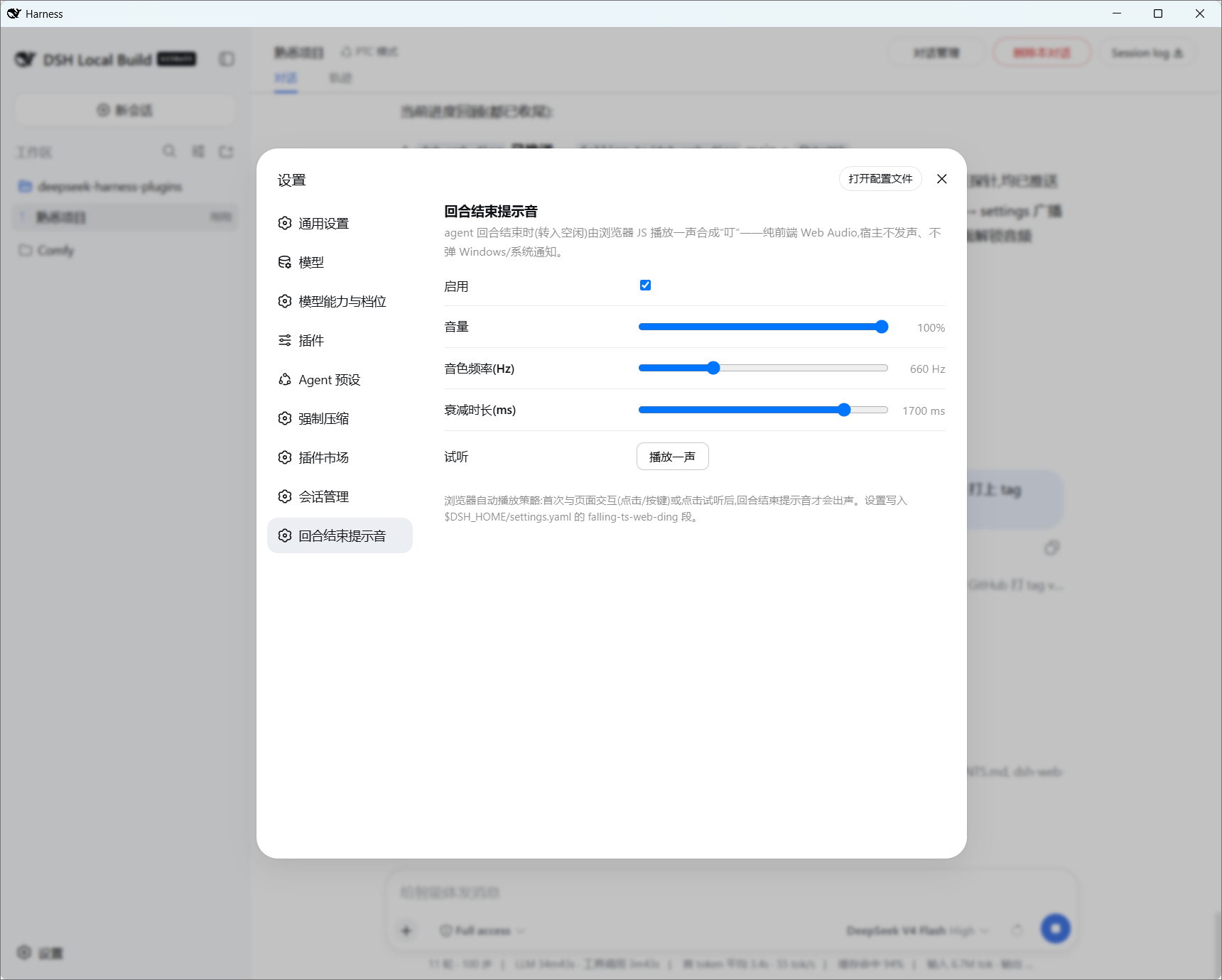
When your DSH agent finishes every turn and drops into idle, or when a question chooser pops up on screen, you are left staring at the tab waiting for a cue. dsh-web-ding closes that feedback gap with a short, synthesized ding played right in the browser. The tone is built from three sine oscillators and exponential-decay envelopes driven by the Web Audio API, so there is no backend audio pipeline, no OS notification, and no system dependency at all.
Two independent trigger scenarios are wired in. The turn-end path watches the agent/status idle transition on the Host side and mirrors a done signal into the falling-ts-web-ding settings namespace; the question-popup path detects the QuestionComposer DOM anchor entirely client-side. Each scenario carries its own on/off switch, volume, frequency, and decay-length knobs, plus a preview button that warms the AudioContext against browser autoplay policies. On every turn end a Win11-style toast slides into the bottom-right corner; clicking it reveals a notification drawer listing up to the last 100 messages stored in localStorage, deduped by timestamp, individually deletable, and clearable all at once. The Host never reads or writes that log.
It is built for developers and power users who run DSH through the web client and want the least-intrusive way to know that a turn has finished or a decision is needed, without reaching for system notifications or switching windows. If your agent runs take a while or you are frequently interrupted by confirmations, that single ding keeps your attention in the right place at the right moment.
Screenshots
Use Cases
- Hear a ding the moment a long agent run finishes and returns to idle
- Get an instant audio cue when a question chooser pops up so nothing is missed
- Stay on the same tab and know turn status without switching windows or OS alerts
Best For
- Developers running agent turns in the DSH web client who want a lightweight end-of-turn cue
- Workflow operators who frequently hit confirmation popups and do not want to miss them
- Users who prefer pure front-end alerts and would rather not enable system notifications or background services
Related Plugins
A service-oriented sidebar framework for DSH, offering a full workbench with file explorer, embedded browser, real terminal, Git panel, and extensible plugin services.

A beautiful, practical Claude Code-style TUI plugin with pixel whale top bar, flowing glow title, real-time status line, streaming thought expansion, time rewind, context progress bar and TPS gauge — zero core changes.

The plugin market for DeepSeek Harness: browse/search/one-click install community plugins and themes, with updates, backup/restore, hot disable, diagnostics, and AI fix.

A persistent whale widget on the DSH web UI that shows DeepSeek balance, today's usage, and per-turn cost, with drag-and-snap and sound effects.