dsh-subagent-inspector
Run the following command in DeepSeek Harness:
dsh plugin install chongyangdu2008-cyrus/dsh-subagent-inspector
Paste the following prompt into your AI chat to install this plugin:
Run dsh plugin install chongyangdu2008-cyrus/dsh-subagent-inspector in your terminal to install the plugin; the source is available at https://github.com/chongyangdu2008-cyrus/dsh-subagent-inspector . Restart the Web profile after installation.
About this plugin
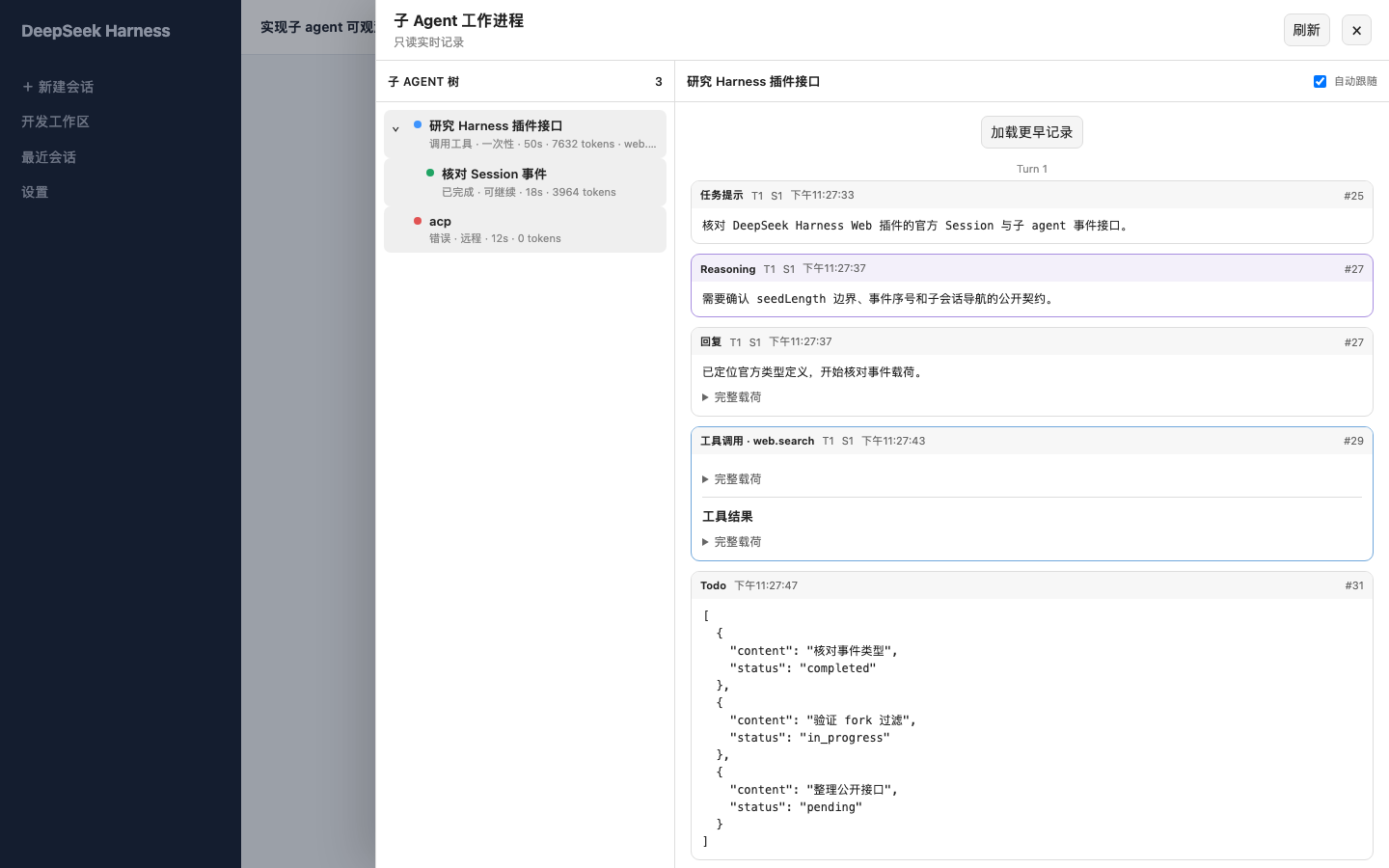
When orchestrating multi-layer sub-agents in DeepSeek Harness Web, the reasoning paths, tool-call details, and token flow of each node often remain buried in raw logs. dsh-subagent-inspector turns that opacity into a visual panel: a single click on the session header opens a right-side drawer that lays out the full sub-agent execution tree, with per-node status, mode, depth, elapsed time, and token spend visible at a glance.
The drawer drills down from Turn to Step, surfacing the reasoning Harness actually recorded, the reply, Todo items, tool calls with results, errors, and termination reasons. SSE keeps events streaming in real time with automatic reconnection and de-duplication; history is pageable for retroactive review, and a one-click jump takes you straight into the native sub-agent session. Tool payloads are collapsed by default and fully expandable, and all log content is rendered as plain text with no raw HTML injection.
The plugin is strictly read-only. It registers no model tools, does not alter sub-agent scheduling, model selection, permissions, or context, and never speculates about internal reasoning that Harness did not persist. It is well suited for developers running multi-agent workflows in Harness Web who need to pinpoint an anomalous tool call or an unexpected token spike in seconds, as well as engineering leads who want to walk a team through exactly how a complex task is decomposed and executed layer by layer.
Screenshots
Use Cases
- Pinpoint an anomalous tool call or token spike on a specific sub-agent node in a multi-agent workflow
- Review past sessions to trace sub-agent reasoning, tool results, and termination reasons
- Walk a team through how a complex task is decomposed and dispatched across sub-agents, layer by layer
Best For
- Developers orchestrating multi-agent workflows in Harness Web
- Engineers who need to debug sub-agent execution details
- Engineering leads who want to demo agent architecture and execution flow to their team
Related Plugins
A service-oriented sidebar framework for DSH, offering a full workbench with file explorer, embedded browser, real terminal, Git panel, and extensible plugin services.

A beautiful, practical Claude Code-style TUI plugin with pixel whale top bar, flowing glow title, real-time status line, streaming thought expansion, time rewind, context progress bar and TPS gauge — zero core changes.

The plugin market for DeepSeek Harness: browse/search/one-click install community plugins and themes, with updates, backup/restore, hot disable, diagnostics, and AI fix.

A persistent whale widget on the DSH web UI that shows DeepSeek balance, today's usage, and per-turn cost, with drag-and-snap and sound effects.