dsh-plugin-source
Run the following command in DeepSeek Harness:
dsh plugin install Carrick-K7/dsh-plugin-source
Paste the following prompt into your AI chat to install this plugin:
Run dsh plugin install Carrick-K7/dsh-plugin-source in your terminal to install; the plugin source lives at https://github.com/Carrick-K7/dsh-plugin-source
About this plugin
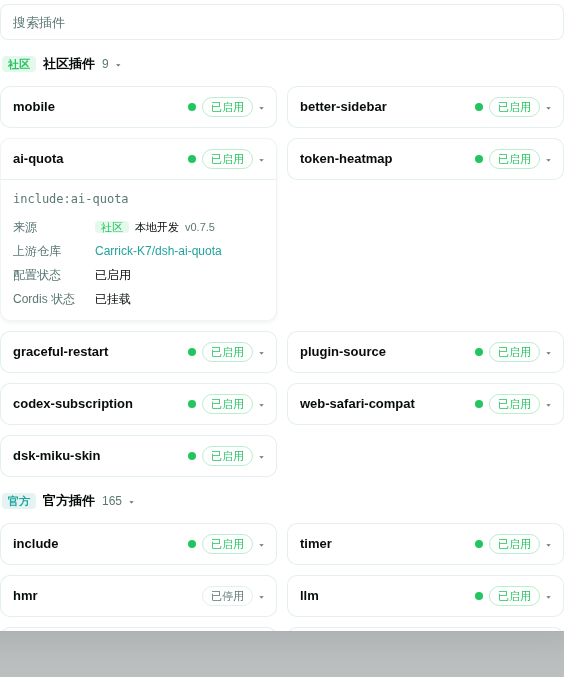
Once you have a dozen plugins installed, the DSH plugin list tab turns into a flat, undifferentiated wall of cards: official monorepo packages, loader internals, local projects linked via file:, and community plugins all mixed together. Telling them apart, finding the right upstream repo, or spotting which ones are under local development means opening each card one by one.
dsh-plugin-source takes a restrained approach. It shadows the official plugin-list tab and layers on three practical enhancements while preserving every existing feature such as search, detail expansion, status dots, and retry. Plugins are grouped by source — official (the @deepseek-ai/ scope and cordis: prefix) and community — with collapsible group headers showing counts; community sits above official. Each card gains a version badge, an upstream repository link (org/repo with one-click GitHub jump, or a note when not declared), and a local-development marker for profile dependencies using file: or link:.
The plugin is entirely read-only, makes zero network requests, and writes nothing to disk. All metadata comes from local loader manifests and package.json files under node_modules. It is well suited to users who maintain many plugins and need to distinguish sources at a glance, as well as developers juggling local and community plugins simultaneously.
Screenshots
Use Cases
- Quickly tell official plugins apart from community ones in a long list
- Jump to a plugin's upstream GitHub repo with one click
- Distinguish locally developed file: or link: plugins from regular installs
Best For
- DSH users with many third-party plugins installed
- Developers maintaining both local and community plugins
- Users who want to enhance the plugin list without modifying official code
Related Plugins
A service-oriented sidebar framework for DSH, offering a full workbench with file explorer, embedded browser, real terminal, Git panel, and extensible plugin services.

A beautiful, practical Claude Code-style TUI plugin with pixel whale top bar, flowing glow title, real-time status line, streaming thought expansion, time rewind, context progress bar and TPS gauge — zero core changes.

The plugin market for DeepSeek Harness: browse/search/one-click install community plugins and themes, with updates, backup/restore, hot disable, diagnostics, and AI fix.

A persistent whale widget on the DSH web UI that shows DeepSeek balance, today's usage, and per-turn cost, with drag-and-snap and sound effects.