dsh-tool-emoji
Run the following command in DeepSeek Harness:
dsh plugin install LWLAymh/dsh-tool-emoji
Paste the following prompt into your AI chat to install this plugin:
Install this plugin in DeepSeek Harness by running dsh plugin install LWLAymh/dsh-tool-emoji; the source repository is at https://github.com/LWLAymh/dsh-tool-emoji — after installation, restart the Web profile to activate it.
About this plugin
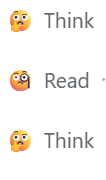
DeepSeek Harness tool cards ship with neutral inline SVG icons that are hard to distinguish at a glance during quick scans. dsh-tool-emoji swaps each card leading icon for a semantically clear emoji — 🤔 for reasoning, 🧐 for search and read, ☝️🤓 for editing, 👨💻 for terminal, and 😫 for error states — so tool types become instantly recognizable while every piece of original content (title, summary, diff, terminal output, expand/collapse) stays untouched.
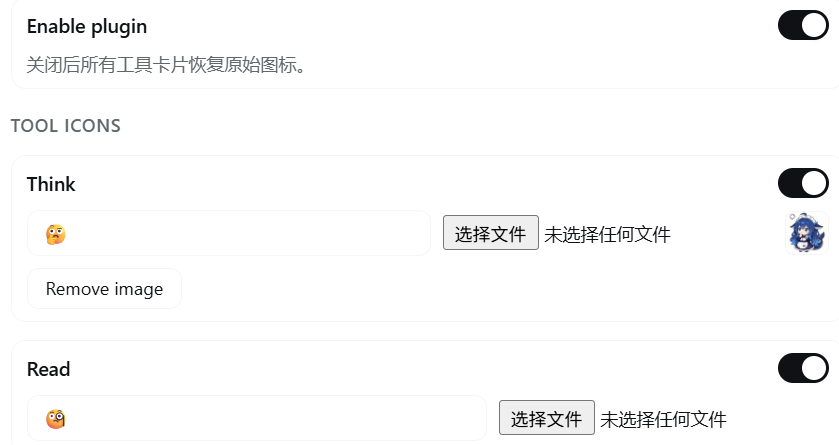
Under the hood the plugin injects a small global stylesheet that hides the built-in SVG and renders the emoji via ::before. It does not register a toolview or alter the DOM tree, so there is zero conflict with existing card rendering. From the DSH Settings page you can toggle each tool icon independently, type any custom emoji or text, upload a local PNG/JPEG/GIF/WebP/BMP image (1 MB cap per image), and reset any or all entries back to defaults — all changes apply immediately and persist across refreshes without touching code.
It is built for anyone running a Web-profile workflow who wants clearer visual cues on tool cards, and pairs well with companion plugins like dsh-edit-guardian, keeping heavy multi-tool sessions scannable at a glance.
Screenshots

Use Cases
- Distinguish reasoning, search, edit, and terminal cards at a glance
- Spot error states instantly without expanding the card
- Personalize the tool bar with custom emoji or uploaded images
Best For
- Power users running DeepSeek Harness Web-profile workflows
- Users pairing with companion plugins like dsh-edit-guardian for fast card-type recognition
- Anyone seeking higher visual distinction on tool cards to reduce cognitive load
Related Plugins
A service-oriented sidebar framework for DSH, offering a full workbench with file explorer, embedded browser, real terminal, Git panel, and extensible plugin services.

A beautiful, practical Claude Code-style TUI plugin with pixel whale top bar, flowing glow title, real-time status line, streaming thought expansion, time rewind, context progress bar and TPS gauge — zero core changes.

The plugin market for DeepSeek Harness: browse/search/one-click install community plugins and themes, with updates, backup/restore, hot disable, diagnostics, and AI fix.

A persistent whale widget on the DSH web UI that shows DeepSeek balance, today's usage, and per-turn cost, with drag-and-snap and sound effects.