dsh-conversation-map
Run the following command in DeepSeek Harness:
dsh plugin install xyAxzy/dsh-conversation-map
Paste the following prompt into your AI chat to install this plugin:
Run dsh plugin install xyAxzy/dsh-conversation-map in your terminal; the full source is at https://github.com/xyAxzy/dsh-conversation-map . After installation, restart dsh web and the Conversation Map entry will appear at the bottom of the left sidebar.
About this plugin
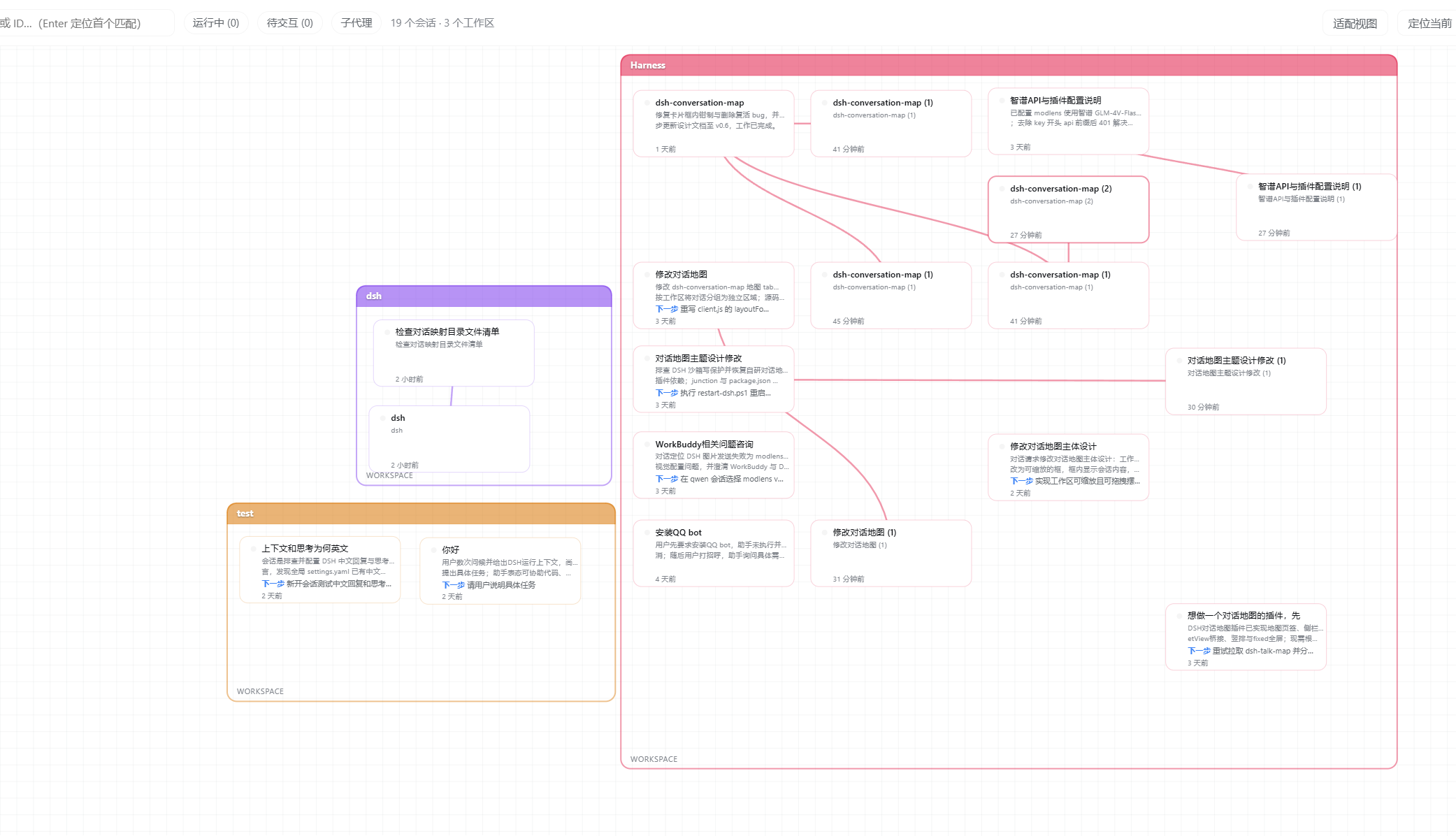
Running several sessions in parallel while your agents keep spawning subagents quickly turns the DeepSeek Harness workspace into a tangle of threads. You lose track of who is a parent, which branch is still running, and where a fork ended up. dsh-conversation-map renders every session in the current workspace as a live tree diagram: parent sessions in the left column, children indenting rightward by layer, with running, awaiting-input, and idle states marked by color dots. Double-click any card to jump straight into that conversation, and the full lineage of your workspace is visible at a glance.
The plugin invests heavily in layout clarity and visual polish. Parent-child connectors follow true Bezier curves and trigger automatic avoidance, shifting any card a line would cross to the nearest empty spot so the path stays legible. The workspace theme color flows through borders, card outlines, and connectors, with selected and unselected states differentiated by shade. The background is a zoomable, pannable grid-paper canvas; the workspace frame is a transparent hand-drawn style box that auto-expands when new or forked sessions appear, keeping cards from overlapping or overflowing. Drag-and-drop positions and canvas transforms persist across reloads.
If you regularly run multi-turn dialogue in DeepSeek Harness, let agents spawn subagents, and need to trace branch status and navigate between sessions without losing context, this conversation map serves as a lightweight, server-free panoramic console for your entire workspace.
Screenshots
Use Cases
- Quickly locate a branch run status amid parallel sessions
- Trace parent-child lineage after subagent spawning
- Jump into the target session directly from the map
Best For
- Users managing multiple concurrent conversations in DeepSeek Harness
- Developers who frequently spawn subagents and branch tasks
- Teams that need a workspace-wide view of session states
Related Plugins
A service-oriented sidebar framework for DSH, offering a full workbench with file explorer, embedded browser, real terminal, Git panel, and extensible plugin services.

A beautiful, practical Claude Code-style TUI plugin with pixel whale top bar, flowing glow title, real-time status line, streaming thought expansion, time rewind, context progress bar and TPS gauge — zero core changes.

The plugin market for DeepSeek Harness: browse/search/one-click install community plugins and themes, with updates, backup/restore, hot disable, diagnostics, and AI fix.

A persistent whale widget on the DSH web UI that shows DeepSeek balance, today's usage, and per-turn cost, with drag-and-snap and sound effects.