dsh-conversation-nav-dots
Run the following command in DeepSeek Harness:
dsh plugin install yuioi666/dsh-conversation-nav-dots
Paste the following prompt into your AI chat to install this plugin:
Run dsh plugin install yuioi666/dsh-conversation-nav-dots in your terminal to install the plugin; the source is available at https://github.com/yuioi666/dsh-conversation-nav-dots. After installing, restart DSH Web to apply the changes.
About this plugin
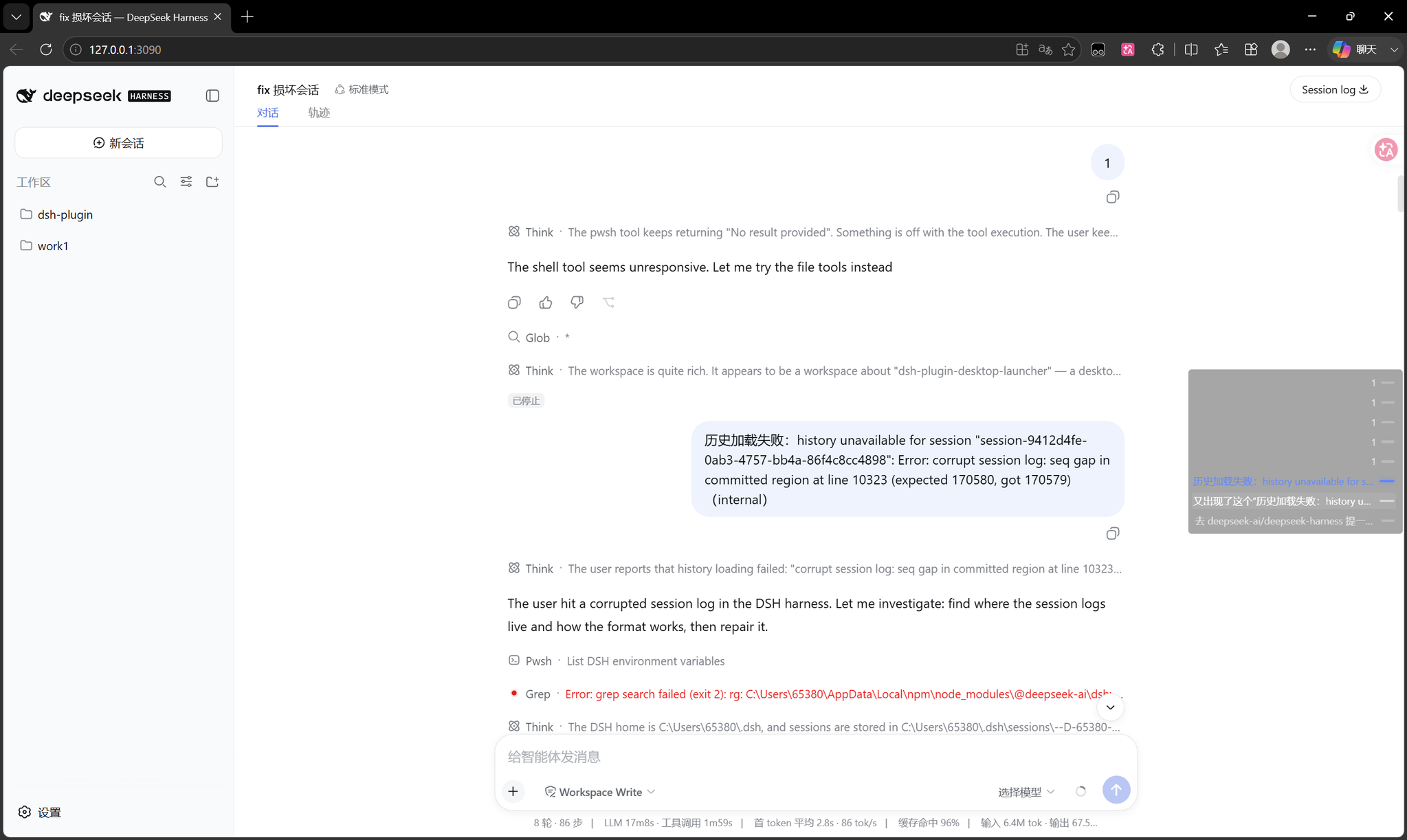
Long conversations tend to sprawl. After ten or twenty turns, your user messages are buried under mountains of model replies, and jumping back to a specific question turns into a scroll-and-pray exercise. dsh-conversation-nav-dots solves this with a minimal column of hairline markers pinned to the right edge of the DSH Web conversation pane, one per user message, sitting quietly out of the way until you need it.
Hover over the right edge and each marker reveals a short preview of the corresponding message so you can confirm before clicking. Click any marker or its preview text and the view snaps instantly to that message, with no animation in the way. The marker for the message currently in view glows blue, the list refreshes automatically when you switch conversations, and it scrolls gracefully when there are more messages than fit on screen. Under the hood the plugin is pure DOM: it tracks visibility with IntersectionObserver, throttles updates via requestAnimationFrame, and uses event delegation, so the performance impact is negligible. Dark themes work out of the box, and every color is exposed as a CSS variable for easy theming.
If your DSH Web sessions regularly run past ten rounds of back-and-forth—code reviews, architecture discussions, debugging sessions—and you find yourself repeatedly scrolling back to earlier questions, this plugin is built for you. Install it, restart DSH Web, and the navigation dots appear on the next conversation with zero configuration required.
Screenshots
Use Cases
- Jump back to a specific user question in a long conversation
- Cross-reference user messages with model replies during code review
- Locate context position instantly in multi-round technical discussions
Best For
- Developers who routinely run conversations of ten or more rounds
- Users who need to repeatedly locate specific messages in long threads
- DSH Web users who prefer a clean, non-intrusive interface
Related Plugins
A service-oriented sidebar framework for DSH, offering a full workbench with file explorer, embedded browser, real terminal, Git panel, and extensible plugin services.

A beautiful, practical Claude Code-style TUI plugin with pixel whale top bar, flowing glow title, real-time status line, streaming thought expansion, time rewind, context progress bar and TPS gauge — zero core changes.

The plugin market for DeepSeek Harness: browse/search/one-click install community plugins and themes, with updates, backup/restore, hot disable, diagnostics, and AI fix.

A persistent whale widget on the DSH web UI that shows DeepSeek balance, today's usage, and per-turn cost, with drag-and-snap and sound effects.