dsh-plugin-noticeme
Run the following command in DeepSeek Harness:
dsh plugin install lw-storm/dsh-plugin-noticeme
Paste the following prompt into your AI chat to install this plugin:
Run dsh plugin install lw-storm/dsh-plugin-noticeme in the DeepSeek Harness terminal to install this plugin, available at https://github.com/lw-storm/dsh-plugin-noticeme; after installation, restart DSH and grant browser notification permission.
About this plugin
DSH often pauses mid-workflow waiting for your confirmation—an approval prompt or an ask_user_question card appears and simply sits there while you are busy in another window. By the time you notice, the session has been idle for minutes. dsh-plugin-noticeme exists to eliminate that passive, silent wait.
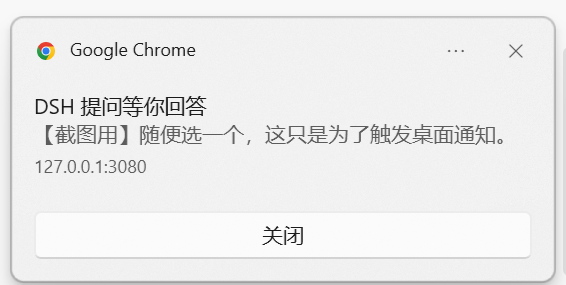
The plugin listens on the DSH host for approval prompts and question cards. When one shows up while the page is hidden, it raises an immediate desktop notification; clicking the notification pulls focus back to the DSH tab. If the browser has not granted Notification permission, the plugin gracefully falls back to prefixing the tab title with a visible reminder marker, which is automatically removed once the page becomes visible again. No build step is required—the client script is a hand-written bundle.
This is for developers who drive DSH sessions as part of their daily workflow and frequently keep the page in a background tab. Instead of polling for changes, DSH will reach out to you the moment it needs a decision.
Screenshots
Use Cases
- Never miss an approval prompt after switching tabs
- Stay responsive to background DSH sessions while multitasking
- Fall back to tab-title alerts when notification permission is off
Best For
- Engineers who keep DSH in a background tab during daily workflows
- Developers who prefer tools that reach out instead of manual polling
- Users who favor lightweight, no-build client-side plugins
Related Plugins
A service-oriented sidebar framework for DSH, offering a full workbench with file explorer, embedded browser, real terminal, Git panel, and extensible plugin services.

A beautiful, practical Claude Code-style TUI plugin with pixel whale top bar, flowing glow title, real-time status line, streaming thought expansion, time rewind, context progress bar and TPS gauge — zero core changes.

The plugin market for DeepSeek Harness: browse/search/one-click install community plugins and themes, with updates, backup/restore, hot disable, diagnostics, and AI fix.

A persistent whale widget on the DSH web UI that shows DeepSeek balance, today's usage, and per-turn cost, with drag-and-snap and sound effects.