dsh-chat-history
Run the following command in DeepSeek Harness:
dsh plugin install VioletScar-Hui/dsh-chat-history
Paste the following prompt into your AI chat to install this plugin:
Install via dsh plugin install VioletScar-Hui/dsh-chat-history in DeepSeek Harness; the source is at https://github.com/VioletScar-Hui/dsh-chat-history. Refresh the browser after installation to activate.
About this plugin
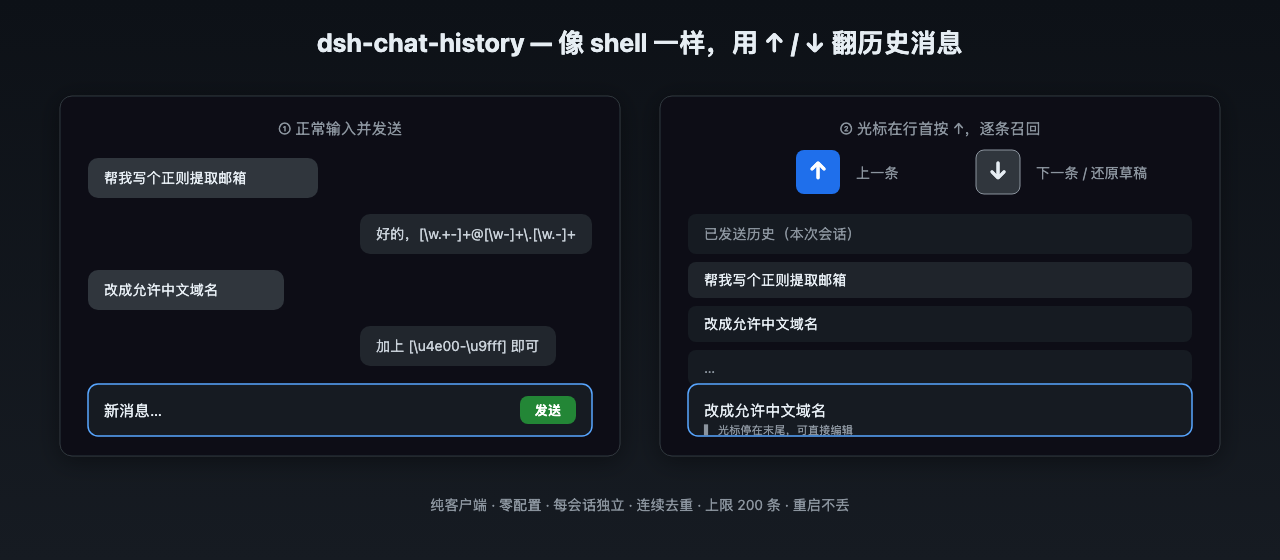
Firing off dozens of prompts in a DSH session and then hunting through the scrollback for that one earlier message is tedious. dsh-chat-history brings the familiar shell-style Up/Down history workflow to the chat input: put the cursor at line start, press Up to step back through previously sent messages, press Down to move forward or restore the draft you were editing. Consecutive duplicates are skipped, each session maintains its own independent list capped at 200 entries, and everything re-seeds from the conversation on every page load—purely in-memory, no disk I/O, no host-side changes.
Beyond arrow-key recall, a Locate button in the session header opens a floating panel that lists every message you have sent in that session in order. Click any entry and the view scrolls directly to it with a brief highlight. The plugin is deliberately invisible to the UI: the component renders nothing, it only attaches keyboard side effects. Arrow-key interception fires exclusively when the cursor sits at line zero and stays silent during IME composition, slash-command menus, or mid-text editing, so it never competes with your typing flow.
Ideal for power users who chain many prompts, frequently revisit or reuse earlier messages, and prefer a keyboard-driven workflow over extra buttons and panels. After installation, a simple browser refresh is all it takes—no configuration, no host restart, no visible chrome added to the interface.
Screenshots
Use Cases
- Revisiting or reusing an earlier prompt after sending many messages in sequence
- Quickly locating a specific message you sent in a long conversation
- Preferring pure keyboard workflows over mouse-driven scrolling
Best For
- Heavy DSH users who run many conversations and frequently revisit earlier prompts
- Keyboard-first power users who prefer arrow-key navigation over extra UI chrome
- Minimalist-oriented users who want invisible enhancements without added interface elements
Related Plugins
A service-oriented sidebar framework for DSH, offering a full workbench with file explorer, embedded browser, real terminal, Git panel, and extensible plugin services.

A beautiful, practical Claude Code-style TUI plugin with pixel whale top bar, flowing glow title, real-time status line, streaming thought expansion, time rewind, context progress bar and TPS gauge — zero core changes.

The plugin market for DeepSeek Harness: browse/search/one-click install community plugins and themes, with updates, backup/restore, hot disable, diagnostics, and AI fix.

A persistent whale widget on the DSH web UI that shows DeepSeek balance, today's usage, and per-turn cost, with drag-and-snap and sound effects.