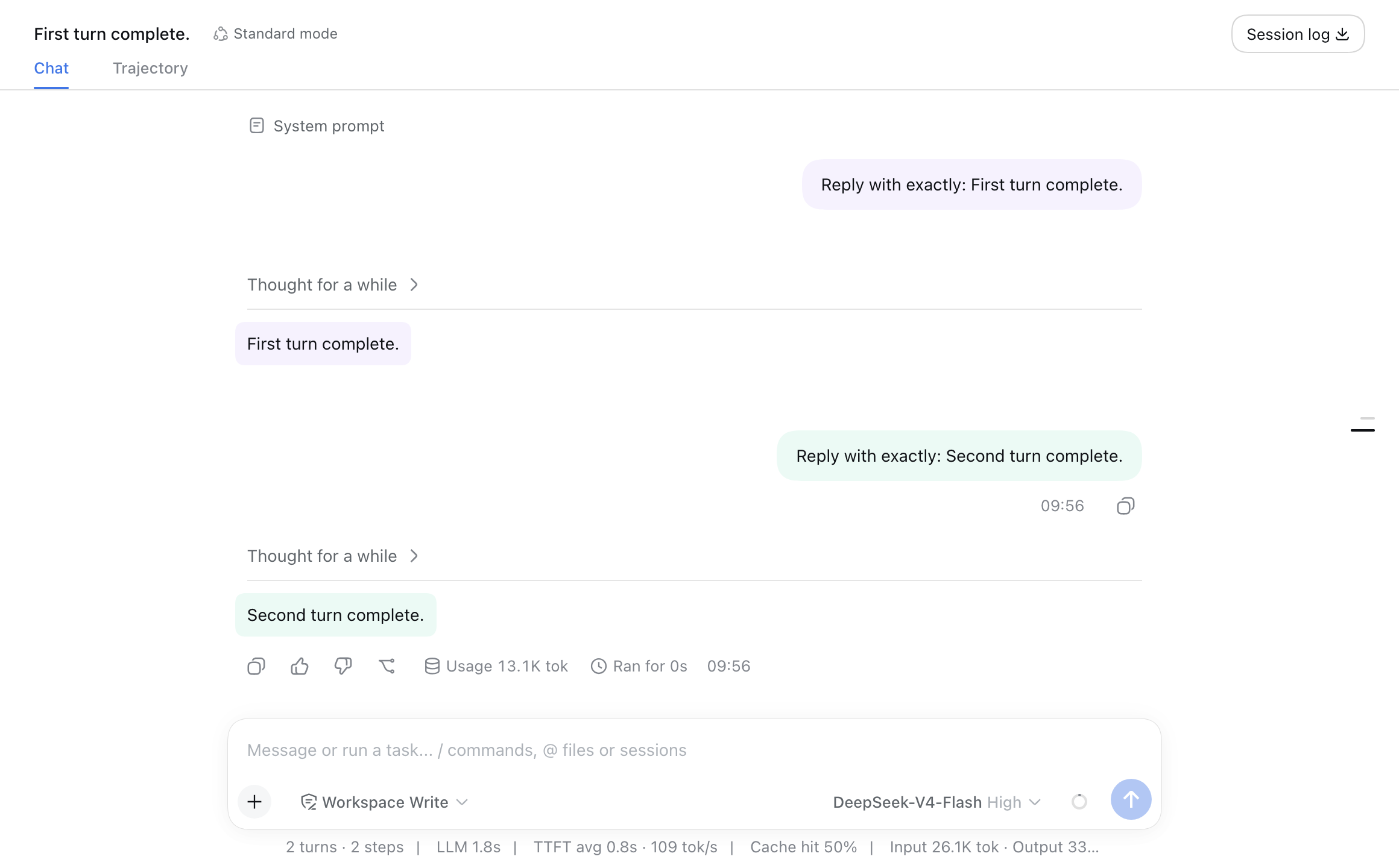
dsh-turn-colors
Run the following command in DeepSeek Harness:
dsh plugin install geecraft23/dsh-turn-colors
Paste the following prompt into your AI chat to install this plugin:
Run dsh plugin install geecraft23/dsh-turn-colors once in the DeepSeek Harness Web Profile to install; the source is at https://github.com/geecraft23/dsh-turn-colors , and the plugin will auto-load on every subsequent Web launch.
About this plugin
When you work through many turns in DeepSeek Harness Web, every message sits on the same plain white background. Telling where one user prompt begins and where its final assistant reply ends quickly becomes a guessing game, especially as the conversation stretches past the viewport.
dsh-turn-colors takes a restrained approach: it assigns a subtle background tint to each Turn (the user message paired with its final Assistant reply) so that adjacent turns alternate between two colors. System prompts, expanded reasoning, tool-call cards, and message action buttons are left completely untouched, meaning nothing about your debugging workflow or UI affordances changes. The plugin is added to the Web Profile once and then loads automatically every time you start the app.
If you regularly run multi-turn tasks in the Web interface, need to skim back through earlier exchanges, or simply want a little visual rhythm in a wall of text, this small plugin gives every turn its own quiet anchor without altering a single word of the conversation.
Screenshots
Use Cases
- Quickly pairing a question with its final reply in long conversations
- Clear visual boundaries between adjacent turns during multi-step tasks
- Reducing eye strain from a uniform white background in extended sessions
Best For
- DeepSeek Harness users who run multi-turn tasks in the Web interface
- Developers and researchers who frequently scroll back through earlier turns
- Users who prioritize readability and visual rhythm in text-heavy UIs
Related Plugins
A service-oriented sidebar framework for DSH, offering a full workbench with file explorer, embedded browser, real terminal, Git panel, and extensible plugin services.

A beautiful, practical Claude Code-style TUI plugin with pixel whale top bar, flowing glow title, real-time status line, streaming thought expansion, time rewind, context progress bar and TPS gauge — zero core changes.

The plugin market for DeepSeek Harness: browse/search/one-click install community plugins and themes, with updates, backup/restore, hot disable, diagnostics, and AI fix.

A persistent whale widget on the DSH web UI that shows DeepSeek balance, today's usage, and per-turn cost, with drag-and-snap and sound effects.