dsh-image-serve
Run the following command in DeepSeek Harness:
dsh plugin install carlclouder/dsh-image-serve
Paste the following prompt into your AI chat to install this plugin:
Run dsh plugin install carlclouder/dsh-image-serve in DeepSeek Harness to install this plugin; source code is available at https://github.com/carlclouder/dsh-image-serve .
About this plugin
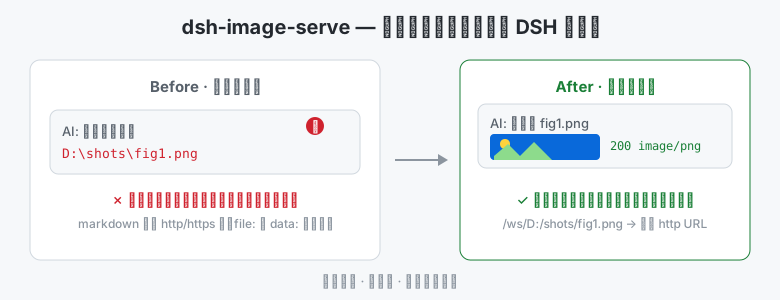
In a DSH web session, once the AI saves or generates a local image it can only reply with an absolute path like D:\shots\fig1.png. The markdown renderer accepts http/https sources strictly—file: and data: URIs are silently dropped, and DSH ships no local-file routing at all. The image simply never appears in the chat.
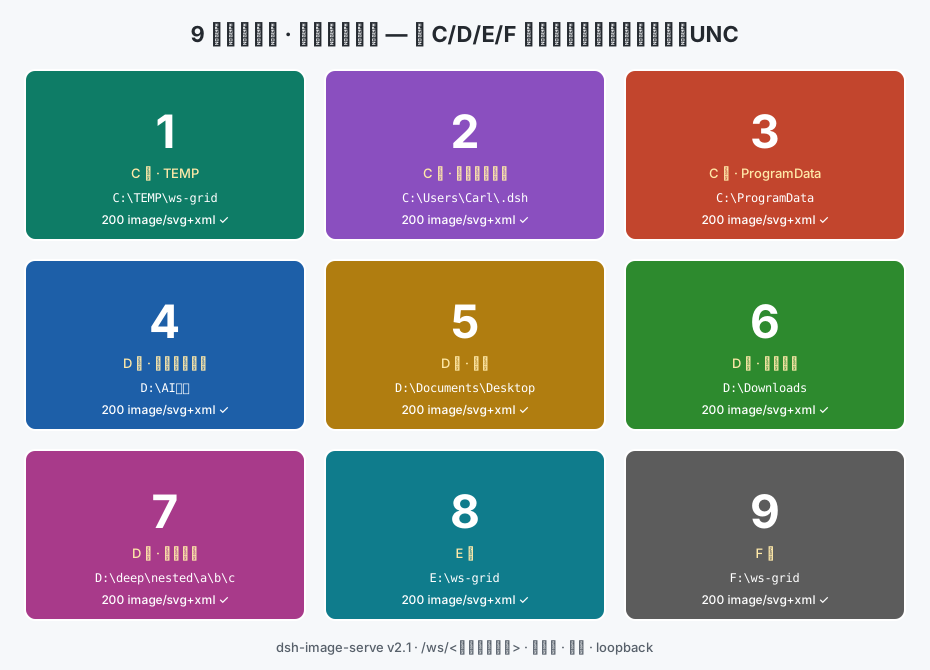
dsh-image-serve registers a /ws/ route in DSH web that maps any on-disk file to a same-origin HTTP URL. It works across drives (C:/, D:/, E:/ and beyond), Chinese file names, deeply nested folders, and UNC shares; MIME types for png, jpg, webp, svg, md, json and more are auto-detected; requesting a directory returns a clickable HTML listing with sub-directory navigation and parent-directory links. Zero runtime dependencies, with hot start, stop, update, and uninstall available from dsh-market.
Built for anyone who regularly asks an AI to process, generate, or display local images—screenshot review, cover-art validation, side-by-side chart comparison, document or page-snapshot preview—and wants the result rendered right in the conversation instead of chasing a dead path in Explorer.
Screenshots
Use Cases
- Preview AI-generated or processed screenshots right in the chat without opening Explorer
- Display multiple local charts across drives and Chinese paths side by side
- View exported documents or page snapshots directly in the session
Best For
- Users who regularly ask AI to process local images and need instant visual confirmation
- Developers who need to reference arbitrary disk files inside DSH web sessions
- Workflow users doing screenshot review, cover-art validation, or chart comparison with DSH
Related Plugins
A service-oriented sidebar framework for DSH, offering a full workbench with file explorer, embedded browser, real terminal, Git panel, and extensible plugin services.

A beautiful, practical Claude Code-style TUI plugin with pixel whale top bar, flowing glow title, real-time status line, streaming thought expansion, time rewind, context progress bar and TPS gauge — zero core changes.

The plugin market for DeepSeek Harness: browse/search/one-click install community plugins and themes, with updates, backup/restore, hot disable, diagnostics, and AI fix.

A persistent whale widget on the DSH web UI that shows DeepSeek balance, today's usage, and per-turn cost, with drag-and-snap and sound effects.