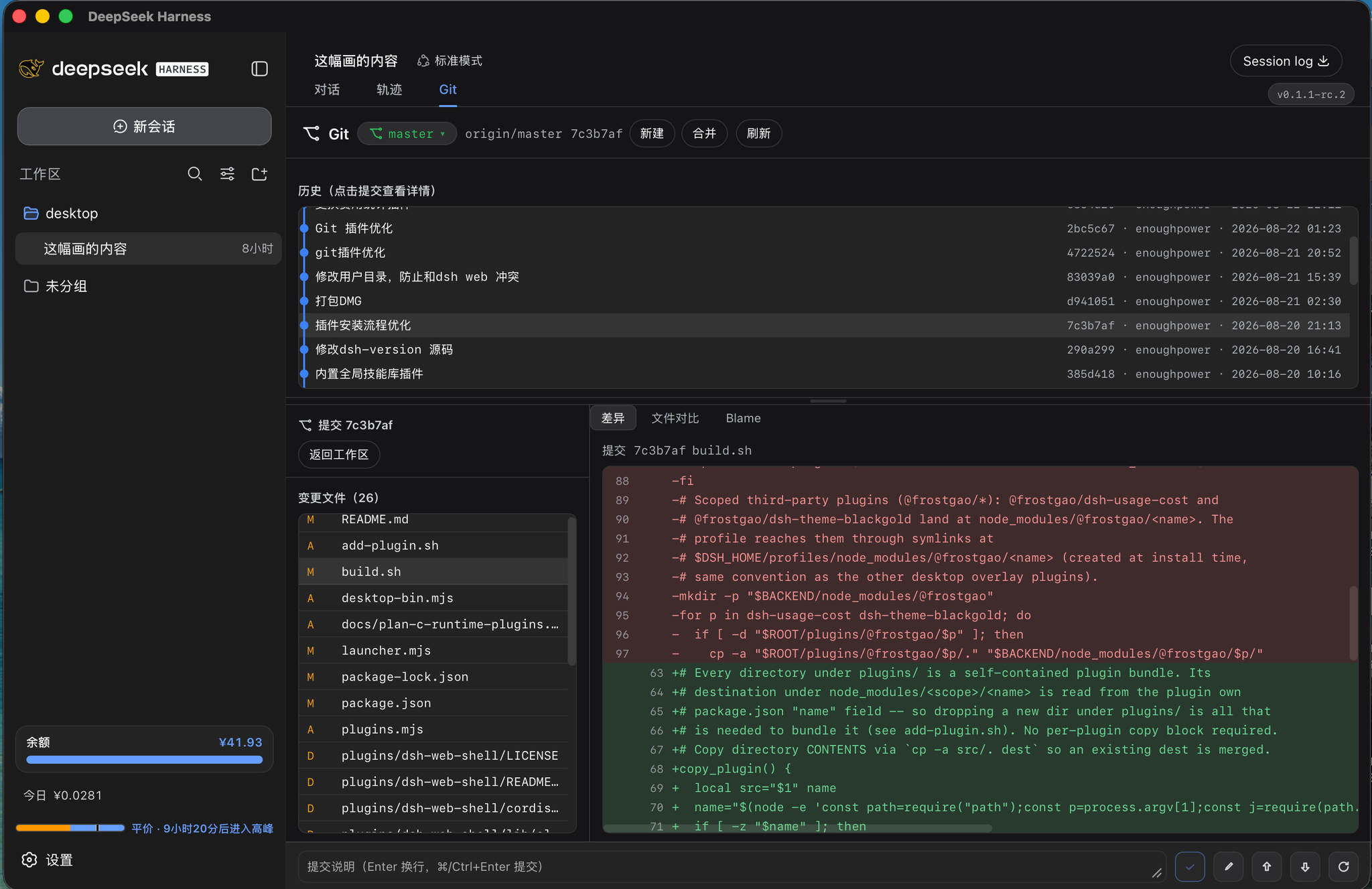
dsh-git-graph
Run the following command in DeepSeek Harness:
dsh plugin install enoughpower/dsh-git-graph
Paste the following prompt into your AI chat to install this plugin:
Run dsh plugin install enoughpower/dsh-git-graph in your DeepSeek Harness terminal to install the plugin. Source code: https://github.com/enoughpower/dsh-git-graph
About this plugin
You are deep in a session, just refactored a function, and the natural next step is to check Git status, switch a branch, or push to remote—yet every single one of those used to mean leaving the chat, hunting down a terminal, typing commands, and coming back. dsh-git-graph folds the entire Git workflow into a single tab beside your conversation thread. Bound to the session workspace, the panel immediately shows the branch bar, an interactive commit graph, the changed-file list, and inline diffs, with staging, committing, branch switching, and line-level blame all handled in place.
The plugin covers the full day-to-day Git surface: workspace status (staged, unstaged, and untracked files with per-file XY status codes), branch CRUD, switching, and merging with an optional no-ff flag, diff viewing plus workspace actions (stage, unstage, discard, commit, amend), commit history with a parent-linked graph visualization (graphLog), per-file log and line-by-line blame, and remote push, pull, and fetch with tag listing. Every operation is dispatched as a JSON API call and executed through execFile with argument arrays—no arbitrary shell strings. Diffs are capped at 2 MiB, request bodies at 1 MiB, and git output buffers at 64 MiB, so large repositories will not stall the host process.
On mobile (dsh-pocket) the Git tab automatically reflows into a single stacked column (commit graph, changed files, diff) with a compact header and enlarged touch targets, while desktop wide screens retain the three-column layout. UI labels follow the dsh locale service, switching between Chinese and English automatically.
Best for developers who work heavily in dsh and want to see and act on Git state without leaving the session: stage a change right after editing it, blame a line before a code review, or glance at how many commits behind you are on your phone—all without a terminal, all without an extra GUI tool.
Screenshots
Use Cases
- Stage, commit, and review diffs right inside the session after editing code, without switching to a terminal
- Compare changed files and per-file diffs immediately after a branch switch or merge
- Check branch status, commit history, and line-level blame on the go via dsh-pocket
Best For
- Developers working heavily in dsh who want a full Git workflow without leaving the session
- Remote-collaboration teams that need branch status and commit graphs on a phone
- Security-conscious teams that prefer execFile-based JSON API calls over arbitrary shell strings
Related Plugins
A service-oriented sidebar framework for DSH, offering a full workbench with file explorer, embedded browser, real terminal, Git panel, and extensible plugin services.

A beautiful, practical Claude Code-style TUI plugin with pixel whale top bar, flowing glow title, real-time status line, streaming thought expansion, time rewind, context progress bar and TPS gauge — zero core changes.

The plugin market for DeepSeek Harness: browse/search/one-click install community plugins and themes, with updates, backup/restore, hot disable, diagnostics, and AI fix.

A persistent whale widget on the DSH web UI that shows DeepSeek balance, today's usage, and per-turn cost, with drag-and-snap and sound effects.