
dsh-add-to-chat
Run the following command in DeepSeek Harness:
dsh plugin install choco9527/dsh-add-to-chat
Paste the following prompt into your AI chat to install this plugin:
Run dsh plugin install choco9527/dsh-add-to-chat in DeepSeek Harness to install; see https://github.com/choco9527/dsh-add-to-chat for the full source.
About this plugin
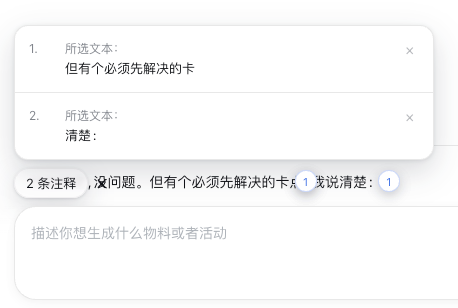
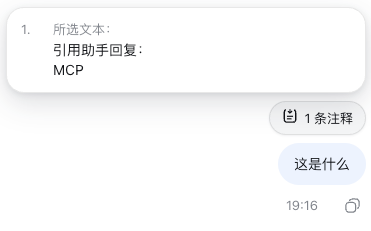
In a long multi-turn conversation with an AI assistant, you often want to reference one specific sentence as context for your next prompt, but end up either pasting the entire paragraph into the input box or paraphrasing from memory. dsh-add-to-chat collapses that into a single click: select any text in an assistant reply, hit the floating Add to Chat button, and the snippet becomes an independent annotation that travels with your next message as plugin-sourced context for the model. Because the annotation lives outside the Lexical editor body, it never merges with your draft and cannot be lost to a stray Backspace.
You can stack multiple annotations in a row. A small x annotations pill hovers above the input field; click it to review each passage in full, remove them one by one, or clear all at once. On a successful send the annotations wipe themselves clean; if the request fails they are restored so nothing is silently dropped. Everything runs entirely in the browser, requires no Host service, and the UI labels follow the active DSH locale in real time.
If you are a power user who iterates on prompts, drafts documents, or annotates long conversations in DSH and wants a Codex-flavored pin-this-sentence workflow without extra tooling or context switching, this ultra-light client plugin fits the job.
Screenshots
Use Cases
- Pin a specific sentence from an assistant reply as exact context for the next prompt
- Stack multiple key points from a long response and send them as a structured instruction set
- Annotate and iterate on prompts in-flow without leaving DSH or opening external tools
Best For
- Power users who run long multi-turn conversations and iterate on prompts in DSH
- Users who want a Codex-like pin-and-reference workflow without extra tooling
- DSH Desktop or Web users who prefer lightweight, purely client-side plugins with no Host dependency
Related Plugins
A service-oriented sidebar framework for DSH, offering a full workbench with file explorer, embedded browser, real terminal, Git panel, and extensible plugin services.

A beautiful, practical Claude Code-style TUI plugin with pixel whale top bar, flowing glow title, real-time status line, streaming thought expansion, time rewind, context progress bar and TPS gauge — zero core changes.

The plugin market for DeepSeek Harness: browse/search/one-click install community plugins and themes, with updates, backup/restore, hot disable, diagnostics, and AI fix.

A persistent whale widget on the DSH web UI that shows DeepSeek balance, today's usage, and per-turn cost, with drag-and-snap and sound effects.