dsh-turn-outline
Run the following command in DeepSeek Harness:
dsh plugin install Andor-Z/dsh-turn-outline
Paste the following prompt into your AI chat to install this plugin:
Run dsh plugin install Andor-Z/dsh-turn-outline in DeepSeek Harness to install this plugin (source: https://github.com/Andor-Z/dsh-turn-outline), then restart DSH and select Turn Outline from the + menu in better-sidebar to start using it.
About this plugin
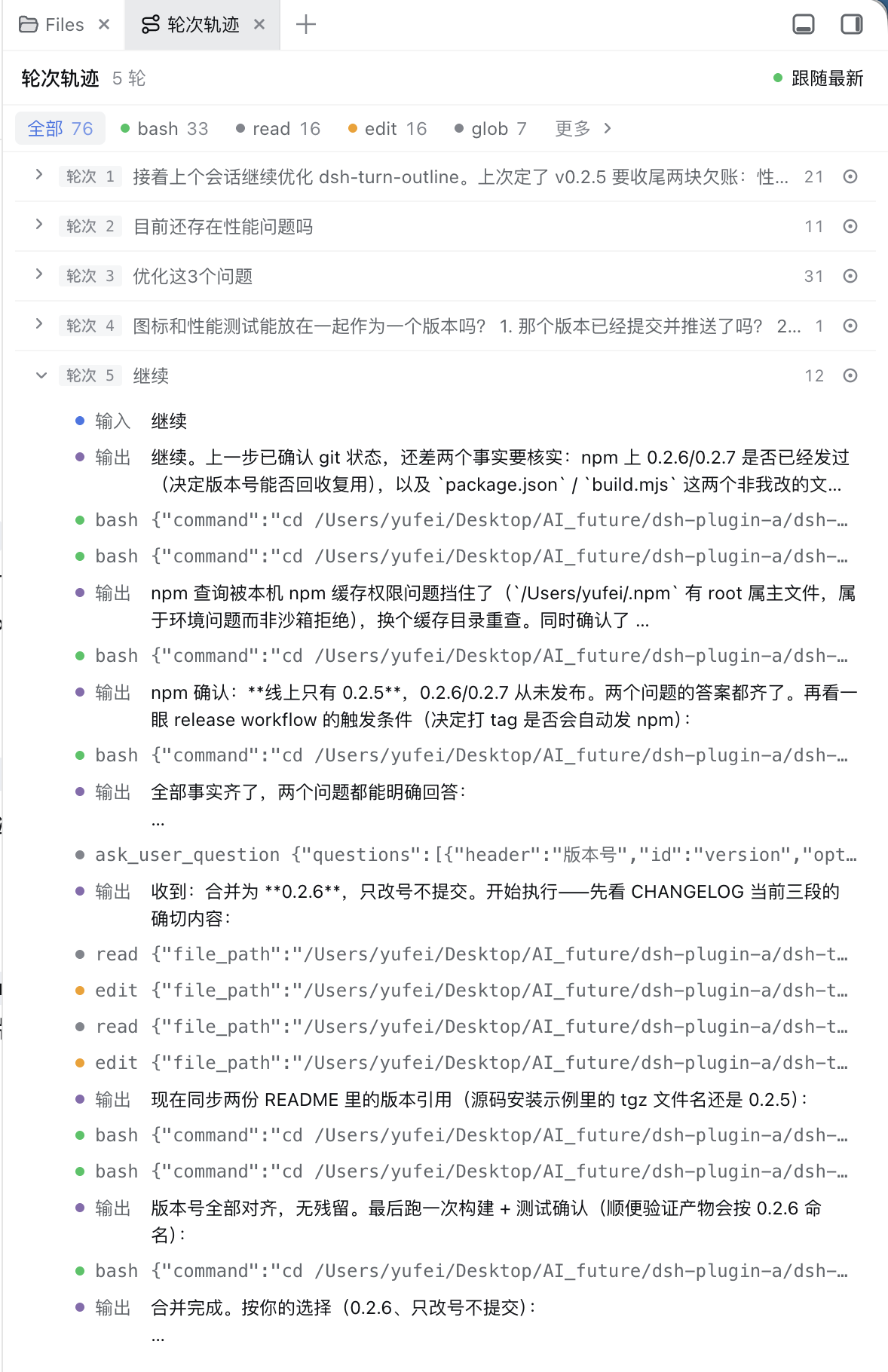
Long conversations are the scenario where DeepSeek Harness users most easily lose their way. After dozens of turns have scrolled by, revisiting a specific step to recall exactly what happened—what input was given, which tools were invoked, what was produced—often means scrolling back and forth or re-running the whole thing. dsh-turn-outline registers a Turn Outline tab in the dsh-better-sidebar, folding the entire session into per-turn structured summaries of input, tool steps, and final output, making the shape of a long conversation scannable at a glance.
The core interaction revolves around two things. First, structured folding: each turn supports multi-level expansion, and a row of semantic-color filter chips (bash, read, edit, and more) lets you isolate exactly the steps you care about. Second, precise positioning: clicking any turn or tool step triggers the client sessions service (loadOlder + anchorSeq + data-chat-anchor-key) to load history and scroll to the corresponding line in either the chat view or the trace view—no reliance on DOM text or hashed class names, so it stays stable across versions.
The plugin is entirely zero-AI: it folds events deterministically, sends nothing to a model, consumes no tokens, and has no failure state. Architecturally it registers one read-only host route and one client tab without touching DSH internals, so setup is trivial and removal is clean. On the performance side, refresh is driven by session subscriptions rather than polling, folding is incremental at O(delta), and new steps are appended via seq-keyed reconciliation instead of full re-mounts—very long sessions still open instantly. It complements dsh-conversation-outline, which uses an LLM to generate a one-line title per turn; the two register different tabs and coexist in the better-sidebar menu, each serving a different review style.
Screenshots
Use Cases
- Recall exactly what a given turn did—input, tool calls, output—in a session that has already scrolled far past
- Filter turns by tool type (bash, read, edit, etc.) to isolate the steps relevant to the current debugging question
- Click any turn or step to auto-load history and scroll to the matching line in the chat or trace view
Best For
- DSH Web or Desktop users whose sessions routinely exceed dozens of turns
- Developers who want token-free, LLM-free, instant-loading session history browsing
- Users who already run dsh-better-sidebar and want a deeper, structurally-aware way to navigate their sessions
Related Plugins
A service-oriented sidebar framework for DSH, offering a full workbench with file explorer, embedded browser, real terminal, Git panel, and extensible plugin services.

A beautiful, practical Claude Code-style TUI plugin with pixel whale top bar, flowing glow title, real-time status line, streaming thought expansion, time rewind, context progress bar and TPS gauge — zero core changes.

The plugin market for DeepSeek Harness: browse/search/one-click install community plugins and themes, with updates, backup/restore, hot disable, diagnostics, and AI fix.

A persistent whale widget on the DSH web UI that shows DeepSeek balance, today's usage, and per-turn cost, with drag-and-snap and sound effects.