dsh-workspace-enhance
Run the following command in DeepSeek Harness:
dsh plugin install yuanzehui313/dsh-workspace-enhance
Paste the following prompt into your AI chat to install this plugin:
On a Windows machine with DeepSeek Harness (@deepseek-ai/dsh@0.1.0-rc.6) already installed, run dsh plugin install yuanzehui313/dsh-workspace-enhance to fetch and install the plugin from https://github.com/yuanzehui313/dsh-workspace-enhance; it activates immediately after installation with no extra scripts required.
About this plugin
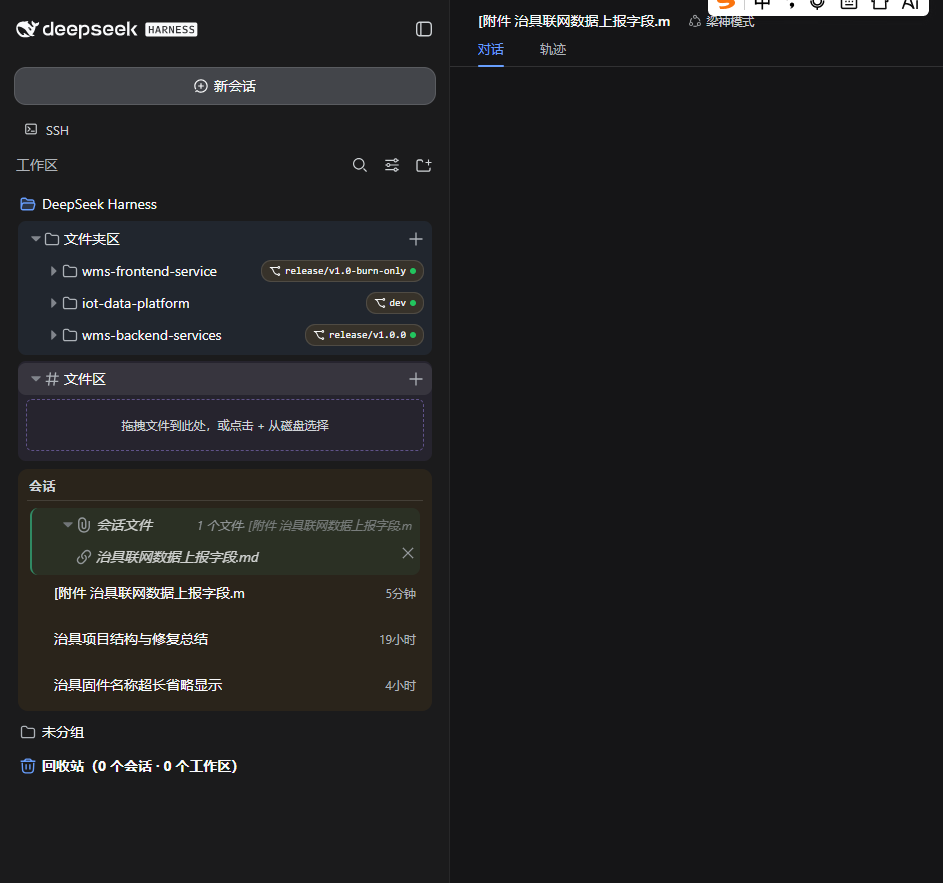
Out of the box, DeepSeek Harness leaves several high-frequency workflows unresolved: deleted sessions are gone for good, a session belongs to exactly one workspace, a workspace can only mount a single root, sidebar files can be downloaded but not previewed in place, and Git status lives entirely in the terminal. dsh-workspace-enhance patches 17 official bundles via an overlay set to fill those gaps, with idempotent apply, verify, and rollback scripts so a DSH upgrade never silently breaks your setup.
Capabilities span three areas. Session management: a recycle bin (soft delete, restore, purge), cross-workspace drag to reassign ownership, a persistent ungrouped bucket, and icon-driven actions on each session row. Workspace management: multi-folder mounting, separate folder-zone and file-zone panels per workspace, a built-in multi-select browser, drag-and-drop upload, and unrestricted attachment formats. Knowledge and collaboration: a 520 px file preview panel with Markdown rendering, syntax highlighting for 30+ languages, and inline image display; a per-folder Git panel showing branch, status dot, and one-click pull, branch creation, and AI-generated commit-and-push; and an OpenViking MCP bridge plus AGENTS.md / HANDOFF.md templates that turn DSHs default session isolation into a searchable, continuable workflow.
Built for Windows developers running DeepSeek Harness 0.1.0-rc.6 who juggle multiple project workspaces, want fewer terminal round-trips for file inspection and Git operations, and need context to carry across sessions. If you regularly reorganize sessions, preview project files, track branches, or reuse decisions across conversations, this plugin measurably shortens those loops.
Screenshots
Use Cases
- Juggling multiple project workspaces in DSH, needing session reassignment, multi-folder mounting, and recoverable deletion
- Previewing Markdown, code, and images in-place while switching Git branches, pulling, and pushing without leaving the app
- Carrying context across sessions using OpenViking semantic memory and AGENTS.md handoff templates to avoid repeating background
Best For
- Individual developers on Windows using DeepSeek Harness 0.1.0-rc.6 for AI-assisted coding
- Mid to senior engineers managing multiple workspaces who want fewer terminal round-trips for file and Git operations
- Tech leads who need persistent project context across sessions to minimize repetitive onboarding input
Related Plugins
A service-oriented sidebar framework for DSH, offering a full workbench with file explorer, embedded browser, real terminal, Git panel, and extensible plugin services.

A beautiful, practical Claude Code-style TUI plugin with pixel whale top bar, flowing glow title, real-time status line, streaming thought expansion, time rewind, context progress bar and TPS gauge — zero core changes.

The plugin market for DeepSeek Harness: browse/search/one-click install community plugins and themes, with updates, backup/restore, hot disable, diagnostics, and AI fix.

A persistent whale widget on the DSH web UI that shows DeepSeek balance, today's usage, and per-turn cost, with drag-and-snap and sound effects.