dsh-better-workspace
Run the following command in DeepSeek Harness:
dsh plugin install KannaKuron/dsh-better-workspace
Paste the following prompt into your AI chat to install this plugin:
Run dsh plugin install KannaKuron/dsh-better-workspace in the DeepSeek Harness terminal, or manually mount the package from https://github.com/KannaKuron/dsh-better-workspace and restart DSH to activate.
About this plugin
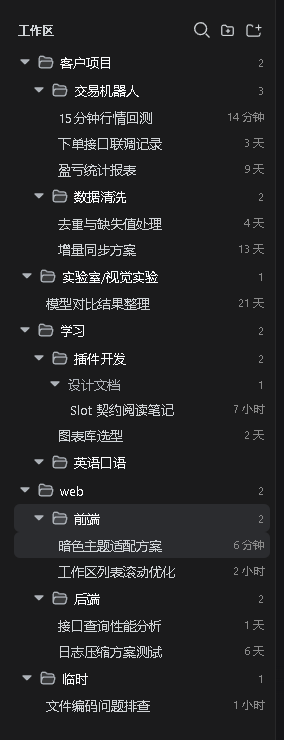
The DSH sidebar workspace list is inherently flat: every new workspace adds another row at the root level. When related workspaces such as \"Web Frontend\", \"Web Backend\", and \"Mini-Program\" pile up together, finding the right one means scanning by eye, and renaming forces you to re-sort one by one. dsh-better-workspace addresses exactly this: it does not change what a workspace is (still a single directory) but introduces / in the workspace name as a hierarchy separator, turning folder-style grouping into a projection of the name with no second data store to keep in sync.
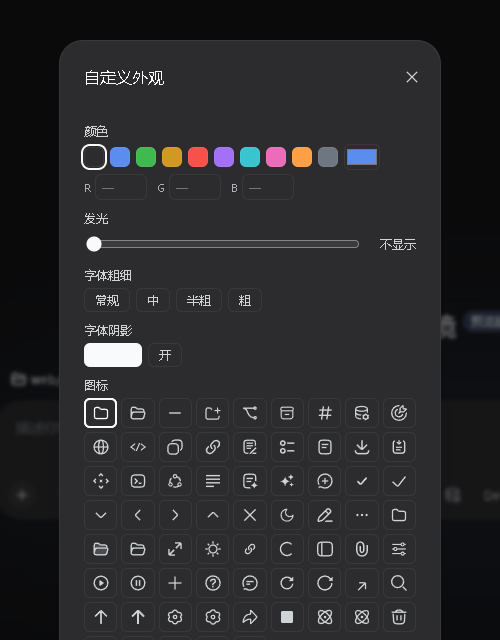
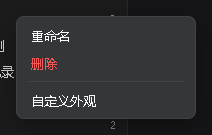
Key capabilities include: a \"belonging group\" picker that appears after selecting a folder when adding a workspace, letting you type or pick an existing level so the entry lands on the tree automatically; right-clicking any group row offers sub-group creation, sub-workspace creation, group rename, and empty-group deletion; session names follow the same / scheme, rendered in a secondary color palette to distinguish them from workspace folders, with group-wide batch rename supported; every level supports a right-click \"Custom Appearance\" panel for color, text glow, font weight, shadow, and icon with live preview, persisted locally in the browser. Workspace and session rows are drag-and-drop reorderable or movable into groups, while native features like single-chain group merge, status breathing lights, active schedule badges, and the official status ring are all preserved.
Best suited for DSH power users managing ten or more workspaces who need to organize by project line or role (frontend / backend / mini-program). Pure JS, zero build, zero npm dependencies—install and restart DSH to activate; uninstall and the official browser returns as-is. It is complementary to dsh-better-sidebar (the right-side VS Code-style panel) and the two can coexist.
Screenshots


Use Cases
- Grouping ten or more workspaces by role such as frontend, backend, or mini-program
- Layering session names by project line and batch-renaming entire groups at once
- Customizing sidebar colors, icons, and text glow without pulling in external dependencies
Best For
- DSH power users managing many workspaces who need role- or project-based grouping
- Heavy users with large session lists who rely on name-based layering and right-click shortcuts
- Minimalist users who prefer pure-JS, zero-build, zero-dependency plugins that work on restart
Related Plugins
A service-oriented sidebar framework for DSH, offering a full workbench with file explorer, embedded browser, real terminal, Git panel, and extensible plugin services.

A beautiful, practical Claude Code-style TUI plugin with pixel whale top bar, flowing glow title, real-time status line, streaming thought expansion, time rewind, context progress bar and TPS gauge — zero core changes.

The plugin market for DeepSeek Harness: browse/search/one-click install community plugins and themes, with updates, backup/restore, hot disable, diagnostics, and AI fix.

A persistent whale widget on the DSH web UI that shows DeepSeek balance, today's usage, and per-turn cost, with drag-and-snap and sound effects.