dsh-gb
Run the following command in DeepSeek Harness:
dsh plugin install zingzheng/dsh-gb
Paste the following prompt into your AI chat to install this plugin:
Run dsh plugin install zingzheng/dsh-gb in your terminal to install the plugin; the source is hosted at https://github.com/zingzheng/dsh-gb . After installation, restart dsh and scan the QR code on the GUI settings page to connect your phone.
About this plugin
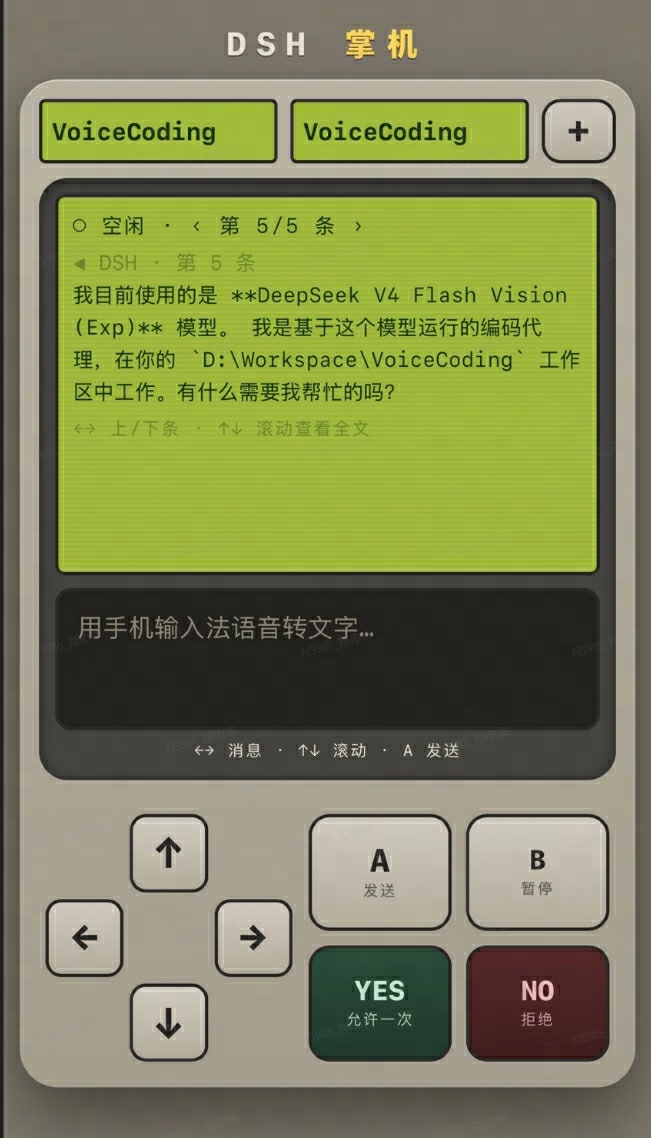
Running long DSH sessions at a desk means constantly switching windows and hunting for a mouse just to approve a step, answer a quiz, or glance at where your agent is. dsh-gb turns your phone into a handheld controller: scan one QR code on the same Wi-Fi and your phone instantly becomes a voice remote plus a live status screen for DSH.
The core workflow covers the full daily loop: a status bar shows the active workspace, conversation, agent state, and message scroll position; voice input invokes the system keyboard transcription and sends in one tap; YES / NO approvals mirror the GUI panel semantics with a flashing highlight when action is pending; multi-choice quizzes scroll with arrow keys and submit the whole set with a single press; the joystick flips through messages and scrolls full text; a top dropdown switches workspaces or opens a new conversation. When your phone is off-network, the settings page enables a built-in public tunnel in one click: cloudflared is auto-downloaded on first use and cached locally, quick tunnels need zero account setup, and named tunnels give you a fixed address on your own domain, replacing any third-party reverse-proxy tool with nothing extra to run.
Ideal for developers who run long agent tasks and want to approve or nudge progress in spare moments on the go; users who prefer dictating over typing and want to keep a conversation going from the couch; and anyone tired of juggling a separate tunneling app. The plugin ships with zero npm runtime dependencies, a persistent 128-bit random token for all page, SSE, and API access, and lock-down endpoints (tunnel config, token reset) restricted to the local loopback interface.
Screenshots
Use Cases
- Approve or answer agent tasks from your phone away from the desk
- Use voice input to quickly push forward long conversations
- Connect to DSH remotely when your phone is off-network via the built-in tunnel
Best For
- Developers running long DSH agent sessions who need to step in at any moment
- Mobile users who prefer voice interaction and fewer window switches
- Remote workers who need on-the-go access to a local DSH instance
Related Plugins
A service-oriented sidebar framework for DSH, offering a full workbench with file explorer, embedded browser, real terminal, Git panel, and extensible plugin services.

A beautiful, practical Claude Code-style TUI plugin with pixel whale top bar, flowing glow title, real-time status line, streaming thought expansion, time rewind, context progress bar and TPS gauge — zero core changes.

The plugin market for DeepSeek Harness: browse/search/one-click install community plugins and themes, with updates, backup/restore, hot disable, diagnostics, and AI fix.

A persistent whale widget on the DSH web UI that shows DeepSeek balance, today's usage, and per-turn cost, with drag-and-snap and sound effects.