dsh-plugin-archive-manager
Run the following command in DeepSeek Harness:
dsh plugin install qinyre/dsh-plugin-archive-manager
Paste the following prompt into your AI chat to install this plugin:
Install the plugin in DeepSeek Harness using the install command, sourced from https://github.com/qinyre/dsh-plugin-archive-manager.
About this plugin
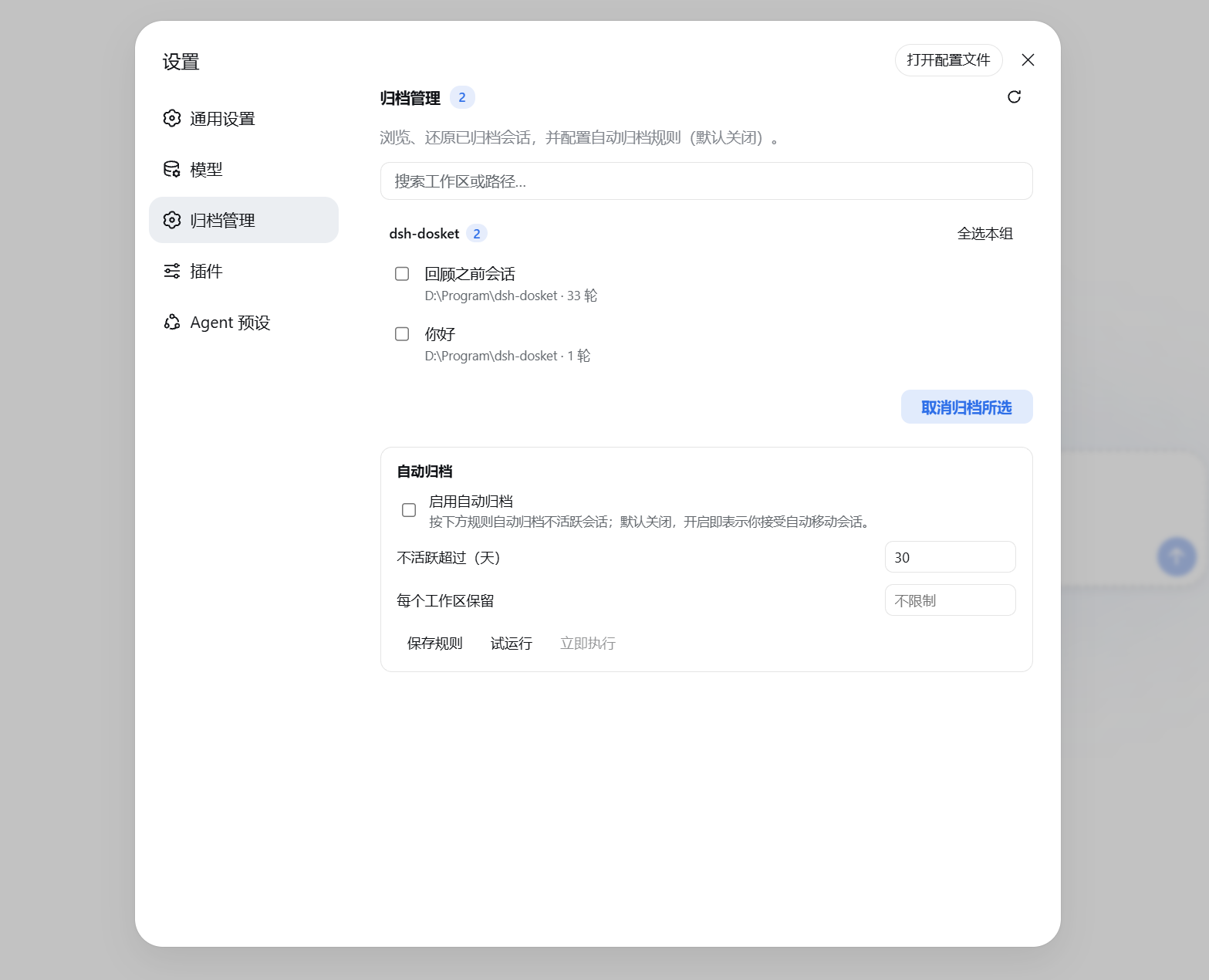
Juggling multiple workspaces in dsh means your sidebar quickly piles up with stale conversations, and there is no native way to archive them. dsh-plugin-archive-manager adds a first-level Archive Management panel under Settings, turning archiving and restoring into routine actions. Archived sessions are grouped by workspace and searchable, with batch unarchive that refreshes the sidebar instantly without a restart.
Auto-archive is off by default; once enabled you can set an inactivity threshold and a per-workspace retention cap, checked once per day with a dry-run preview before anything is committed. The plugin only calls dsh public APIs, never deletes sessions or files, and surfaces a clear error instead of corrupting data if upstream interfaces shift. It works in both the Web UI and DSH Desktop out of the box, making it a good fit for anyone who switches between several workspaces and wants a tidy sidebar without losing conversation history.
Screenshots
Use Cases
- Sidebar gets cluttered with stale sessions after switching between many workspaces, requiring batch archiving.
- Want auto-archive based on inactivity days to keep the sidebar tidy over time.
- Accidentally archived a session, but can quickly search and batch-restore it without restarting.
Best For
- dsh users who frequently switch between multiple workspaces.
- Developers using DSH Desktop as part of their daily workflow.
- Anyone who wants a clean sidebar without losing conversation history.
Related Plugins
A service-oriented sidebar framework for DSH, offering a full workbench with file explorer, embedded browser, real terminal, Git panel, and extensible plugin services.

A beautiful, practical Claude Code-style TUI plugin with pixel whale top bar, flowing glow title, real-time status line, streaming thought expansion, time rewind, context progress bar and TPS gauge — zero core changes.

The plugin market for DeepSeek Harness: browse/search/one-click install community plugins and themes, with updates, backup/restore, hot disable, diagnostics, and AI fix.

A persistent whale widget on the DSH web UI that shows DeepSeek balance, today's usage, and per-turn cost, with drag-and-snap and sound effects.