dsh-mcp-diff
Run the following command in DeepSeek Harness:
dsh plugin install Fakek0f3sT/dsh-mcp-diff
Paste the following prompt into your AI chat to install this plugin:
In DeepSeek Harness, run dsh plugin install Fakek0f3sT/dsh-mcp-diff to install this plugin (source: https://github.com/Fakek0f3sT/dsh-mcp-diff), then restart dsh web and refresh the GUI page to activate it.
About this plugin
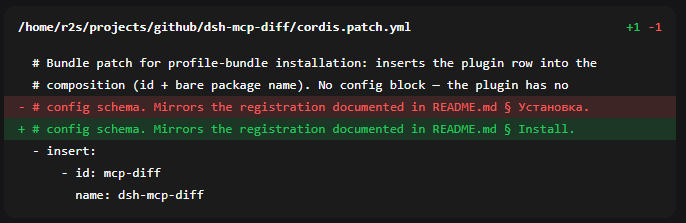
By default, the DeepSeek Harness chat UI only renders a diff for its own edit and write tools. When the agent mutates files through the MCP filesystem server or a bash command, the user is left with a generic, structure-less block and the actual changes are invisible. dsh-mcp-diff closes that gap: it unifies every parsable file mutation — whether it comes from MCP's edit_file, write_file, move_file or from bash patterns like heredoc replaces, sed -i, or cat redirects — into a single collapsible diff card with per-line green/red highlighting and a +N -M header.
Every path shown on a card is clickable, handing it to the host's file opener so the file lands directly in your IDE. Operations that carry no diff lines — move_file, create_directory, mkdir, mv, cp, rm — are rendered as compact informational cards instead. The bash parser follows a "miss rather than mislead" principle: dynamic paths ($VAR, globs) and unrecognized shapes keep the plain terminal card, while commands matching unambiguous destructive signatures (rm -rf, git reset --hard, and the like) gain a small warning chip as a reminder without asserting a mutation.
This plugin is well suited for developers who work heavily inside the DSH Web GUI with MCP filesystem servers or bash edit commands and want a consistent, readable, and traceable change view in the chat stream — without repeatedly expanding raw terminal output to figure out what actually changed.
Screenshots
Use Cases
- Reviewing per-line changes made through MCP filesystem server calls
- Inspecting edits performed by bash commands such as sed, heredoc, or cat redirects
- Tracking all file mutations in the chat stream and opening the target file in the IDE with one click
Best For
- Developers using MCP filesystem servers within the DSH Web GUI
- Users who frequently edit files via bash commands and need visual diffs
- Heavy DSH users who want a unified, readable card for every file mutation in chat
Related Plugins
A service-oriented sidebar framework for DSH, offering a full workbench with file explorer, embedded browser, real terminal, Git panel, and extensible plugin services.

A beautiful, practical Claude Code-style TUI plugin with pixel whale top bar, flowing glow title, real-time status line, streaming thought expansion, time rewind, context progress bar and TPS gauge — zero core changes.

The plugin market for DeepSeek Harness: browse/search/one-click install community plugins and themes, with updates, backup/restore, hot disable, diagnostics, and AI fix.

A persistent whale widget on the DSH web UI that shows DeepSeek balance, today's usage, and per-turn cost, with drag-and-snap and sound effects.