dsh-telegram
Run the following command in DeepSeek Harness:
dsh plugin install Kevin66Z0/dsh-telegram
Paste the following prompt into your AI chat to install this plugin:
Install it in DeepSeek Harness by running dsh plugin install Kevin66Z0/dsh-telegram; the source lives at https://github.com/Kevin66Z0/dsh-telegram . After installation, set the TELEGRAM_BOT_TOKEN environment variable and configure your allowChatIds whitelist
About this plugin
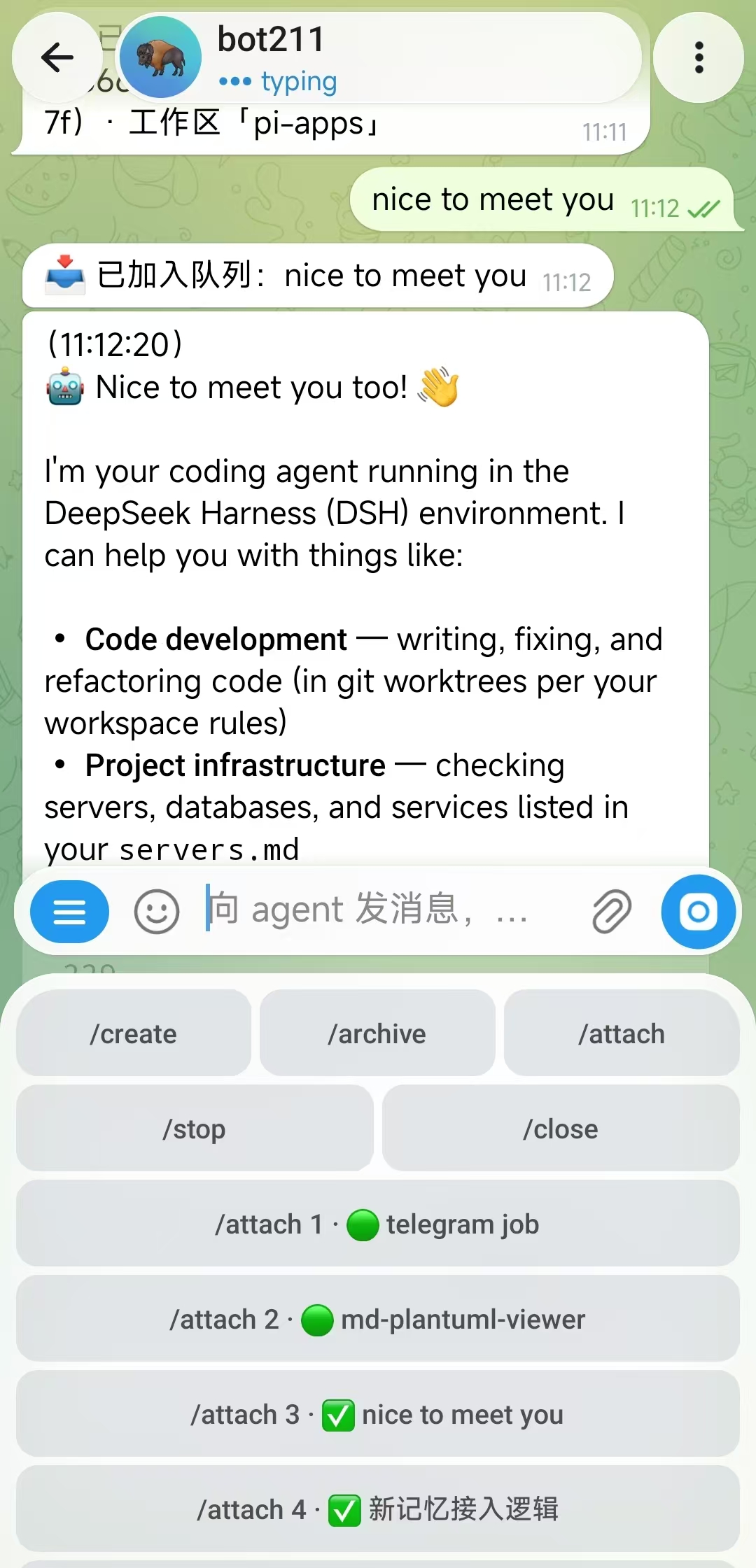
DeepSeek Harness agent sessions have always been tied to the browser. dsh-telegram brings the full session console into Telegram: bind a session, send prompts, watch live streaming replies, answer the agent questions with inline buttons, and create or archive sessions all through the same apiProxy channel the Web UI uses. The pocket becomes the cockpit.
Interaction leans on taps over typing. When the agent raises an ask_user_question, an inline keyboard appears right in the chat message so you can answer or cancel with a single press. Reply keyboards keep /create, /attach, and /stop one thumb-reach away; session lists and workspace pickers render as inline buttons. Streaming output edits a single message in place, refreshing Think and tool-action lines step by step, then finalises with a token-usage footer.
Security is closed by default. Only chat IDs on the allowlist can talk to the bot; everyone else gets a fixed denial reply and learns nothing. The plugin opens no inbound port at all—all traffic is outbound Telegram long-polling, so NAT and firewalls are a non-issue. The bot token is referenced as an environment variable and never written to disk or config files. It is a fit for DeepSeek Harness users who want to monitor, steer, or stop agent runs from their phone, and for teams that prefer whitelist-gated access without exposing any server port.
Screenshots
Use Cases
- Watch live agent progress from your phone and stop a run at any time
- Answer agent questions with a single tap on inline buttons
- Drive dsh sessions securely behind NAT with no inbound port needed
Best For
- Developers who need mobile control of DeepSeek Harness
- Ops users who cannot open inbound server ports
- Security-sensitive teams requiring whitelist gates and zero-disk tokens
Related Plugins
A service-oriented sidebar framework for DSH, offering a full workbench with file explorer, embedded browser, real terminal, Git panel, and extensible plugin services.

A beautiful, practical Claude Code-style TUI plugin with pixel whale top bar, flowing glow title, real-time status line, streaming thought expansion, time rewind, context progress bar and TPS gauge — zero core changes.

The plugin market for DeepSeek Harness: browse/search/one-click install community plugins and themes, with updates, backup/restore, hot disable, diagnostics, and AI fix.

A persistent whale widget on the DSH web UI that shows DeepSeek balance, today's usage, and per-turn cost, with drag-and-snap and sound effects.