dsh-server-deck
Run the following command in DeepSeek Harness:
dsh plugin install meyaomiao/dsh-server-deck
Paste the following prompt into your AI chat to install this plugin:
Run dsh plugin install meyaomiao/dsh-server-deck inside DeepSeek Harness to install this plugin; the full source repository is at https://github.com/meyaomiao/dsh-server-deck, then restart dsh web and hard-refresh your browser.
About this plugin
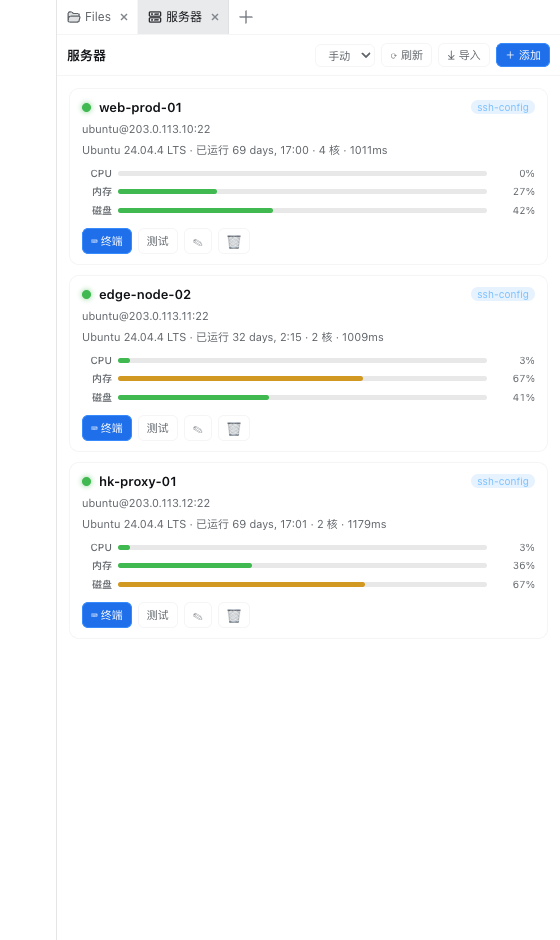
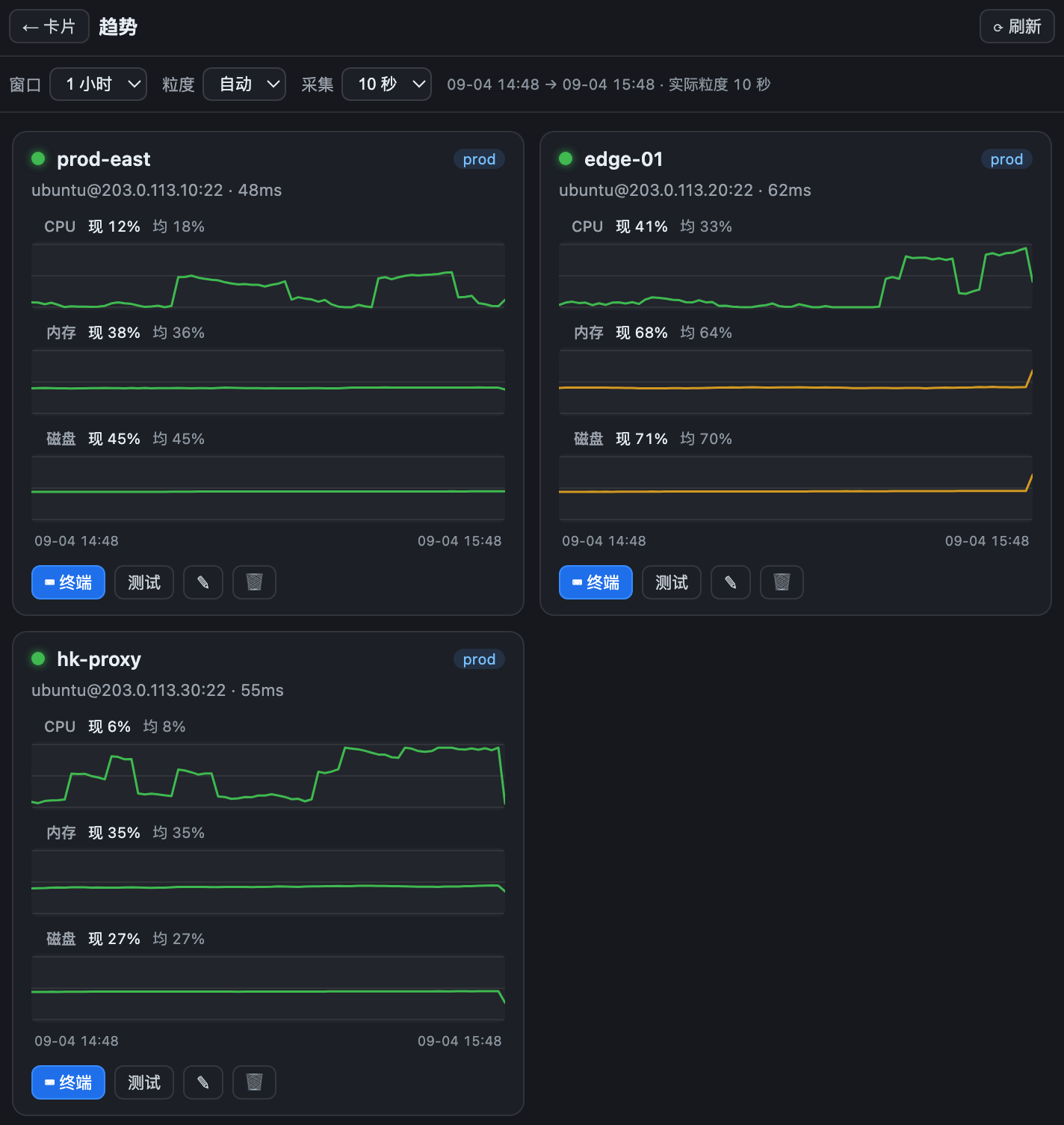
Managing several remote servers usually means pinging each one with ad-hoc commands and juggling terminal windows. dsh-server-deck pulls every connected host into a single card wall: a breathing status dot, OS name, uptime, core count, handshake latency, and live CPU / memory / disk bars, so you can tell at a glance which box is under load. A dedicated trend view plots CPU, memory, and disk over a time window, eliminating the need to grep logs or spin up a monitoring stack just to see a spike.
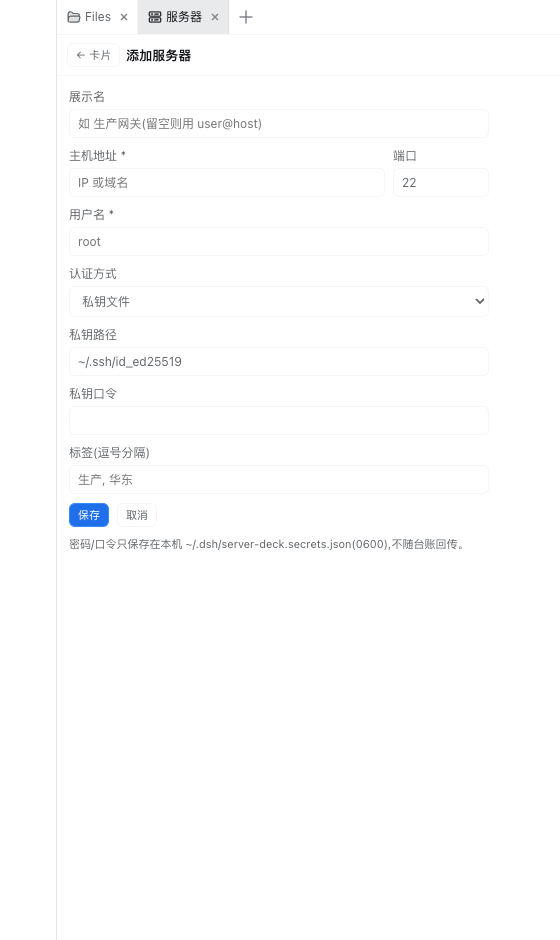
Clicking any card drops you straight into a full-featured xterm.js terminal with 5000 lines of scrollback, 256-color support, real-time window-size sync, and a blinking cursor, all bridged over WebSocket to an ssh2 shell on the Node side. The server list can be populated in one shot by parsing your ~/.ssh/config file (Host, HostName, User, Port, IdentityFile, ProxyJump), automatically skipping wildcard entries and Git-hosting key aliases while preferring semantic aliases for display. Manual addition is equally straightforward: password, private key with passphrase, or SSH Agent, with a connect-test button that gives instant latency feedback.
The UI adapts to your setup: if dsh-better-sidebar is installed it registers as a native sidebar tab under a settings toggle; otherwise it falls back to a draggable right-edge panel with persisted width, so the two forms never conflict. Security is baked in from day one, all API and PTY routes are loopback-only to prevent DNS rebinding and LAN direct access, secrets live in a 0600 local file and are never echoed back in API responses, and deleting a host merely removes it from the local ledger without executing any operation on the remote machine.
Best suited for DeepSeek Harness users who run two or more servers and want a single interface for status checks and immediate hands-on work. The managed side only needs SSH open with no pre-installed software required. Trend backfill relies on the remote sar utility from sysstat; if it is absent the feature is silently skipped without throwing errors.
Screenshots

Use Cases
- Glance at online status and CPU/memory/disk usage across all servers in one view
- Click a card to jump into an xterm.js terminal for immediate ops work
- Review resource trends over time to locate anomaly spikes
- Bulk-import existing hosts from ~/.ssh/config in a single click
Best For
- DevOps or SRE engineers maintaining three or more remote servers
- Developers using DeepSeek Harness who want to replace scattered terminal windows
- Ops personnel who prefer card-based visual inspection over manual SSH commands
Related Plugins
A service-oriented sidebar framework for DSH, offering a full workbench with file explorer, embedded browser, real terminal, Git panel, and extensible plugin services.

A beautiful, practical Claude Code-style TUI plugin with pixel whale top bar, flowing glow title, real-time status line, streaming thought expansion, time rewind, context progress bar and TPS gauge — zero core changes.

The plugin market for DeepSeek Harness: browse/search/one-click install community plugins and themes, with updates, backup/restore, hot disable, diagnostics, and AI fix.

A persistent whale widget on the DSH web UI that shows DeepSeek balance, today's usage, and per-turn cost, with drag-and-snap and sound effects.