dsh-cache-billing
Run the following command in DeepSeek Harness:
dsh plugin install better-er/dsh-cache-billing
Paste the following prompt into your AI chat to install this plugin:
Run dsh plugin install better-er/dsh-cache-billing in your terminal to install; the source repository is at https://github.com/better-er/dsh-cache-billing, and the plugin auto-mounts after restarting DSH web.
About this plugin
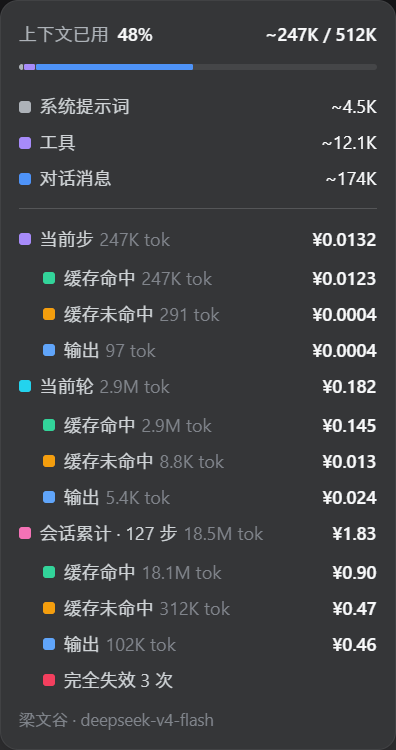
The DSH context ring tells you how many tokens you used but never how much it cost. A high cache hit rate is great, but the longer your context grows, the more expensive the cached prefix becomes each turn. Near the window-switch threshold, every action in the old window is paying for cache you may never see itemized. dsh-cache-billing puts that bill front and center.
At the bottom of the overlay, three blocks—current step, current turn, and session total—stack top to bottom. Each shows a headline row with the grand total and token count, then indented lines for cache hit, cache miss, and output. Peak and off-peak rates are applied automatically based on event timestamps: weekday peak hours charge full price, everything else half, independent of your system timezone. V4 Flash, V4 Pro, and Vision Exp each have distinct unit prices, calculated per step by the model actually used. Third-party relays are billed the same way—no DeepSeek official route required. If the model name matches the rate table, an estimated amount is shown.
Ideal for two profiles: heavy DSH users constantly probing the window edge who need a real-time number to decide when to switch, and users connecting through relays like SiliconFlow whose pricing differs from official rates but who still want to see actual per-turn costs. Install, restart the DSH web, and it is live—no config file edits needed.
Screenshots
Use Cases
- Check per-step and per-turn costs when context approaches its limit to decide on window switching
- Track actual billing amounts across turns and cumulative session cost via third-party relays
- Review how peak and off-peak rates affect cumulative session cost during multi-day usage
Best For
- Heavy DSH users who frequently operate near context window limits
- Users connecting through third-party relays such as SiliconFlow
- Developers and operators who want precise per-call cost visibility
Related Plugins
A service-oriented sidebar framework for DSH, offering a full workbench with file explorer, embedded browser, real terminal, Git panel, and extensible plugin services.

A beautiful, practical Claude Code-style TUI plugin with pixel whale top bar, flowing glow title, real-time status line, streaming thought expansion, time rewind, context progress bar and TPS gauge — zero core changes.

The plugin market for DeepSeek Harness: browse/search/one-click install community plugins and themes, with updates, backup/restore, hot disable, diagnostics, and AI fix.

A persistent whale widget on the DSH web UI that shows DeepSeek balance, today's usage, and per-turn cost, with drag-and-snap and sound effects.