dsh-git-worktree
Run the following command in DeepSeek Harness:
dsh plugin install LaoYueHanNi/dsh-git-worktree
Paste the following prompt into your AI chat to install this plugin:
Run dsh plugin install LaoYueHanNi/dsh-git-worktree in your terminal to install the plugin; the project is available at https://github.com/LaoYueHanNi/dsh-git-worktree . Make sure DSH Web is running and the host version is at least 0.1.2-rc.1 before installing.
About this plugin
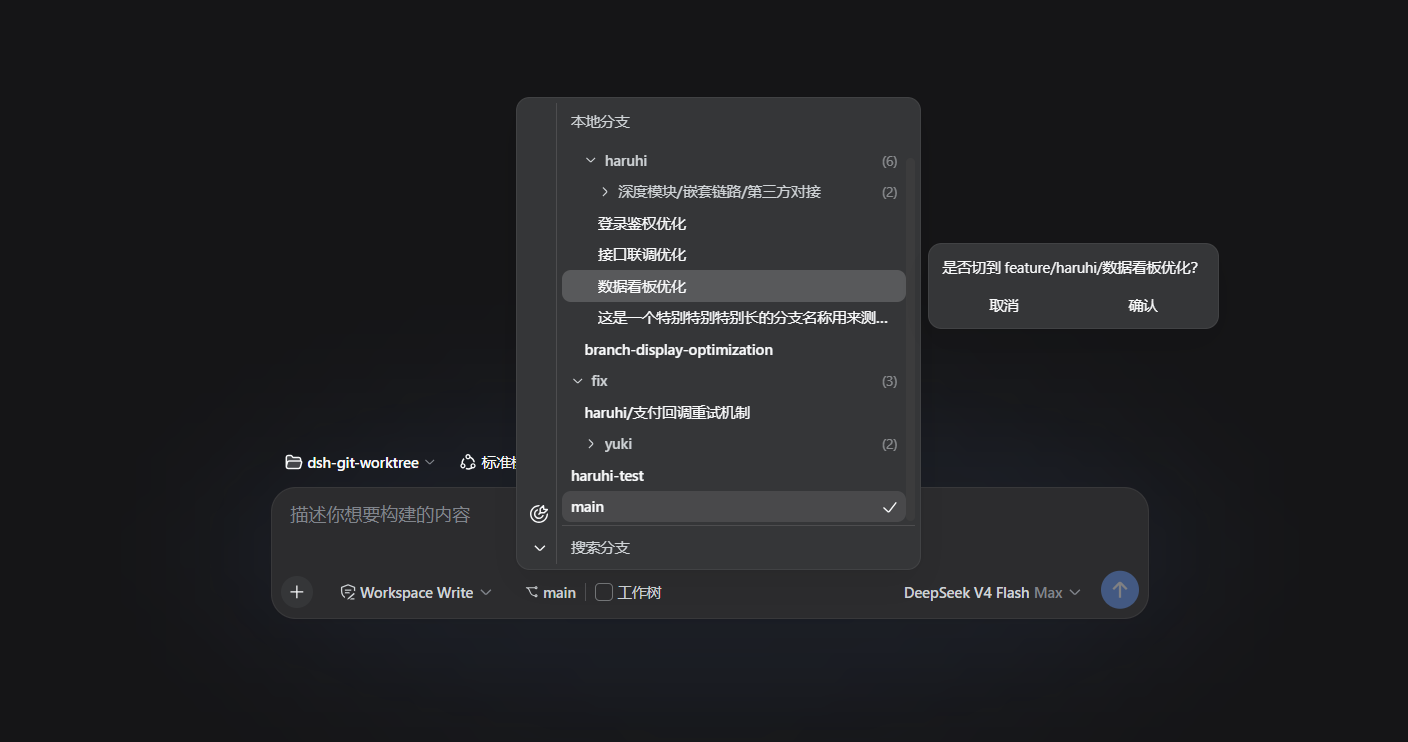
Managing Git branches and worktrees in a web environment usually means hopping back and forth to a terminal. dsh-git-worktree brings that entire workflow into the DSH Web UI: pick a branch, checkout from remote, switch in place, create a new branch, and fetch with pruning—all from a single toolbar row, no external terminal required.
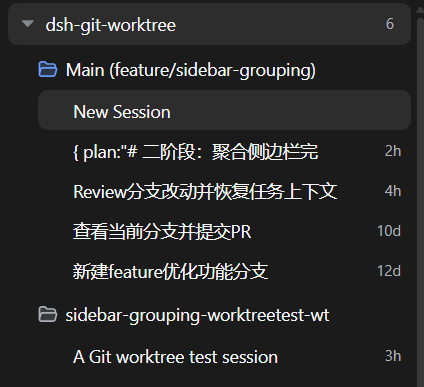
The plugin core strength is worktree isolation: on a blank session, flipping the Worktree toggle cuts the current branch into a separate isolated worktree registered as a real workspace, so parallel sessions never interfere. Removal first counts uncommitted files and ahead commits, then archives sessions only after explicit confirmation. The branch menu follows an IDEA-style collapsible hierarchy, remote branches check out with automatic tracking, and the sidebar clusters all worktrees of the same repository under collapsible group headers for a clear multi-branch overview.
Ideal for developers who work on several branches in parallel in DSH Web and frequently need isolated workspaces to run experiments or fix bugs. If you prefer finishing branch operations entirely in a graphical interface, this plugin eliminates most terminal round-trips.
Screenshots
Use Cases
- Parallel development on multiple branches in the web UI with isolated workspaces
- Frequent branch switching and remote checkout entirely within the interface, no terminal needed
- Creating, browsing, and removing multiple worktrees in one place
Best For
- Developers working on multiple branches in parallel within DSH Web
- Engineers who frequently need isolated workspaces for experiments or bug fixes
- Developers who prefer graphical Git workflows over repeated terminal commands
Related Plugins
A service-oriented sidebar framework for DSH, offering a full workbench with file explorer, embedded browser, real terminal, Git panel, and extensible plugin services.

A beautiful, practical Claude Code-style TUI plugin with pixel whale top bar, flowing glow title, real-time status line, streaming thought expansion, time rewind, context progress bar and TPS gauge — zero core changes.

The plugin market for DeepSeek Harness: browse/search/one-click install community plugins and themes, with updates, backup/restore, hot disable, diagnostics, and AI fix.

A persistent whale widget on the DSH web UI that shows DeepSeek balance, today's usage, and per-turn cost, with drag-and-snap and sound effects.