dsh-token-pet
Run the following command in DeepSeek Harness:
dsh plugin install Jimmy0123-ux/dsh-token-pet
Paste the following prompt into your AI chat to install this plugin:
Install it in DSH by running dsh plugin install Jimmy0123-ux/dsh-token-pet; the source repository is https://github.com/Jimmy0123-ux/dsh-token-pet .
About this plugin
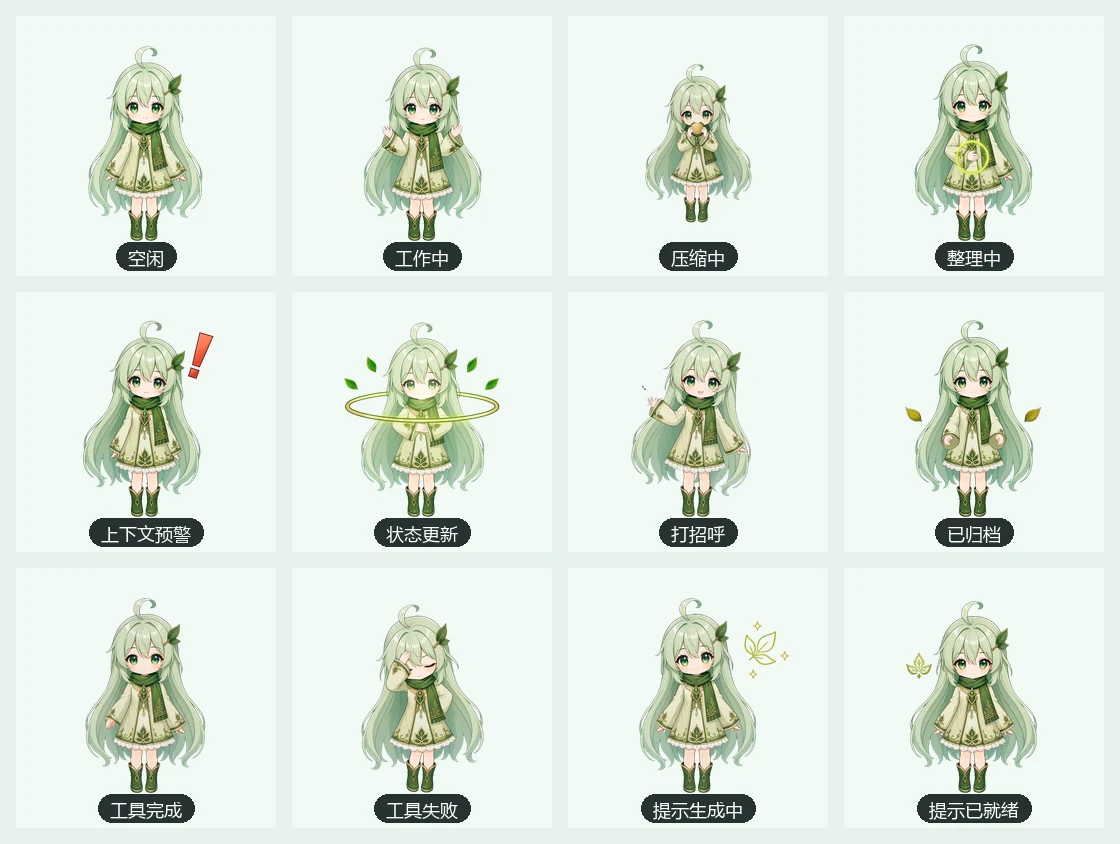
When you run long sessions in DSH, it is often hard to tell at a glance whether a request is still in flight, how close the context window is to its limit, or whether a tool call just succeeded or failed. dsh-token-pet distils all of those signals into a small chibi character that lives on your desktop: twelve frame-by-frame animations map one-to-one to real DSH events such as idle, working, context compression, tool success, tool failure, and prompt generation, so a quick look at the status badge and the context-percentage label tells you what the system is doing right now without switching to a log window.
A draggable, resizable three-tab panel sits beside the pet. The Overview tab shows current round, step count, model latency, and token breakdown; the Models tab aggregates per-provider and per-model usage with a local-timezone hourly trend chart; and a cross-session Lifetime Ledger keeps cumulative totals even after the source conversation is archived or deleted. The panel reads only persisted snapshots, so opening it never triggers a full history scan; background incremental indexing is coordinated by the host at low frequency with a ten-second deadline fallback, keeping the UI lightweight throughout. A prompt-enhancement drawer lets you trigger, preview, edit, overwrite, append, undo, or submit the result directly to the DSH composer entirely on your terms.
If you develop with DSH daily and care about token spend and context health, or if you simply want a little character on your desktop that makes system state visible at a glance, dsh-token-pet was built for that.
Screenshots







Use Cases
- Glance at request, tool, and compression state during long sessions
- Track cross-session token spend and per-model, per-hour usage trends
- Enhance, preview, edit, and submit prompts straight into the DSH composer
Best For
- Engineers who develop with DSH daily and want lightweight status feedback
- Users who track token spend, context health, and per-model usage trends
- Developers who want a prompt-enhancement workflow on the desktop
Related Plugins
A service-oriented sidebar framework for DSH, offering a full workbench with file explorer, embedded browser, real terminal, Git panel, and extensible plugin services.

A beautiful, practical Claude Code-style TUI plugin with pixel whale top bar, flowing glow title, real-time status line, streaming thought expansion, time rewind, context progress bar and TPS gauge — zero core changes.

The plugin market for DeepSeek Harness: browse/search/one-click install community plugins and themes, with updates, backup/restore, hot disable, diagnostics, and AI fix.

A persistent whale widget on the DSH web UI that shows DeepSeek balance, today's usage, and per-turn cost, with drag-and-snap and sound effects.