dsh-web-plugin-explain
Run the following command in DeepSeek Harness:
dsh plugin install 2710165659/dsh-web-plugin-explain
Paste the following prompt into your AI chat to install this plugin:
Run dsh plugin install 2710165659/dsh-web-plugin-explain in your DeepSeek Harness terminal; the source repository is available at https://github.com/2710165659/dsh-web-plugin-explain .
About this plugin
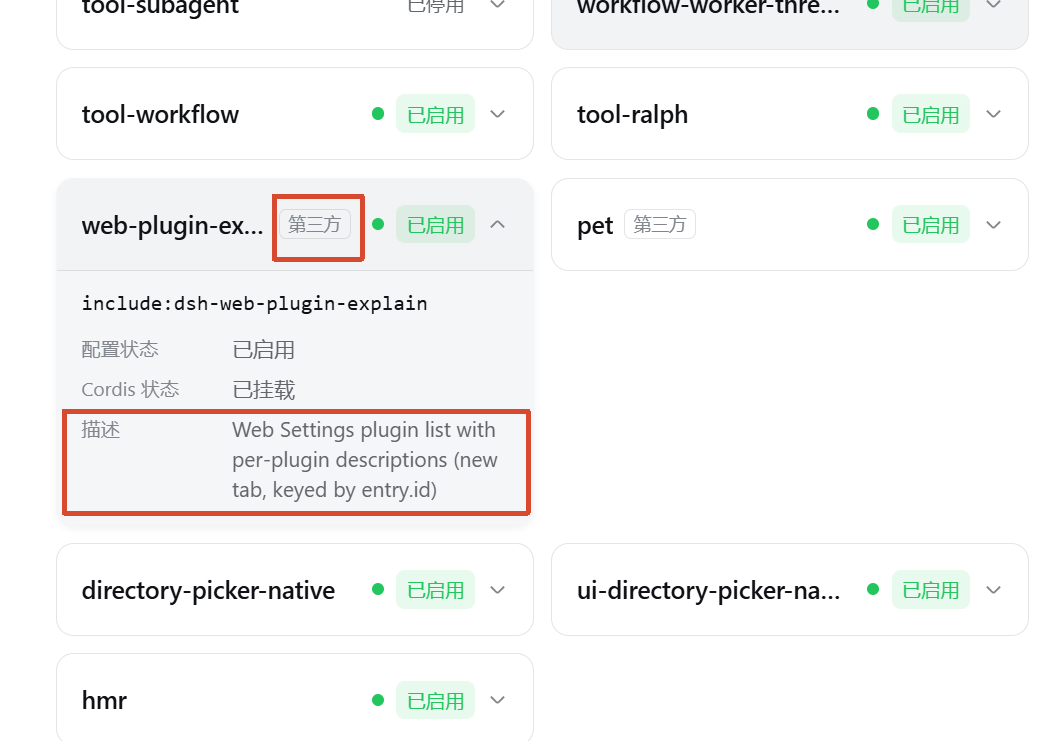
Once your plugin list grows past a dozen entries, the Settings page in dsh web starts to look like an undifferentiated wall of names. You cannot quickly tell which plugin handles completion, which one does formatting, or which are community-built. dsh-web-plugin-explain fills that gap: expanding any plugin card now shows the raw description string from that plugin's own package.json, so you can read what every plugin does at a glance without hunting through repos or docs.
Beyond descriptions, it appends a small third-party badge next to any plugin that does not belong to the built-in ecosystem, making the boundary immediately obvious. The search box also becomes more capable, matching on plugin id, module name, and description text (third-party rows additionally match the badge label), which is a real time-saver as your collection grows. Everything is best-effort by design: if a description cannot be resolved, only that single row is affected while the rest of the list renders normally, so one anomaly never takes down the page.
If you maintain a growing set of dsh web plugins and frequently need to identify what a given plugin does or where it comes from, this lightweight enhancer is a good fit. A simple restart of the web server after installation is all it takes-no extra configuration required.
Screenshots
Use Cases
- Expand a plugin card to instantly confirm what it does
- Locate a specific plugin by its description when the list is long
- Distinguish built-in plugins from third-party ones at a glance
Best For
- Users with multiple dsh web plugins who need quick identification
- Developers managing a plugin set and distinguishing origins
- Daily users who want fewer lookups and a more efficient plugin page
Related Plugins
A service-oriented sidebar framework for DSH, offering a full workbench with file explorer, embedded browser, real terminal, Git panel, and extensible plugin services.

A beautiful, practical Claude Code-style TUI plugin with pixel whale top bar, flowing glow title, real-time status line, streaming thought expansion, time rewind, context progress bar and TPS gauge — zero core changes.

The plugin market for DeepSeek Harness: browse/search/one-click install community plugins and themes, with updates, backup/restore, hot disable, diagnostics, and AI fix.

A persistent whale widget on the DSH web UI that shows DeepSeek balance, today's usage, and per-turn cost, with drag-and-snap and sound effects.