dsh-visual-trace
Run the following command in DeepSeek Harness:
dsh plugin install wikiiizhao/dsh-visual-trace
Paste the following prompt into your AI chat to install this plugin:
Run dsh plugin install wikiiizhao/dsh-visual-trace in your terminal to install the plugin; the source is hosted at https://github.com/wikiiizhao/dsh-visual-trace .
About this plugin
In DeepSeek Harness, Web consoles, headless profiles, ACP hosts, SDK adapters, and Hooks plugins each interpret execution traces in their own way, forcing developers to hop between interfaces and manually compare raw event fields during debugging. dsh-visual-trace treats the official persistent session/event log as the single source of truth and applies one shared set of node semantics, natural-language explanations, and review signals across every runtime mode, so trace inspection no longer depends on a particular canvas.
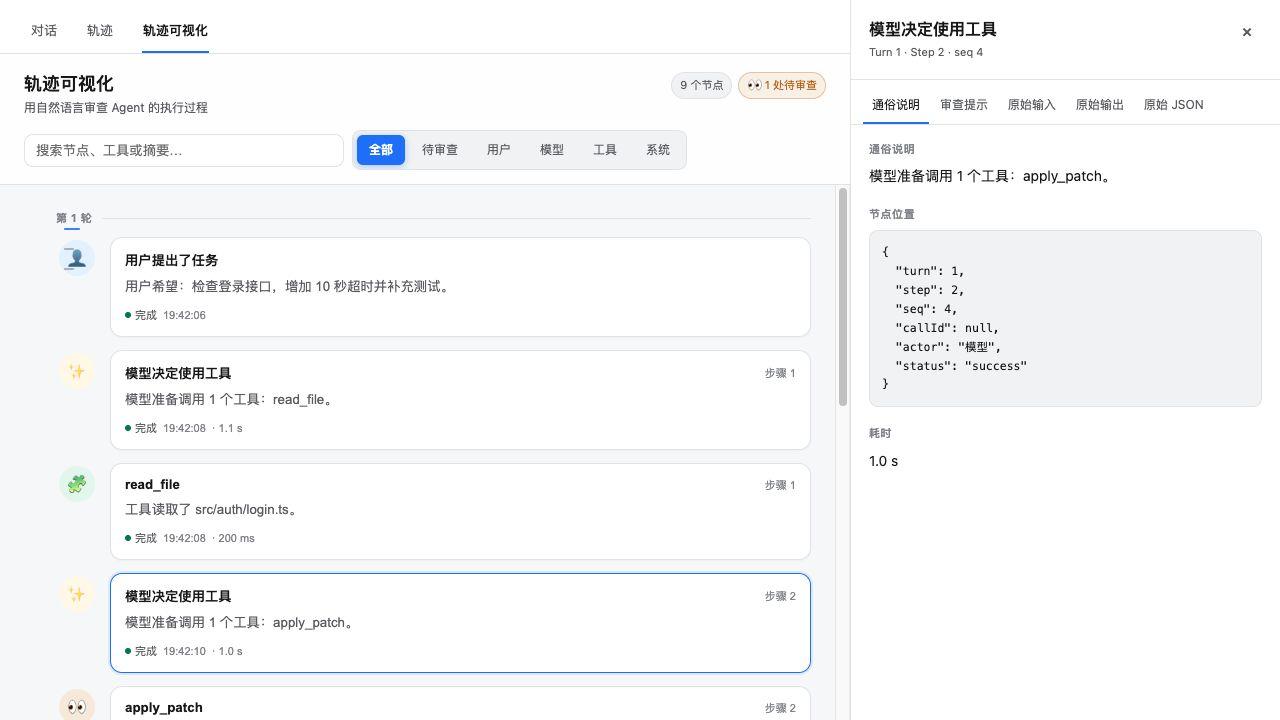
Capabilities span three layers. The Web tab offers a filterable timeline, expanded tool sub-calls, inline review confirmation, and right-click quoting into the dialogue draft, with summaries in Chinese or English that require no extra model calls. In headless mode, traces are written to stderr while the final model answer stays on stdout, leaving existing pipelines intact. ACP, SDK, custom UI, and Hooks plugins call ctx.visualTrace.build() and render() to obtain the same standard node structure as the Web timeline, usable in protocol responses, audit files, or external dashboards. Quoted content automatically redacts common API keys, tokens, secrets, and passwords and flags the material as untrusted execution evidence.
Ideal for developers working across Web, headless, ACP protocol, and custom terminal environments on DeepSeek Harness 0.1.0-rc.6 or later, and for platform teams that need a unified trace report inside Hooks audit plugins. When official event types evolve, only the session-adapter and client adapter files need updating; no output interface requires a separate rewrite.
Screenshots
Use Cases
- Filter the timeline, expand tool sub-calls, and confirm pending-review nodes in the Web tab
- Capture natural-language traces on stderr during headless batch runs while keeping the final answer on stdout
- Generate unified trace reports in Hooks audit plugins via render() for storage or upload
Best For
- DeepSeek Harness developers working across Web, headless, and ACP runtimes
- Integration developers building custom UIs or TUIs that render unified trace nodes
- Platform security and ops teams standardizing audit log formats across interfaces
Related Plugins
A service-oriented sidebar framework for DSH, offering a full workbench with file explorer, embedded browser, real terminal, Git panel, and extensible plugin services.

A beautiful, practical Claude Code-style TUI plugin with pixel whale top bar, flowing glow title, real-time status line, streaming thought expansion, time rewind, context progress bar and TPS gauge — zero core changes.

The plugin market for DeepSeek Harness: browse/search/one-click install community plugins and themes, with updates, backup/restore, hot disable, diagnostics, and AI fix.

A persistent whale widget on the DSH web UI that shows DeepSeek balance, today's usage, and per-turn cost, with drag-and-snap and sound effects.