dsh-skills-manager
Run the following command in DeepSeek Harness:
dsh plugin install zhangzheng25/dsh-skills-manager
Paste the following prompt into your AI chat to install this plugin:
Run dsh plugin install zhangzheng25/dsh-skills-manager in your terminal to install; the source code is available at https://github.com/zhangzheng25/dsh-skills-manager.
About this plugin
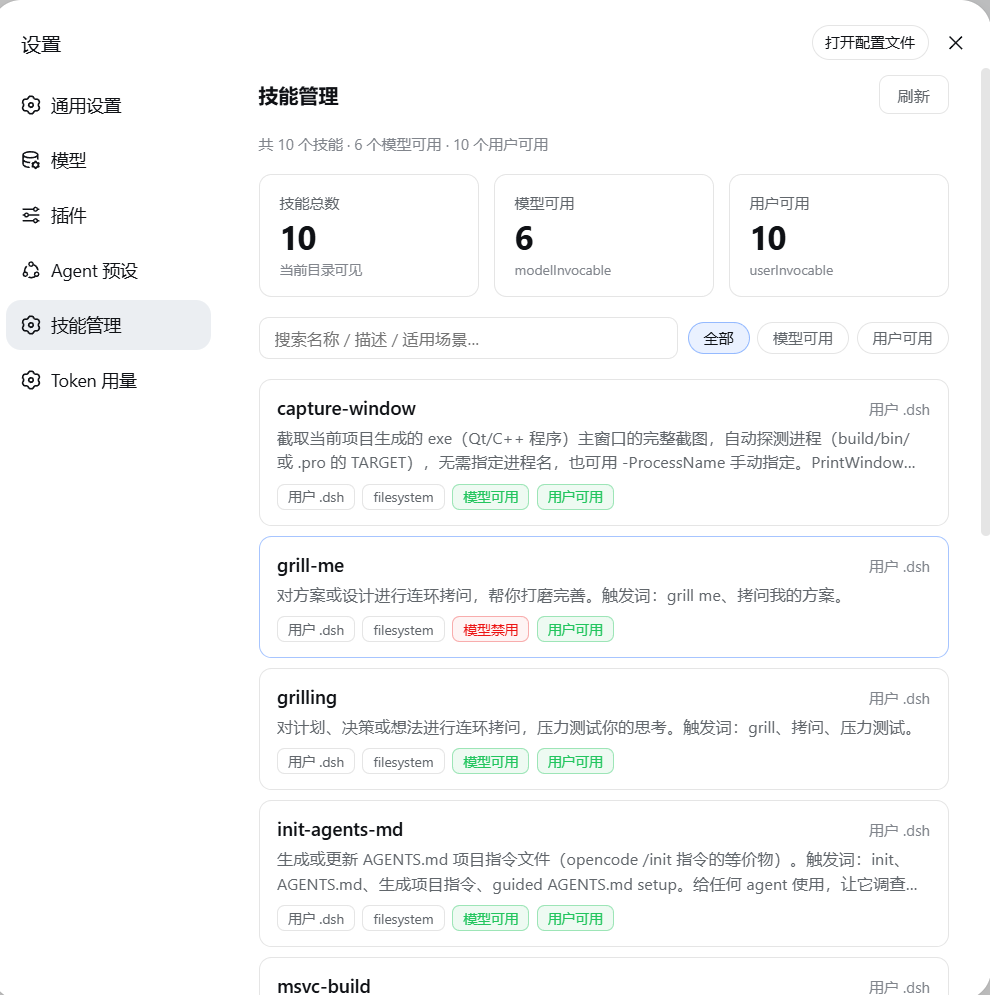
Agent skills in a DSH environment are scattered across project .dsh, .agents, user directories, built-in bundles, and multiple agent preset scopes. Figuring out which skills are actually available and where they come from usually means digging through files one by one. dsh-skills-manager compresses that into a single settings page: open Settings → Skill Management and you get a merged catalog of every available skill, each entry annotated with name, description, origin, provider, model/user invocation policy, and the preset scopes it appears in.
The core capabilities revolve around three things: see, find, and grab. Real-time search filters by name, description, or use-case, with three readiness buckets (All / Model-available / User-available). Clicking a skill expands a detail panel right below the card showing whenToUse, file path, resource base, metadata, and the full SKILL.md body. One-click copy of the body text or local path makes manual maintenance and sharing easy. The page polls every 30 seconds and offers a manual refresh button; a warning appears when the skill source is incomplete. Styling follows native DSW theme variables with light/dark adaptation, flat cards, thin borders, rounded corners, and no shadows.
One caveat: the current version is read-only. The DSH skill registry is owned by providers such as dsh-skill-filesystem and does not expose delete or disable operations, so this plugin focuses on browsing, searching, reading the full body, and locating files rather than managing skills. It is well suited to DeepSeek Harness users who maintain multiple agent presets, work with heterogeneous skill sources, and need to quickly confirm whether a skill exists and where it belongs.
Screenshots
Use Cases
- Quickly confirm which agent skills are available in the current DSH environment
- Search a skill, expand its full SKILL.md body, and copy in one click
- Cross-check how the same skill appears across different preset scopes and origins
Best For
- DeepSeek Harness developers maintaining multiple agent presets
- Plugin users who need to quickly locate skill origins and file paths
- DSH users who want to browse all available skills without digging through source code
Related Plugins
A service-oriented sidebar framework for DSH, offering a full workbench with file explorer, embedded browser, real terminal, Git panel, and extensible plugin services.

A beautiful, practical Claude Code-style TUI plugin with pixel whale top bar, flowing glow title, real-time status line, streaming thought expansion, time rewind, context progress bar and TPS gauge — zero core changes.

The plugin market for DeepSeek Harness: browse/search/one-click install community plugins and themes, with updates, backup/restore, hot disable, diagnostics, and AI fix.

A persistent whale widget on the DSH web UI that shows DeepSeek balance, today's usage, and per-turn cost, with drag-and-snap and sound effects.