dsh-plugin-hot-toggle
Run the following command in DeepSeek Harness:
dsh plugin install 5102a/dsh-plugin-hot-toggle
Paste the following prompt into your AI chat to install this plugin:
Run dsh plugin install 5102a/dsh-plugin-hot-toggle inside DeepSeek Harness to install the plugin; its full source repository is at https://github.com/5102a/dsh-plugin-hot-toggle .
About this plugin
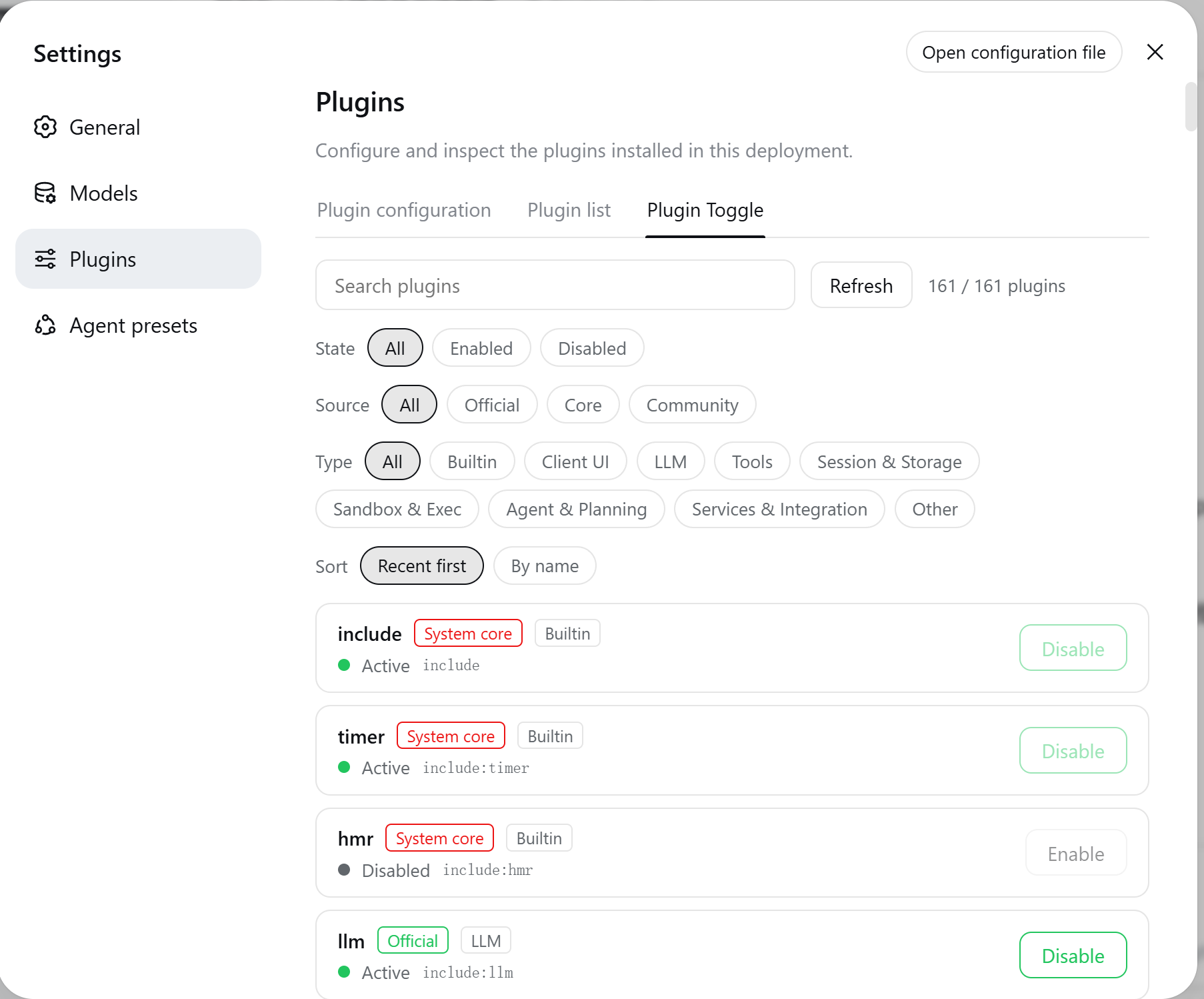
When you are running several plugins under DeepSeek Harness, you occasionally just want to silence a noisy tool or swap in a different community loader mid-session. The old ritual—edit a YAML file, then restart the whole process—is broken here. dsh-plugin-hot-toggle moves that action into a dedicated tab under Web Settings, calling the official Cordis Loader Entry.update API on every click. Disabling disposes the plugin fiber in place; enabling re-imports and starts it, all in-process with instant effect. No DSH restart, no loss of conversation context. The toggle state is also written to the profile patch layer and hot-applied by the built-in HMR watcher, so it survives restarts without any manual re-application.
The management view goes well beyond a simple on/off list. You can combine filters by state (enabled / disabled), source (official / core / community), and functional type (builtin framework, client UI, LLM, tools, session and storage, sandbox and exec, agent and planning, services and integration, other), then layer in a keyword search with a live hit count. Community plugins sort to the top by default. System-critical entries such as include, cordis:* modules, and internal loader components are locked and clearly labelled, so a stray click cannot accidentally dismantle the host. The entire UI follows the DSH language preference and switches between English and Chinese automatically.
It is built for anyone running three or more plugins who needs to debug, A/B-test, or tailor their plugin stack per project without the ritual of editing config and restarting. If your Harness setup has accumulated a mix of official, core, and community entries and you want a single glanceable panel to control them all, this is the missing piece.
Screenshots
Use Cases
- Disable a misbehaving plugin instantly during a live debugging session without restarting DSH
- A/B-test different community plugin combinations per project with sub-second toggle cycles
- Locate a stuck plugin quickly via multi-dimensional filters and one-click reset in daily ops
Best For
- DSH users running three or more plugins who need frequent stack adjustments
- Developers and teams managing a mix of official, core, and community plugins
- Efficiency-oriented users who refuse to interrupt a live session or restart for a single toggle
Related Plugins
A service-oriented sidebar framework for DSH, offering a full workbench with file explorer, embedded browser, real terminal, Git panel, and extensible plugin services.

A beautiful, practical Claude Code-style TUI plugin with pixel whale top bar, flowing glow title, real-time status line, streaming thought expansion, time rewind, context progress bar and TPS gauge — zero core changes.

The plugin market for DeepSeek Harness: browse/search/one-click install community plugins and themes, with updates, backup/restore, hot disable, diagnostics, and AI fix.

A persistent whale widget on the DSH web UI that shows DeepSeek balance, today's usage, and per-turn cost, with drag-and-snap and sound effects.