dsh-diffstream
Run the following command in DeepSeek Harness:
dsh plugin install F-Light/dsh-diffstream
Paste the following prompt into your AI chat to install this plugin:
Run dsh plugin install F-Light/dsh-diffstream in the DeepSeek Harness terminal to install the plugin; the source code is available at https://github.com/F-Light/dsh-diffstream
About this plugin
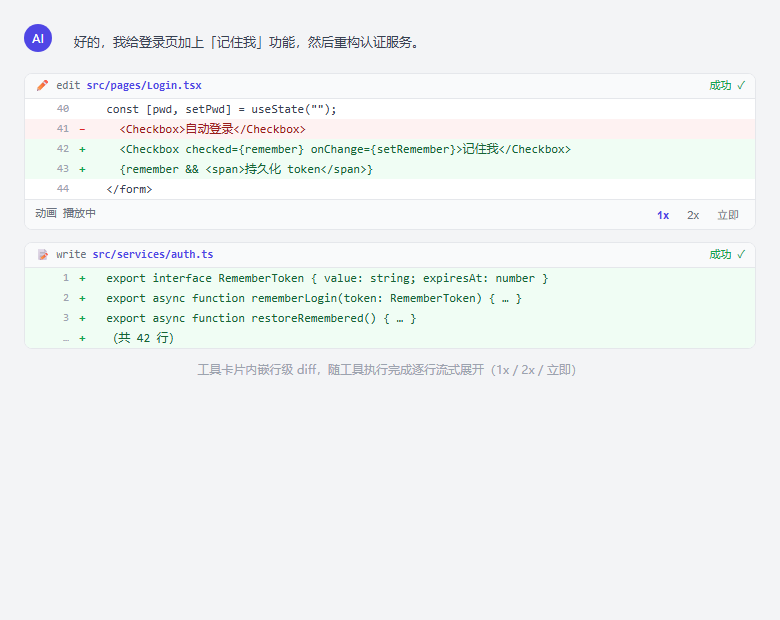
When driving a coding agent through DSH, the chat stream is mostly a stack of tool calls. Which files were touched, what exactly changed, and how far execution has reached can easily be lost in a long session. dsh-diffstream renders code changes directly inside the conversation cards so you never need to switch windows or dig through logs.
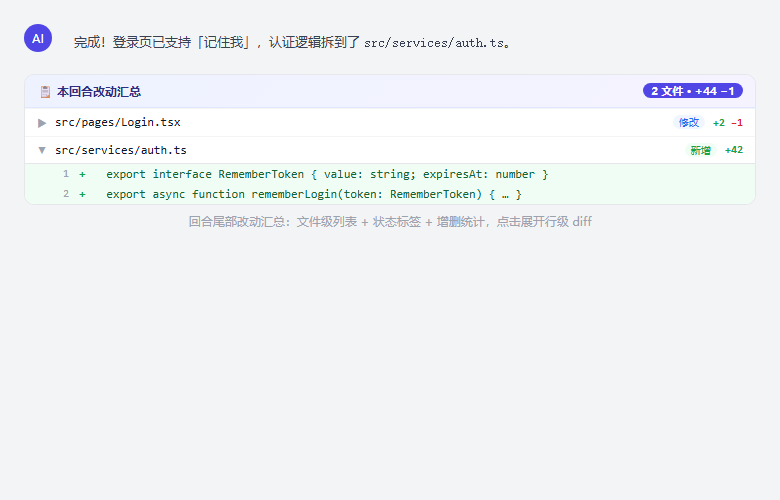
After every edit or write call completes, the matching card expands a line-level diff in place — green additions, red deletions, line numbers and surrounding context — animated line by line at 1x, 2x, or instant speed, so the line currently unfolding is exactly where the agent stands. At the tail of each finished turn a summary card lists every modified file with +N / -M counts; clicking a row opens the full diff. Data prefers real git hunks and silently falls back to tool-parameter comparison for non-git projects or git failures; files over 200 lines are truncated with a one-click expand.
Built for developers who rely on DSH agents for editing, refactoring, or batch code generation and need a continuous in-chat view of what the agent changed, how much, and how far it got over long sessions. The plugin runs entirely client-side with zero dependencies, and historical turns remain fully readable after a page refresh without modifying any dsh source code.
Screenshots
Use Cases
- Watch agent edit progress line by line during long sessions
- Quickly review which files changed at the end of a turn
- Fall back to parameter-based diff safely in non-git projects
Best For
- Developers who rely on DSH agents for editing or refactoring
- Teams that need continuous visibility into agent-generated changes
- Individual developers driving long coding agent sessions
Related Plugins
A service-oriented sidebar framework for DSH, offering a full workbench with file explorer, embedded browser, real terminal, Git panel, and extensible plugin services.

A beautiful, practical Claude Code-style TUI plugin with pixel whale top bar, flowing glow title, real-time status line, streaming thought expansion, time rewind, context progress bar and TPS gauge — zero core changes.

The plugin market for DeepSeek Harness: browse/search/one-click install community plugins and themes, with updates, backup/restore, hot disable, diagnostics, and AI fix.

A persistent whale widget on the DSH web UI that shows DeepSeek balance, today's usage, and per-turn cost, with drag-and-snap and sound effects.