dsh-plugin-opencode-usage
Run the following command in DeepSeek Harness:
dsh plugin install jiekesu967/dsh-plugin-opencode-usage
Paste the following prompt into your AI chat to install this plugin:
Install this plugin from https://github.com/jiekesu967/dsh-plugin-opencode-usage, then restart dsh web and refresh the page to see the floating entry in the bottom-left corner of the chat window.
About this plugin
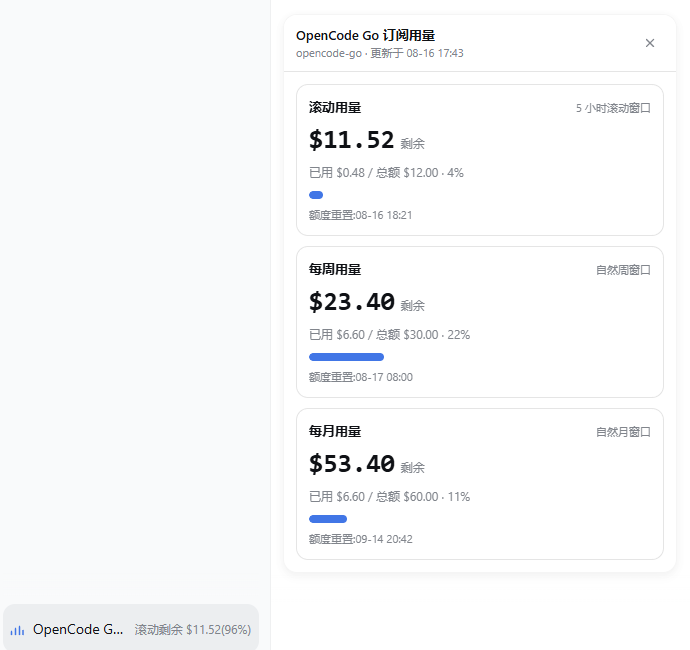
When running an OpenCode Go subscription through DeepSeek Harness, the question that comes up most often is simple: how much quota is left? The official API returns only percentages and reset timestamps, and because different models carry different dollar quotas, converting to currency would introduce more confusion than clarity. dsh-plugin-opencode-usage turns that data into a glanceable floating panel tucked into the bottom-left corner of the chat window: one click reveals the rolling five-hour, weekly, and monthly usage—each showing used percent, remaining percent, and the upcoming reset time—refreshing itself every sixty seconds and dismissing cleanly with Esc or an outside click, all without interrupting the conversation in progress.
The panel deliberately registers in the shell overlay rather than the sidebar or input area, sidestepping conflicts with other plugins. A ResizeObserver keeps it pinned to the chat column through sidebar toggles, detail-panel changes, and window resizes, with automatic fallback if it would overflow the viewport. Security is handled by design: the API key is resolved only inside the Harness host process and never shipped to the browser—what the frontend sees is percentage data and nothing more.
If you are on a Web profile using an OpenCode Go subscription and want to keep an eye on how three time windows are filling up without ever leaving the chat interface, this plugin is that quiet little dot in the bottom-left corner. It does not support headless or CLI mode, and it performs no dollar-amount conversion. Its single job is to present the official percentages accurately, unobtrusively, and exactly where your gaze naturally lands.
Screenshots
Use Cases
- Check subscription quota across rolling, weekly, and monthly windows without leaving the chat
- Confirm whether a usage window is about to reset during long sessions
- Get a unified at-a-glance view of all three time windows to avoid mid-conversation cutoffs
Best For
- DeepSeek Harness Web users on an OpenCode Go subscription
- Developers who want real-time quota visibility without disrupting workflow
- Users who need multi-window usage visualization without dollar-amount conversion
Related Plugins
A service-oriented sidebar framework for DSH, offering a full workbench with file explorer, embedded browser, real terminal, Git panel, and extensible plugin services.

A beautiful, practical Claude Code-style TUI plugin with pixel whale top bar, flowing glow title, real-time status line, streaming thought expansion, time rewind, context progress bar and TPS gauge — zero core changes.

The plugin market for DeepSeek Harness: browse/search/one-click install community plugins and themes, with updates, backup/restore, hot disable, diagnostics, and AI fix.

A persistent whale widget on the DSH web UI that shows DeepSeek balance, today's usage, and per-turn cost, with drag-and-snap and sound effects.