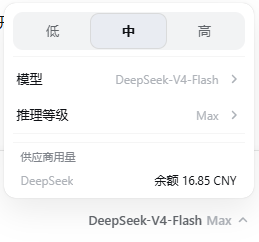
dsh-model-slider
Run the following command in DeepSeek Harness:
dsh plugin install ipcjs/dsh-model-slider
Paste the following prompt into your AI chat to install this plugin:
Run dsh plugin install ipcjs/dsh-model-slider in the DeepSeek Harness terminal to install this plugin; the source is available at https://github.com/ipcjs/dsh-model-slider. Restart DSH after installation to activate it.
About this plugin
The native DSH Web UI model picker requires several nested clicks to switch between models and reasoning efforts. When you mostly hop between two or three familiar tiers (quick Q&A, daily dev, heavy reasoning), that chain of taps interrupts your flow constantly. dsh-model-slider collapses the switch into a single click: a low / medium / high slider sits at the top of the popup, each level mapped to a preconfigured model-plus-effort pair. One tap and you are there, with the panel staying open so you can immediately see the new model and its usage. Below the slider, the original full model list and reasoning-effort panes remain available for fine-grained control. Modality icons (image, video, audio) appear right after each model name so you can confirm capabilities at a glance. At the bottom of the panel, the current provider's usage or balance is displayed in real time: membership-based providers show remaining percent (hover to see weekly quota and 5-hour window details), while prepaid providers show wallet balance. It suits developers who live in the DSH Web GUI and switch between two or three model tiers many times a day, as well as anyone who wants a constant, at-a-glance read on API spend. A single config file is shared across all workspaces, so there is no per-project setup.
Screenshots
Use Cases
- Frequently toggling between a lightweight tier for quick Q&A and a mid tier for daily coding
- Checking provider API balance or membership quota in real time without leaving the editor
- Glancing at modality icons to confirm a model supports image, video, or audio input before switching
Best For
- Developers who live in the DSH Web GUI and hop between two or three model tiers dozens of times a day
- Heavy LLM users who want a constant read on API spend to stay within budget
- Efficiency-focused users who prefer a one-time setup shared across all workspaces
Related Plugins
A service-oriented sidebar framework for DSH, offering a full workbench with file explorer, embedded browser, real terminal, Git panel, and extensible plugin services.

A beautiful, practical Claude Code-style TUI plugin with pixel whale top bar, flowing glow title, real-time status line, streaming thought expansion, time rewind, context progress bar and TPS gauge — zero core changes.

The plugin market for DeepSeek Harness: browse/search/one-click install community plugins and themes, with updates, backup/restore, hot disable, diagnostics, and AI fix.

A persistent whale widget on the DSH web UI that shows DeepSeek balance, today's usage, and per-turn cost, with drag-and-snap and sound effects.