dsh-session-categories
Run the following command in DeepSeek Harness:
dsh plugin install ht719/dsh-session-categories
Paste the following prompt into your AI chat to install this plugin:
To install this plugin in DeepSeek Harness, visit the full source address https://github.com/ht719/dsh-session-categories and use the command 'dsh plugin install ht719/dsh-session-categories'.
About this plugin
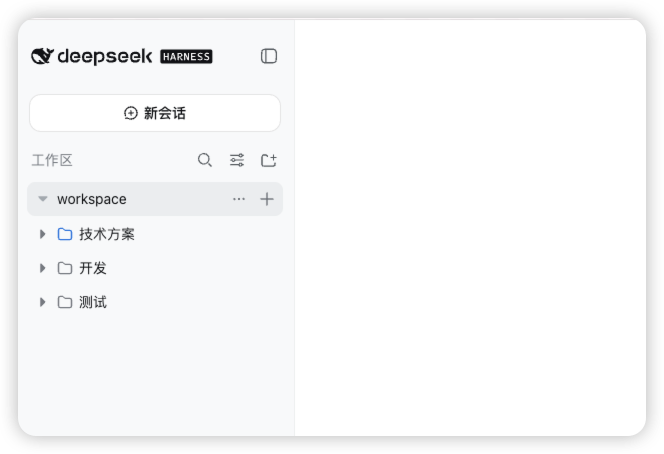
When managing multiple sessions in dsh, the flat sidebar list can become cluttered, making it difficult for users to quickly locate and organize sessions. The dsh-session-categories plugin addresses this by adding user-managed category trees to the sidebar, allowing each workspace's sessions to be grouped and managed clearly.
Core capabilities of this plugin include: creating, renaming, deleting, and nesting categories; dragging sessions between categories; and expanding or collapsing categories while maintaining hierarchy. Each session can belong to at most one category, ensuring simple and conflict-free management.
It is particularly suited for users who frequently handle multiple sessions in dsh, such as developers, system administrators, or anyone needing efficient session organization. By enhancing the sidebar's structure, the plugin significantly improves workflow efficiency and user experience.
Screenshots
Use Cases
- Manage multiple development sessions to boost efficiency
- Quickly locate and switch between sessions across workspaces
- Organize cluttered sidebar through categories for easier navigation
Best For
- Developers who frequently switch between multiple terminal sessions
- System administrators managing multiple server connections
- Any user who uses dsh for multitasking operations
Related Plugins
A service-oriented sidebar framework for DSH, offering a full workbench with file explorer, embedded browser, real terminal, Git panel, and extensible plugin services.

A beautiful, practical Claude Code-style TUI plugin with pixel whale top bar, flowing glow title, real-time status line, streaming thought expansion, time rewind, context progress bar and TPS gauge — zero core changes.

The plugin market for DeepSeek Harness: browse/search/one-click install community plugins and themes, with updates, backup/restore, hot disable, diagnostics, and AI fix.

A persistent whale widget on the DSH web UI that shows DeepSeek balance, today's usage, and per-turn cost, with drag-and-snap and sound effects.