dsh-companion
Run the following command in DeepSeek Harness:
dsh plugin install gjnzsu/dsh-companion
Paste the following prompt into your AI chat to install this plugin:
Run dsh plugin install gjnzsu/dsh-companion in the DeepSeek Harness terminal to install this plugin; the source repository is at https://github.com/gjnzsu/dsh-companion . After installation it mounts via shell.overlay onto the active session.
About this plugin
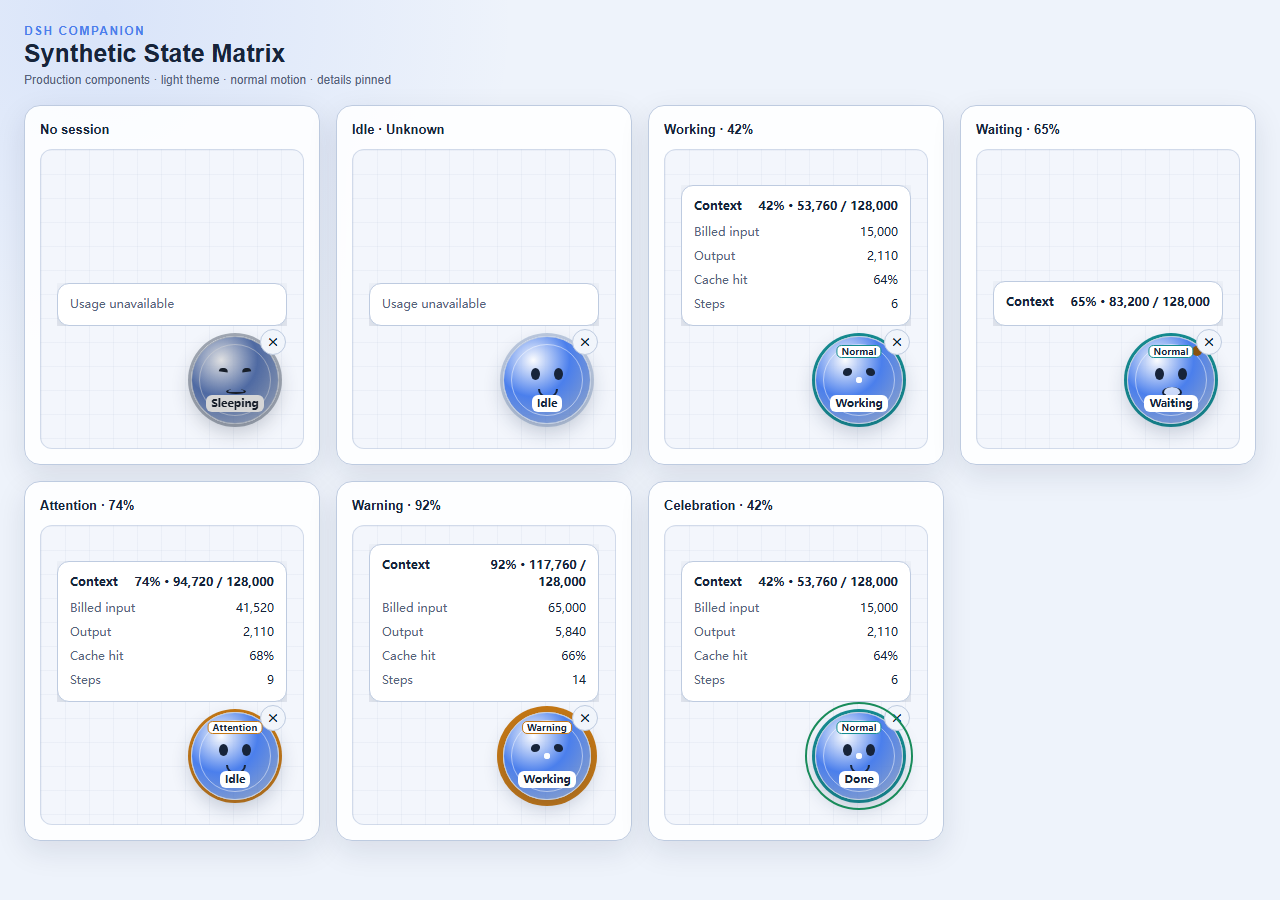
DSH Companion is a lightweight in-web companion for DeepSeek Harness that distills agent activity status and context-window pressure into a single Living Data Orb readable at a glance. Instead of repeatedly opening usage panels and scanning through numbers, the default view answers just two questions: what is the agent doing right now, and does the context window need attention. Hover or click to expand Context, Billed input, Output, Cache hit, and Steps when you actually need to diagnose.
The design follows a status-first, usage-on-demand principle. Facial expressions and state labels convey Sleeping, Idle, Working, Waiting, and Done; a pressure ring with a text label indicates Normal, Attention, Warning, or Unknown context occupancy. The plugin reads only the session summary and projections already provided by DSH. It never modifies prompts, tools, or model requests, does not read conversation content or files, and ships with no telemetry or remote services. When projections are missing, metrics stay Unknown rather than showing zero, keeping data presentation honest.
Built for developers who work with DSH Web agents at high frequency and want a quick glance to know whether the agent is running or waiting for input, and whether the context window is nearing its limit. No flickering animations, no gamified retention loops, no always-visible number panels. Just a calm Living Data Orb that is friendly but never intrusive.
Screenshots
Use Cases
- Instantly tell whether the agent is working or waiting for input without expanding any panel
- Stay aware of context-window occupancy during long sessions to avoid mid-request truncation
- Hover to inspect token usage and cache hit metrics on demand instead of watching numbers constantly
Best For
- Developers who use DSH Web agents at high frequency
- Users who prefer calm, non-gamified UI that does not demand constant attention
- Privacy-conscious developers who want zero telemetry and no remote data calls
Related Plugins
A service-oriented sidebar framework for DSH, offering a full workbench with file explorer, embedded browser, real terminal, Git panel, and extensible plugin services.

A beautiful, practical Claude Code-style TUI plugin with pixel whale top bar, flowing glow title, real-time status line, streaming thought expansion, time rewind, context progress bar and TPS gauge — zero core changes.

The plugin market for DeepSeek Harness: browse/search/one-click install community plugins and themes, with updates, backup/restore, hot disable, diagnostics, and AI fix.

A persistent whale widget on the DSH web UI that shows DeepSeek balance, today's usage, and per-turn cost, with drag-and-snap and sound effects.