dsh-mobile-plugin
Run the following command in DeepSeek Harness:
dsh plugin install april-jk/dsh-mobile-plugin
Paste the following prompt into your AI chat to install this plugin:
Run dsh plugin install april-jk/dsh-mobile-plugin in your DeepSeek Harness terminal to add this plugin; the source code is available at https://github.com/april-jk/dsh-mobile-plugin.
About this plugin
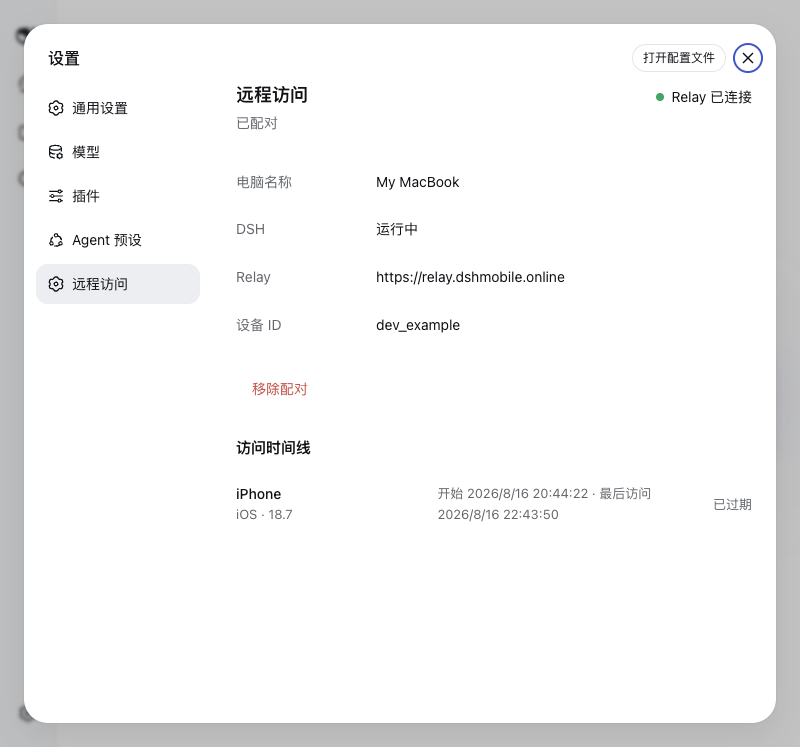
DeepSeek Harness binds to 127.0.0.1 by default, so the moment you step away from your desk the local Web UI is out of reach. The DSH Mobile Remote plugin solves this with a single outbound WSS connection to a Relay server — no NAT traversal, no public listener, no inbound port to open. A paired phone simply connects to the Relay browser client and gets full access to the local DSH interface.\n\nSecurity is handled end-to-end: HTTP, SSE, and WebSocket payloads are encrypted with AES-256-GCM between the mobile app and the local Companion, while the Relay forwards only sealed frames and never persists request or response bodies. Pairing is done via a QR code in the Web UI settings; the one-time code and encryption key live in the URL fragment and are never sent in the page request. Device credentials are stored locally with owner-only permissions and can be revoked at any time from the settings page or the dsh-mobile CLI.\n\nThis is the go-to plugin if you run DeepSeek Harness locally but frequently need to check a conversation, switch directories, or tweak settings from your phone after leaving your workstation. After a single QR-code pairing in Settings > Remote Access, your iPhone takes over the full interaction while the local DSH instance keeps exactly the same network footprint as before.
Screenshots
Use Cases
- Check local DSH conversations from your iPhone after leaving the desk
- Switch working directories or tweak parameters on the go during a trip
- Operate Harness over a mobile network at a café without exposing any public port
Best For
- Developers running DeepSeek Harness locally
- Mobile workers who need on-demand access to AI conversations
- Security-conscious users who refuse to open public ports
Related Plugins
A service-oriented sidebar framework for DSH, offering a full workbench with file explorer, embedded browser, real terminal, Git panel, and extensible plugin services.

A beautiful, practical Claude Code-style TUI plugin with pixel whale top bar, flowing glow title, real-time status line, streaming thought expansion, time rewind, context progress bar and TPS gauge — zero core changes.

The plugin market for DeepSeek Harness: browse/search/one-click install community plugins and themes, with updates, backup/restore, hot disable, diagnostics, and AI fix.

A persistent whale widget on the DSH web UI that shows DeepSeek balance, today's usage, and per-turn cost, with drag-and-snap and sound effects.