dsh-token-usage
Run the following command in DeepSeek Harness:
dsh plugin install vector-sunlight/dsh-token-usage
Paste the following prompt into your AI chat to install this plugin:
Run dsh plugin install vector-sunlight/dsh-token-usage in your DeepSeek Harness terminal to install; the source repository is https://github.com/vector-sunlight/dsh-token-usage .
About this plugin
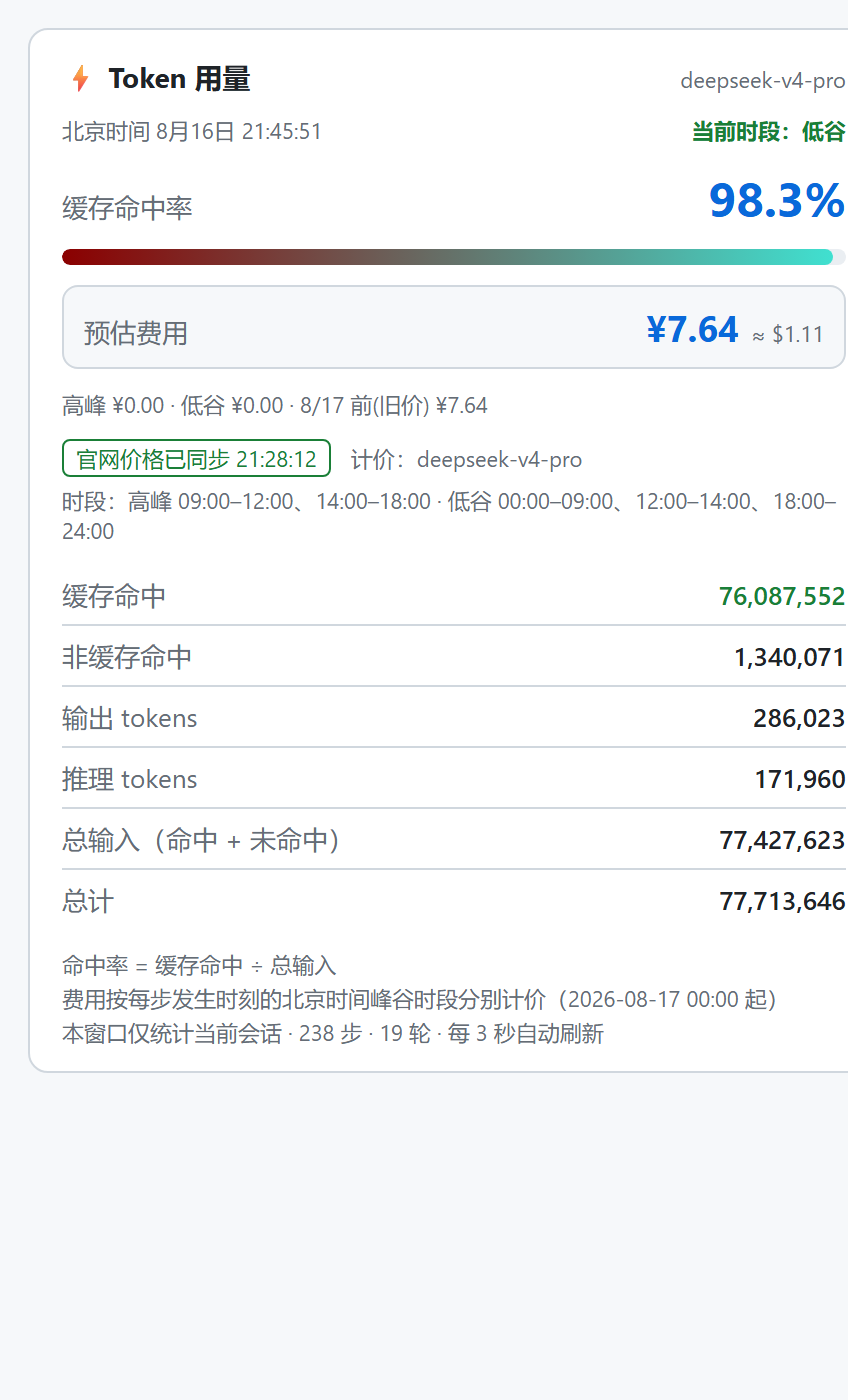
Token invoices rarely answer the questions you actually care about: how many tokens were cache hits, how much went into pure inference, and whether a silent peak-rate multiplier inflated the bill. dsh-token-usage puts those answers in plain sight. It registers a per-session "Token Usage" tab in the dsh-better-sidebar right panel, breaking down every conversation's token consumption and cost in real time, so you see exactly where the money went.
The tab splits each round's tokens into cache hits, non-cache hits, cache writes, output, and reasoning, each tracked in its own column. A gradient progress bar at the top shifts from deep red to teal as your cache hit rate improves, nudging you toward further savings. Pricing is not flat: the plugin uses Beijing time (UTC+8) to classify each recorded usage into peak windows (09:00-12:00, 14:00-18:00) or off-peak, and price accordingly. The host-side half scrapes DeepSeek's official pricing page every six hours, pulling both peak and off-peak tiers in USD and CNY; if a sync fails it falls back to built-in rates and surfaces a warning badge, so cost display is always trustworthy. After a context compaction or a full week without new records the meter resets and the card notes the reason, keeping each window clean and unambiguous.
If you push a high daily volume of prompts, or someone on your team is accountable for token spend, this card answers the three questions you actually care about in under a minute: how much did this session cost, what was the cache hit rate, and did it land in a peak window. Every session gets its own isolated meter window, so switching back and forth never mixes data. The single prerequisite is dsh-better-sidebar (>= 0.12.0) to provide the right-panel container; the install script detects its absence, offers to install it for you, and aborts cleanly if you decline.
Screenshots
Use Cases
- Audit this session token cost after a heavy prompt batch
- Observe cache hit rate trends after tuning cache strategy
- Shift request timing to off-peak windows to reduce overall spend
Best For
- Developers running high-volume DeepSeek API workloads
- Engineering leads accountable for team token spend
- DSH Web users who already run dsh-better-sidebar
Related Plugins
A service-oriented sidebar framework for DSH, offering a full workbench with file explorer, embedded browser, real terminal, Git panel, and extensible plugin services.

A beautiful, practical Claude Code-style TUI plugin with pixel whale top bar, flowing glow title, real-time status line, streaming thought expansion, time rewind, context progress bar and TPS gauge — zero core changes.

The plugin market for DeepSeek Harness: browse/search/one-click install community plugins and themes, with updates, backup/restore, hot disable, diagnostics, and AI fix.

A persistent whale widget on the DSH web UI that shows DeepSeek balance, today's usage, and per-turn cost, with drag-and-snap and sound effects.